I am losing connection to opponent during every game
I am trying to play any game mode; mainly clubs or rivals, and I cannot play a full game without my game freezing and then subsequently getting a popup saying "You lost connection to your opponent we'll check the match report to see who won and who lost". This happens on every single game now, I have not been able to play a full game recently. I am on wired connection, I have tried reinstalling the game, I have repaired my game files, I have tinkered with my DNS settings, I have deleted squad data files in the in-game settings. I am getting increasingly frustrated because I can't play this game with my friends.59Views1like1Comment
Sky Internet - PS5 - FC26 & FC27
We're currently using Sky Broadband (UK) and have been experiencing ongoing issues specifically with EA games, particularly FC26. Other online games work perfectly fine, but whenever we play EA titles, the game frequently freezes and disconnects. To rule out hardware issues, we've taken the same consoles to other households using different internet providers, and the games work without any problems. This suggests the issue may be related to the connection between Sky Broadband and EA's services. The problems we're experiencing include: The game freezing during normal activities such as completing SBCs, managing squads, or changing players. The green FC26 loading/logo icon continuously spinning. Being disconnected from EA servers. Having to completely restart the game, often on a daily basis. We've already had Sky engineers visit our property. They confirmed that: All connections are installed correctly. Broadband speeds and performance are excellent. There are no apparent faults with the line or equipment. The engineers suggested it could potentially be related to server connectivity rather than our broadband service. However, this issue has been ongoing for months, and it's becoming increasingly frustrating. Given that the problem only occurs with EA games and not with other online titles, we're wondering if there are any known issues between Sky Broadband and EA servers, or if there is anything else that can be investigated. Any advice or assistance would be greatly appreciated.215Views2likes6Commentsrandomly disconnected from EA server
hi guys, i keep getting randomly disconnected from EA server followed by cant connect to EA server right now and getting kick to main screen while playing in Ultimate Team like squad battle, rush, doing SBC or just checking objective. if I press R3 in the main screen to connect, it connect me right away, and if i leave it stay in main screen, it also getting disconnected again in about 5-15 minutes later. here several thing i tried suggested by google AI . 1. deleting EA folder in app data and local app data 2. turning off my router for a few minutes to get new IP address 3. flushing my network from command prompt 4. using google DNS 8.8.8.8 and 8.8.4.4 5. verifying fc26 integrity file from steam 6. giving steam, EA app, FC26App, Javelin anti cheat administrator right 7. disconnected all USB except my keyboard ,mouse, and controller 8. deleting all associated device connected to my fc26 account from EA website. I also tried installing my windows, fresh, and reinstall FC26 after. imagine reinstalling your windows just because a game. i also change my LAN cable. i ping google nonstop to check when i got disconnected from EA server while playing, not a single request time out spotted. i don't know what else to do. this is the only game i have to play in my spare time, please if anyone can help me74Views1like1CommentSeasons Mode – Wins Not Counted When Opponent Quits😡
Is anyone else having the same issue in Seasons mode? When the opponent quits or disconnects while I’m winning, the win doesn’t count. it o me 4 times in a row thats sooooo annoying i like won 20 matches 10 o 15 matches dont counted me 😡😡22Views0likes2CommentsFC 27 online season
Please help me with this issue. In Seasons mode, when I’m winning and my opponent quits or disconnects, the game does not count my win. This has been happening since FC 26 and it is still happening in FC 27. Please understand the problem and fix it. I’m really frustrated because I’m losing wins that I actually earned.22Views0likes0Comments
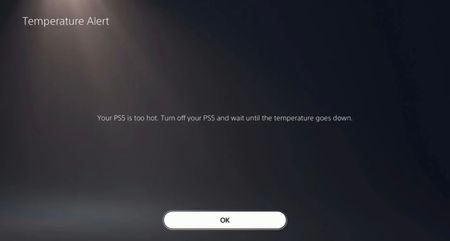
FC 26 Too Hot Notification on PS5 slim (Overheat)
I’ve been experiencing an issue when playing FC26 on the PS5 Slim — after playing for a while, a notification appears saying the PS5 is overheating. I’m not the only one facing this problem; many other players are experiencing the same issue when playing FC26 on the PS5 Slim. Please, EA, kindly optimize the game further for the PS5 Slim.2KViews5likes18CommentsPS5 ultimate team crashing constantly
This is becoming a joke at this point. Please can we have some clarification when they’re going to fix the constant crashing and loading screens on ultimate team. It’s been nearly a week and whether I search for a player, try and claim on objective, open a saved pack and so on, the game continues to crash. Please sort it out… apparently it’s to do with sky internet according to some, but every other game works?2KViews4likes77CommentsDisconnections at the end of the match
Since no EA support member wants to help this case: You don’t offer an in game report system for cheating. I beat this player in FC26 Ultimate Team Champions and had ZERO CONNECTION issues on my end throughout the entire game and afterwards. I get disconnected IMMEDIATELY after winning. My WiFi logs show NO DROPS IN CONNECTION. This is blatant cheating/X-logging and is insane that this is allowed on your game. No repercussions either thus far. Shame. If the response to this attempt for further escalation is post removal will assume compliance then 100% will not be getting FC 27 LOL. (Not that a billion dollar corporation with the poorest customer support needs my money). "Support's" Response: CASE #254017842 Their PSN: [Removed by CM, per rules. EA_Claus] Youtube link to video showing my "disconnection" [Video removed by CM, EA_Claus] [Title changed by CM for clarity. EA_Claus]77Views0likes7CommentsOnline status always appear offline
I'm having difficulties trying to connect to EA server on fifa 26 and I can't change my status to online it returns back to appear offline even after signing out and restarting the router and switching off the PS5 completely and changing the DNS 8.8.8.8 and 1.0.0.1 and restoring the licenses and checking the correct dates but doesn't work please help me in this matter20Views0likes0Comments