Battlefield 6 keeps crashing to desktop with no error
Hey guys, Battlefield 6 keeps crashing for me. The game will randomly just close to desktop with no error or warning. Sometimes it works fine, but then it crashes again later. One time, after it had already crashed a few times, my whole PC froze and restarted, but normally it's just the game closing. My PC specs are CPU: AMD Ryzen 5 5600 GPU: ASUS RTX 4060 Ti 16GB RAM: 32GB DDR4 Motherboard Gigabyte B550M DS3H Windows 11 I'm playing through the EA app. I've already tried reinstalling the game, reinstalling Javelin Anti-Cheat, and trying the other fixes people have suggested, but nothing has fixed it. Other games and programs don't cause this problem. At this point I'm not sure what else I can try. Is there anything specific you guys can check or recommend? Could this be an issue with the game or Javelin AntiCheat?1.4KViews2likes24Comments
APAC CASH CUP servers changed last minute to japan
Apac cash cups were supposed to be hosted on singapore server officially but they changed it last minute to japan server making the game unplayable due to high ping for indians , malaysians , thais and some other countries. this decision was made to accommodate aussie players as the underwater cable in the region has been cut and this decision does not solve the aussie issue as they are still on high ping and instead this has caused other players to get 150 - 180 ping to japan instead . my question is why was such a decision made in the final hours before the cup and no discussion or poll in the official cash cup community discord server ? this has ruined the chances for many teams and wasted the time and effort of teams as we are considering of pulling out due to high ping (180ms) . [CM edit-remove massive tagging]110Views4likes5Comments
Attack Helicopter — Killing Machine. Mobile Anti-Aircraft Unit That Never Gets
Dear DICE Team, I am writing this because it is painful to keep playing like this. The Attack Helicopter is a true killing machine — powerful radar, strong weapons, can strike and retreat, and always receives attention and adjustments patch after patch. Meanwhile, the Mobile Anti-Air vehicle is left behind, forgotten, and placed at a clear disadvantage every single match. The imbalance is obvious: - Missiles lock-on too slowly while helicopters attack and leave before we can respond - Missiles sometimes fly straight into the ground instead of climbing toward the helicopter - Thermal smoke blocks OUR vision completely — we lose sight of the very targets we are supposed to stop - Helicopters have "below radar" protection, flares, and countermeasures that reload fast — we barely have anything to reliably counter them - We send videos, screenshots, and detailed feedback over and over — yet nothing truly changes Infantry gets updates. Helicopters get fine-tuning. Every other vehicle gets looked at and improved. But Mobile Anti-Air? It stays broken, weak, and neglected. I have to ask — why is it like this? Why does everyone else get balance love and improvements, while Mobile Anti-Air players are just ignored? Do DICE truly hate this vehicle and the players who choose to use it? Is it so hard to give us the same fairness you give to pilots? We don't ask to overpower everything — we ask for equality. We ask to be able to defend our team without being an easy target from above. Please stop leaving Mobile Anti-Air behind. Respectfully,284Views8likes71Comments
I need assistance from a real EA support
I have never used any cheats, hacks, or unauthorized third-party programs, and I have never harassed or insulted other players. I do not understand why my account was permanently banned. I have submitted multiple appeals, but all I keep receiving are automated replies from the same **bleep** bot. No one seems to be actually reviewing my case. Is there any real person at EA who can manually review my account and help me resolve this issue?😟
Wrongly Banned for Almost 1 Month and No One Response Me
just last month 8.26,i have not played this game for 4months and want to back play season 4,but after play 2hours, the next day i was banned,it shows its a protect ban for 1 day,and the third day i logged in and was eternally banned im in great despair because EA help cant rekognize my e-mail,i truly love this game and i've never do anything harm the BF community,I just hope anyone manage the anti-cheat can help me,sincerely [Edit: All caps removed from title - ElliotLH]Bipods Are On Backwards!!! Fix It!!
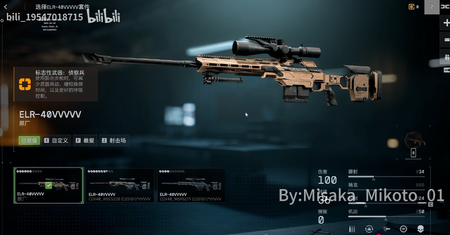
Why are the bipods backwards? this makes no sense to me and its a blaring eye sore to the entire firearms community, as an owner of a cadex rifle can we please not put the bipod on backwards on the new sniper rifle elr-40? id love to be able to run around in game with this rifle and not have the bipods all mounted backwards the only rifle with the correct bipod placement is the m2010. please correct this before release. thank you20Views0likes1Comment
Season 2 Catch-Up Challenge Not Tracking Properly
I've received multiple "destroy vehicle assists" in game when hitting aircraft with the IGLA but the only time it ever counts towards this challenge is if I fully destroy the vehicle myself (or get the last shot on it) Kind of a pain in the butt since I got 3 of those in the last round, enough to complete this challenge, but they didn't count. Also, the fact that I already own this unlock for completing the challenge and the challenge even exists in the first place is kind of silly - but that's a topic for a different conversation. I completed all of Season 2 challenges and got all unlocks, yet these things still show up as being 'unlockable.' Make it make sense.1.1KViews30likes38Comments
Battle Pass Suggestion – NATO Nations & Special Forces
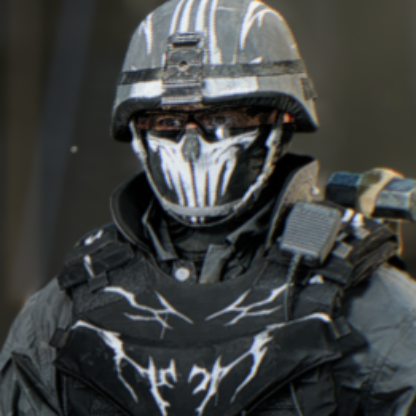
Suggestion: NATO Nations Battle Pass Hello Battlefield Team, I have an idea for a future Battlefield 6 Battle Pass. Since the current Battle Pass shows that themed collaborations and content can work very well, I think a NATO-themed Battle Pass based on real-world nations could be a great future concept. The Battle Pass could focus on four major NATO nations, for example: 🇺🇸 United States 🇹🇷 Türkiye 🇬🇧 United Kingdom 🇫🇷 France Each nation could receive its own small themed package within the Battle Pass, featuring four Operators inspired by real-world special forces and military units from that country. For example: United States Operators inspired by U.S. special operations units Türkiye Operators inspired by Turkish special forces, such as Özel Kuvvetler Komutanlığı United Kingdom Operators inspired by British special forces France Operators inspired by French special forces The Operators could have authentic-looking uniforms, camouflage patterns, helmets, tactical equipment, patches and other cosmetic details inspired by their respective countries. Most importantly, these should be cosmetic only and provide absolutely no gameplay advantage. Players who do not buy the Battle Pass should never be at a disadvantage. The Battlefield Pro Battle Pass could additionally expand the concept with more European/NATO-themed cosmetics, weapon skins, vehicle skins, charms, player cards and similar rewards. I think nation-themed Battle Passes could become a whole series. A later season could focus on other NATO members or a different group of nations. Battlefield is built around large-scale military warfare, so giving players more ways to represent different real-world armed forces could fit the game extremely well and add much more variety to the Operators. Thank you for considering the idea!