Mod and CC Issues: START HERE
Something's wrong in-game and it might be your mods or CC? Here's where to start. Broken and Updated Mods and CC THE CURRENT LIST: Broken and Updated Sims 4 Mods and CC: patch 1.123, April 16, 2026 | EA Forums - 13337074 The "PREVIOUSLY BROKEN" LIST - these are STILL broken!: Previously Broken Sims 4 Mods and CC Recent lists that may still be needed by some of you: Broken and Updated Sims 4 Mods and CC: patch 1.122, March 17, 2026 | EA Forums - 13252814 Broken and Updated Sims 4 Mods and CC: patch 1.121, Feb. 3, 2026 | EA Forums - 13149931 Broken and Updated Sims 4 Mods and CC: 1.120 mini-patch, Jan 13, 2026 | EA Forums - 13091370 Broken and Updated Sims 4 Mods and CC: patch 1.120, Dec 2, 2025 | EA Forums - 12980168 Broken and Updated Sims 4 Mods and CC: patch 1.119, Nov 4, 2025 | EA Forums - 12868987 Broken and Updated Sims 4 Mods and CC: patch 1.118, Sept 18, 2025 | EA Forums - 12594579 Broken and Updated Sims 4 Mods and CC: 1.117, Aug 19, 2025 Game Update CURRENT ISSUES: Bouncing to World Screen when loading household (since August '25) [Patch 1.117] When Loading Household, Game Returns to Neighborhood Select Screen | EA Forums - 12488560 Mod/CC-Related Malware Incidents: Malicious Script Mods and Other Malware How to Use and Test Mods and CC How to Use Mods and CC talks about all sorts of issues, including where to find mods (and what to look out for!) how to properly install them on your computer common reasons your game isn't finding your mods/CC how to manage your mods and CC when the game updates and important troubleshooting tests, including: "vanilla" testing to find out if a mod/CC is definitely your cause or if it's more likely a game issue "50-50" testing to locate broken items in the Mods folder (NOTE: The instructions here include info often missing from other sets of instructions on how to do this!) The Mod and CC Issues Master "Symptom" Post The Mod and CC Issues Master Post covers links to previous (archived) Broken/Updated Mods and CC lists common symptoms of outdated mods, and their known causes Support For issues with mod folder, corrupt files, etc. on a Mac, please see [INFO] Using Mods/CC on a Mac Support posts for getting mods to work in general can be made in the Mod and CC Forum. (Please do note there are tags you can use, too!) For help with using a specific mod, find the creator's own support. Most creators have a Discord server or comments area you can contact them in. - Luth (luthienrising)[OLD] Broken and Updated Sims 4 Mods and CC: patch 1.122, March 17, 2026 +
About This OLD, OUTDATED Thread This thread tracks Sims 4 mods and CC that have been "broken" or made obsolete by game update 1.122, March 17, 2026, and the March 18 and March 23 hotfixes, or declared unsupported by their creators. It also tracks updated game mods, important updates to custom content, general news from/about creators, and new bugfix mods. FOR THE NEW THREAD SEE Broken and Updated Sims 4 Mods and CC: patch 1.123, April 16, 2026 | EA Forums - 13337074 -------------------------------------- FAILED TO LAUNCH ERROR: "Failed to Launch" message plain black screen on launch (no words) sometimes you can launch but are missing CC in CAS A patch for these specific issues was released March 23, 2026. If you have them, please update. If you still have them after that, it's possible that there are other causes. Please do a vanilla test. If the issue persists, please update your ReShade; if you don't use that or other mods that aren't Mods-folder content, go to the Bug Reports forum. ---------------------------------------- SORT THE THREAD FOR WHAT YOU NEED: For the COMPILED LISTS, sort by Oldest For the MOST RECENT INFO, sort by Newest … or FOLLOW to receive notifications of new posts! Click on the bell symbol 🔔, top right. Notifications can even be sent right to your email! Some things are NOT covered here: Early-access content and anything else behind a paywall Content outside the T (for Teen) game rating (no adult mods! including alcohol, violence) Creators/mods outside the EA and EA Answers HQ rules (especially trademark or copyright infringement and having permanently paywalled “exclusives”), and the Maxis guidelines for Sims 4 content creators. NOTE: The Marketplace is not a paywall: it’s items published by EA. The paywall rule is about content that creators self-publish. Creators who update active creators' CC/mods without permission, who upload folders of other people's mods and CC, who copy other modders' code without permission, ***NEW*** or who make tools that will break your mods Separate translation files Loading screens, CAS backdrops, main menu backgrounds, and poses unless the creator says an error is fixed Sims 4 Multiplayer Mod updates that don’t change the version number CAS and Build/Buy CC unless the creator says they're fixing an error or catching up pack content Mods and CC hosted on sites that are mostly adult content or that require joining an 18+ site In addition, news for mods/CC hosted only on Mod the Sims may be selective and/or delayed due to recent security incidents. In the end, YOU are responsible for your mod use. Because not all content and creators are covered on this official forum, many of you should be following creators directly for news. The pinned topic How to Use Mods and CC includes advice about game updates, mod management, finding broken mods, and how to avoid downloading broken and malicious content. And remember… Back up your Saves folder! Index for This Topic Newly Broken/Obsolete Game Mods and Tools Updated Game Mods and Tools, sorted by creator Newly Broken CAS and Build/Buy Updated CAS and Build/Buy Creators Clearing Mods for This Patch - gameplay mods reported by the creator or their testers to be compatible with the game update Core, Injector, Testing and Protection Mods Status: what you should be on for mods like ModGuard, Better Exceptions, venue lists, Lot51 Core, XML Injector, and MC Command Center Creator News New Bugfix Mods Start of Ongoing Reports - scroll down or sort replies by NEWEST Other Resources Previously Broken/Obsolete Mods and CC: up to patch 1.121 [MASTER POST] Common Symptoms of Mod/CC Issues, with Known Causes, including links to earlier Broken/Updated Mods threads. The previous Broken/Updated Mods thread, for patch 1.121 and its mini-patches. Patch Notes for this game update How to use Mods and CC: including how to test for broken mods/CC ("vanilla" testing and the "50-50" method) Malicious Scripts and Malware, including information about the March 2026 incident at Mod the Sims.82KViews24likes52Comments
Symlink message when donloading Gshade...
Although it downloads and im able to open Gshade in game and pick one - the presets look dark and goomy. I play DX11 and followed the tutorial correctly. This isnt the first time ive done this and it usually works and the presets looks great. Ive unistalled the game, installed it and its still not working properly in game.
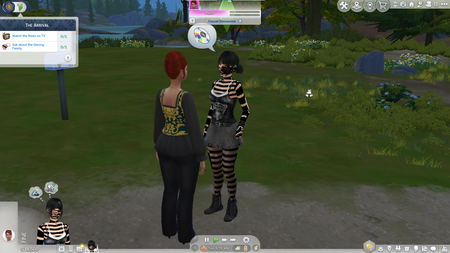
black stripes on sim
i havent played sims since august 2025. and since last week ive been trying to debug the game. firstly it would keep looping the world i somehow fixed that and now theres this i cant seem to fix it. i know that its a CC issue. i did 50/50 several times, deleted the cache, updated CC's but it isnt working. Also the sim is perfectly fine in CAS. i tried taking everything off my sim but it was still covered in black patches. if anyone know how to fix this or the possible list of CC that could be causing this please let me know. thankyou
CC not showing up
I have attempted to do what EA_Solaire had suggested by moving items into the test folder and deleting the mods folder. Started a new game, exited, and a new mods folder was created, and I manually moved the items. So that suggestion doesn't work at all. So when I log in after creating that new folder, my mods show up on the startup option, confirming they are all there. I make sure the script and CC are enabled. Just to log into my game and not see them at all, I can't even get my outfits, etc., to show up. If the failed game pop up doesn't show up my CC doesn't show up. This has been goin on for 4 DAYS!!!!!!!!!!!!!!!!!!!!Solved
[New patch] I can't play the Sims 4 normally
After I opened the game, wishing to play, I turned on CC so I could play. But after I restarted the game.. whole UI was a mess. Everything was misplaced and chaotic. I tried to repair the game, reinstall the game. The same thing, the same chaotic mess. It even refused to turn off my CC mods... what is going on..?