Unable to sprint regardless of remapping
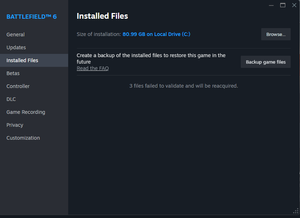
I'm a Windows PC user and BF6 worked great for me up until a ~1.5 weeks ago. Since then, my xbox series elite 2 controller has been unable to sprint (L3) on BF6. I've deduced that this is not a controller problem (L3 works on other games), and not necessarily a windows problem (I went so far as to boot on a brand new OS). I know this is a game file problem. Also, if i equip my knife or a gadget (non-gun) I'm able to sprint again. this is a game breaking issue and many users experience this same problem. I've tried various solutions: uninstall/reinstall uninstall/reinstall > run validate game files with no errors > play game > run validate game file returns 3 files failed deleting profile_save files deleting HID game controller drivers enabling steam xbox controller remapping steam M&K settings (provided temporary fix) disabling steam ps4 controller remapping BF6 controls disabled cloud save & deleted download cache then uninstall/reinstall even REINSTALLED MY OS TO AN EMPTY SSD , REDOWNLOADED EVERYTHING & sprint does not work as expected in any of these conditions. The only consistent issue is the L3 not working and performing the steam "verify integrity of game files" installation files always returns "3 files failed to validate and will be reacquired" every reboot of the game or system. I believe this is the source of the issue. I believe there are corrupt files that are synchronized to the cloud which re-corrupt themselves every game startup/shutdown. Thus, even if i uninstall/reinstall or remap in game, the corrupt files are still persisting.
Game resetting settings on launch and ingame
As i have said int the Technical section *The game launches in fresh start mode and demands initial settings to start game. On getting to main menu you have to go to settings to RESET all your settings to what you think they were before LATEST PATCH, this includes graphics/ ui / hud /infantry settings/aim settings/sound/brightness etc ....EVERYTIME loading game Whilst you think you have put all your settings in once you play any round most the graphic /infantry / brightness settings etc all set to default EVERY ROUND of play On leaving game ie Quit game ..if you relaunch see 1* Sometimes the scoreboard bugs and freezes onscreen. Just before ending some rounds the game crashes back to main menu and no score earned This is all since last patch before Chrismas.SETTINGS REST OVER N OVER SINCE LATEST PATCH
Come on EA DEVS dice pull your finger out and fix this ...between settings not saving over and over ..and scoreboard freeze on game play... Its becoming a joke.. You think CoD has this issue noo ..they are laughing at us ... oh did i forget to mention the £80 i spent on your game and many many other players that constantly has problems patch after patch... Sort this out ..i know you've all clocked off for Christmas etc ...means nothing will get done until 1st week or 2 in Jan26....So every time i want to play i have to take 10mins sorting out the settings i think i had ...then fly chopper upside down ...cheers Sort out the last patch problems ie non saving settings. Random crashes in games and end of rounds scoreboards bug freezing onscreen unable to do anything other than wait until round finished or alt f4 Im sure im not the only person with these issues. Yet no mods or devs will take responsibility and sort itFC26 not launching
I launch the FC26.exe file as administrator and the Javelin Anti Cheat splash loads up and then says Launching Game, a black screen will load top left corner of screen then will disappear and EA App will reload. There is no errors that appear on my screen. This was fine around 6 days ago then all of sudden started happening. I have also done a clean install of Windows 11 and all drivers are up to date, also done all the tutorials that everyone has posted [CM edit - title for CAPS]279Views3likes13CommentsJeu en bois
Bonjour. J’ai acheté fc26 édition ultime y’a bientôt 3 semaine et je n’ai toujours pas accès au mode ultimate team malgres la dernière mise a jour dès que je lance y’a écris « la connexion a ultimate team n’est pas possible pour le moment. Vous allez revenir au menu principal ». Et cependant j’ai quand même accès à fut compagnon et sur le compte fut compagnon je n’ai pas de point fifa alors que normalement j’en ai 2000. J’ai tous essayé re télécharger le jeu, change de wifi, passe en partage de connexion, restaurer la licence tous ce qui a pu se dire sur le forum mais rien ne marche, même supprimé mon équipe active sur fut compagnon rien ne marche. Donc maintenant j’en ai marre on paye des jeux pour ne pas pouvoir y jouer supplément le support ne fait rien pour t’aider ni te dédommager de leur jeu qui bugg à revoir vraiment votre support de maintenance. donc maintenant ea veuillez me trouver une solution ca va sa fait bientôt 3 semaine je vous cours après et toujours aucun changement ce n’est pas normal j’écris toutes les semaines aucune aide vous me mener en bateau au lieu de régler mon prblm4Views0likes0Comments
Battlefield 6 kein Start, keine Fehlermeldung
Hallo zusammen, ich habe Battlefield 6 über die EA App (nicht Steam) installiert. Beim Start passiert Folgendes: Das Battlefield 6-Ladefenster erscheint mit dem grünen Fortschrittsbalken. Der Balken läuft einmal vollständig durch. Danach schließt sich das Fenster einfach, ohne Fehlermeldung oder Hinweis. Stattdessen öffnet sich wieder nur die EA App, als wäre nichts passiert. Das Spiel startet also gar nicht, es gibt keinen Blackscreen, keine Fehlermeldung – einfach ein Abbruch nach dem Splash-Screen. Ich habe bereits alles ausprobiert: EA App mehrfach neu installiert (auch mit Cache-Löschung) Battlefield 6 repariert und neu installiert Secure Boot und TPM 2.0 aktiviert (UEFI-Modus aktiv, BIOS Version 3621) Aktuellste NVIDIA-Treiber (RTX 5070 Ti) EA AntiCheat deinstalliert, repariert, manuell über C:\Program Files\EA\AC\EAAntiCheat.Installer.exe ausgeführt EA App und Spiel als Administrator gestartet Der EA AntiCheat-Dienst wird zwar angelegt, aber nicht als Kernel-Treiber registriert (nur WIN32_OWN_PROCESS) und die Datei C:\Windows\System32\drivers\EAAntiCheat.sys wird nicht erstellt. Fehlercode im Ereignisprotokoll: „Der Dienst EAAntiCheatService wurde mit folgendem Fehler beendet: Falscher Parameter (87)“ Ich habe dazu bereits ein Support-Ticket (#225896595) offen, aber bisher keine Rückmeldung erhalten. Es scheint, als ob der aktuelle Javelin-Treiber nicht mit aktivem Secure Boot unter Windows 11 Home funktioniert. Hat jemand ähnliche Erfahrungen oder eventuell eine funktionierende signierte Treiberversion (v1.9.1 oder neuer) erhalten? Danke schon mal vorab991Views2likes22Comments
Impossible de contacter EA : l’option apparaît mais reste impossible à cliquer.
J'ai payé un pack les sims 3, j'ai le reçu, quand je vais dans la bibliothèque d'achat je le vois "possédé" mais quand je pars dans les extensions du jeu je ne le vois pas donc impossible de le télécharger alors que je l'ai PAYE, et tous les conseillers me demandaient d'attendre pour à la fin couper le tchat et me le bloquer, je me sens arnaqué et je suis très déçu de l'application qui ne fait rien pour aider ses utilisateurs!
fc26 fps drop
FC 26 PC has a serious VRAM or memory leak issue that makes the game unplayable on GPUs with 4GB VRAM. I am using an RTX 3050 Laptop GPU with 4GB VRAM, 16GB RAM, Windows 11, DirectX 12, and the game is installed on SSD. The match starts normally at around 60 FPS, but after halftime or in the second half the FPS suddenly drops to 5 to 10 FPS. VRAM usage keeps increasing and is never released, which strongly indicates a memory or shader cache leak. Restarting the game temporarily fixes the issue, but it returns in the very next match. I have already tried clean reinstalling NVIDIA drivers, testing both old and latest versions, clearing shader cache, increasing paging file, lowering graphics settings, disabling overlays, verifying game files, and reinstalling the game, but none of these are permanent solutions. Sometimes reinstalling GPU drivers fixes the issue only for the first launch, and once the game is closed and reopened the problem comes back, which confirms this is a game-side memory handling issue and not a hardware problem. This issue has been affecting PC players with 4GB VRAM GPUs for more than three months, yet there is still no official acknowledgement or fix from EA. I request EA to acknowledge this as a known PC issue, investigate FC 26 VRAM and memory management, release a proper patch instead of temporary workarounds, and communicate clearly with PC players who paid full price for the game.8Views0likes0CommentsFC 26 PC – RTX 3050 4GB – Game Becomes Unplayable After Halftime
FC 26 PC has a serious VRAM or memory leak issue that makes the game unplayable on GPUs with 4GB VRAM. I am using an RTX 3050 Laptop GPU with 4GB VRAM, 16GB RAM, Windows 11, DirectX 12, and the game is installed on SSD. The match starts normally at around 60 FPS, but after halftime or in the second half the FPS suddenly drops to 5 to 10 FPS. VRAM usage keeps increasing and is never released, which strongly indicates a memory or shader cache leak. Restarting the game temporarily fixes the issue, but it returns in the very next match. I have already tried clean reinstalling NVIDIA drivers, testing both old and latest versions, clearing shader cache, increasing paging file, lowering graphics settings, disabling overlays, verifying game files, and reinstalling the game, but none of these are permanent solutions. Sometimes reinstalling GPU drivers fixes the issue only for the first launch, and once the game is closed and reopened the problem comes back, which confirms this is a game-side memory handling issue and not a hardware problem. This issue has been affecting PC players with 4GB VRAM GPUs for more than three months, yet there is still no official acknowledgement or fix from EA. I request EA to acknowledge this as a known PC issue, investigate FC 26 VRAM and memory management, release a proper patch instead of temporary workarounds, and communicate clearly with PC players who paid full price for the game.8Views0likes0Comments
Do your job.
fix the matchmaking *snip*. fix the cheat *snip* with javelin is juvenile against make the game playable for full xo without without "official" breakthrough or conquest. Portal exists ands theres bots either way so whats the point? its an insult to have a conquest mode dedicated to less vehicles and more ground soldiers over a similar mode for breakthrough. Breakthrough chaos features maybe 4-5 maps played over and over that only had heavy vehicles. Ruined the whole thing. Look at the numbers. prior to discontinuing Chaos, most went back to regular breakthrough because there were more maps, some that included NO vehicles. The fact Dice doesnt understand how vehicles ruins some gameplay, such as rams against poorly balanced teams, tells me all I need to know about how much the people who make, produce and develop the game... actually play the game. also no game invokes an Nvidiacontainer error that crashes the game for Device Hung. Literally no other game, meaning no other platform. Its only EA games. Fishy how Chat GPT, Google AI and many typical sources blame NVidia FrameView,, Nvidia Drivers, and Windows despite every single error associated with those names sources way back to EA if you use the data provided by event viewer. The clear source of all these errors across many games is EA. UN-**snip*_Deniable. (CM: Edited to remove profanity. Please keep our forum rules in mind when engaging on the forums)