Tattoos don't work well for occults with two forms
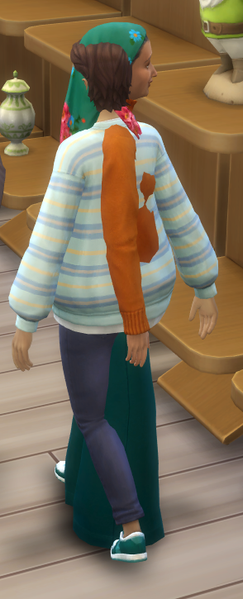
I have been creating a new vampire sim using the tattoo function from Businesses & Hobbies. I have created a tattoo that I only want the sim to wear in his dark form, and it allows me to do this in CAS, but as soon as I go to live mode, it has either disappeared, or shows in both the dark form and the normal form! Edit By Crinrict: Adjusted title a bit to reflect that there might be multiple issues with occults and tattooing. Not adding pack tags as it would be > 31.7KViews50likes31Comments
[XB/PS] Controls/Action Menus stop working (Patch 2.37)
I had just booted up the game and loaded up my save when I went to interact with the computer. The interaction menu thing for the computer came up and I could use the left stick freely to move around the options, however when trying to select an option I was unable to. I was also unable to do anything else within the game such as back out of the menu open up the main menu to save and exit, open up the controls screen, unpause the game and everything else. I sat there for a few minutes as I’ve had this happen before and it normally goes away. It did not. Every button apart from moving the left stick and the Xbox button didn’t work so it’s definitely an issue with the game. I just completely shut down the game and tried again a few hours later after restarting my console. I had the same issue again in the same save but this time I was able to click the “Write…” option and almost start having my sim write a book using the computer until it stopped on the screen where it ask you to name the book and write a description of it where the exact same thing happened again. This is making my game completely unplayable as it seems to be one of those bugs that is just inevitable in my save no matter how many times I restart my console and load up the save again. I did some testing in a different save and had a different issue where I couldn’t interact with the computer at all but my controls worked perfectly fine with everything else so it seems to be an issue with computers? Edit By crinrict: Added Tag to Title, Adjusted Title Note by crinrict: Going to put this on review but a CM will decide if this will be merged with this older thread: [XB/PS] Controls not responding | EA Forums - 12427005 Reopening this as there are many reports atm. Not sure why this would suddenly start. There was no patch or anything. Only use this thread if you are on console.290Views20likes35Comments
Sims do actions using wrong bed/crib
Sims are doing various actions using the wrong bed/crib. For example: There are two cribs (for twins). I click on one crib and tell an adult to put an infant to bed in that crib. The adult picks up the infant, carries the infant to the other crib, and puts the infant to be in the other crib, rather than in the one I selected. Best case, the twins end up sleeping in each other's crib that night. Worst case, both twins end up in the same crib (there's a separate bug for the way Sims can overlap, but that is not this bug). There are multiple children. One asks a parent to spray her bed for monsters. The parent goes to a different bed, not the one used by the child who asked about spraying for monsters. Father, standing in green bedroom (bottom left) just finished spraying the wrong bed for monsters. (FWIW, the green bedroom is used by the older sister, who is a teen.)17Views0likes1Comment
Sims clip into each other
Creating a new thread per Crinrict's request. Sims cut through each other in various circumstances. Be it walking, climbing ladders, or literally anything else, they constantly pass through each other like ghosts, regardless of how much space there is in a room. I had a AVI video that I recorded using the game's recording feature (why is it not supported here if it's what you guys chose is beyond me), but I guess a screenshot will have to do. Edit By crinrict: Adjusted Title437Views21likes24CommentsGrowing babies are impossible to do now.
Hi, another bigger bug what i notice after july 21 update is i can't growing any babies in game when i click on them. The option was always showing when i click on the baby,after this update when i see this option and want to click it game tell me i can't do it for now. I never use any mods ,plays on eaapp and it happend to me after the july 21 update.38Views0likes4Commentsbuttons not working
I am trying to click on my sim to make it do things but it won't do anything and not even show the options it acts like I'm not even trying to click on them. But when clicking on objects it works , I recently had the same problem with the computers but it fixed its self I guess. Now its the opposite the computer options work but the option to click on the sims are not .83Views4likes3Comments
Bug with Spouse title in relationships.
My Sims are getting married normally, but after the marriage, their relationship status in the relationship panel incorrectly shows “Partner” instead of “Spouse.” The Sims have completed the marriage interaction and are recognized as married, but the relationship panel does not update to the correct spouse status. This appears to be a relationship-status bug and can make it difficult to tell whether the game has properly registered the marriage. The issue occurs in an unmodded game on PS5 and should be investigated to determine why married Sims are being incorrectly labelled as partners.7Views0likes1Comment
[EBN] NPC Fairy Failed to do Tummy Time Without Screwing up their Body Pose
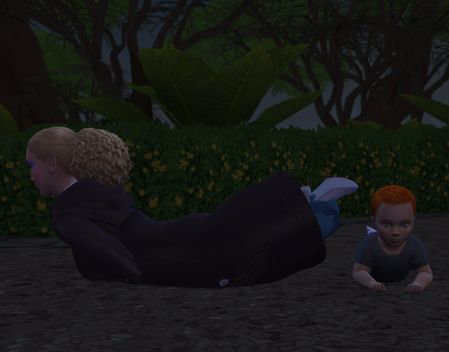
The image is below. My sim in red went over to the Summerdream House to ask if they could remove an ailment. Titinia Summerdream (off screen picture 1) was talking to me and her fairy Adault daughter Mara Summerdream started doing tummy time with their infant Lukas Summerdream. I noticed that Mara was flickering about for .5 of a second in odd poses till after a minute or 2 she got stuck as the Planking shape in the picture. No, I have not played any of these NPC Sim Fairys. While we were talking Titania went while talking to me walked over and picked up the infant. The tummy time abruptly stopped so this could happen. I own and have installed the packs: Get to Work, Get Together, City Living, Seasons, Get Famous, Discover University, Eco Lifestyle, Snowy Escape, Cottage Living, Growing Together, Life and Death, Enhanced By Nature Outdoor Retreat, Vampires, Parenthood, Werewolves, Dine Out Perfect Patio, Movie Hangout, Romantic Garden, Kids Room, Backyard, Laundry Day, My First Pet, Tiny Living, Paranormal, Home Chef Hustle Bust The Dust, Blooming Rooms, Desert Luxe, Poolside Splash, Modern Luxe Holiday Celebration, Grim's Ghoulish Guitar I have finished all the recent Events and unlocked those items as well I have all the recent free Maker Packs I have most of the Sims 3 reward Lamps No mods have ever been installed on this computer.61Views3likes7Commentsno 'swim in ocean' option
I just got the Island Living pack and have made a mermaid sim. But I can't get her to swim in the ocean. Or any sim. Even the NPCs don't seem to swim in the ocean. I am wondering if I accidently turned it off somehow, but I can't find a setting anywhere. I have tried diving from a ladder spot, and the sim walks up and just doe the 'can't path here' wave and bubble. I'm sadddddd I wanted to play with mermaidssssss3.2KViews90likes106Comments