Help. Run ME1 via EA Launcher needs Admin Privileges but won't run.
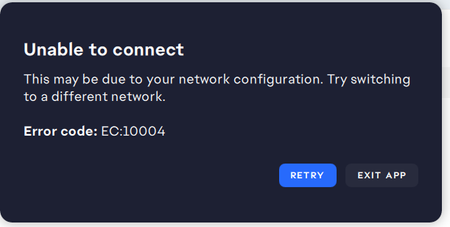
I download and launch ME1 from the EA Launcher "This game requires administrative privileges. do you want to grant access and launch the game" I click "OK" "Failed to launch game. An error on our end caused the launch to fail. Try again a little later" I tried running the EA launcher with Admin privileges. I tried running MassEffect.exe as administrator. I've tried repair. I've uninstalled and reinstalled it. I've tried repair. I've uninstalled and reinstalled it. Nothing works. Always the same message. I DID NOT buy it from Steam but from EA (actually Bioware ages ago) Thanks155Views0likes4Comments
[PC] Mass Effect Unauthorized DLC Error
Commander, you've received a new message at your private terminal! Ready to jump back in the game and save the galaxy? Are you running into an error that matches the following: "Unable to authorize the listed DLC"? Below are the steps to help resolve this error when launching both Mass Effect 2 and Mass Effect 3. Checking your account First things first. Make sure you are logged into the correct account. With older titles, we may often end up with multiple EA accounts without realizing it. Use the following steps to verify you are in the correct account. Head on over to EA.com and log in with your EA credentials. Under the About Me section, make sure you see a Mass Effect ID. If you play on Epic/Steam/Switch, check the Connections tab at the bottom of the page to verify the accounts are linked. Click on Order History, change the drop-down to match All, and scroll through the content, as there should be logs here with each DLC name. Note: If the EA account previously had an EA Play subscription, once the subscription ends, you will lose access to any additional content the subscription provides. You can read more about what content is included in the Learn about EA Play article. Once you verify you are in the correct account, perform the following steps below as these should help reinstall the DLC content and resolve these errors. Troubleshooting Steps Locate the following folder on their PC Default Path: C:\Program Files\EA Games. This path may vary depending on where the player installs the game. C:\Program Files\EA Games\Mass Effect 2\BioGame C:\Program Files\EA Games\Mass Effect 3\BIOGame Delete ALL DLC content within the DLC folder Delete EA License Files Make sure the EA app is closed. Press the Windows key and "R" at the same time. Type or copy and paste "%ProgramData%\Electronic Arts\EA Services" (without the quotes) into the new Window > ENTER. Enable View Hidden Files and Folders Delete all files in the "License" folder. If the above steps do not resolve the issue, you will need to contact one of our advisors to review the account and the content currently linked to the account you log into the game with. Players can contact our live support team on our Help Site. To request a chat or open a case through email. Thanks!1.9KViews15likes0Comments
Yes WCG:
Your subject access request report is below Enum\PCI\VEN_1002&DEV_73EF&SUBSYS_65021EAE&REV_C1 Argument handling done, requested action: 6. Process started, running as admin: true. Started with 'verify-and-install 5da3e878152 DxDiag Notes ------------ Display Tab 1: No problems found. Display Tab 2: No problems found. Sound Tab 1: No problems found. Sound Tab 2: No problems found. Sound Tab 3: No problems found. Sound Tab 4: No problems found. Input Tab: No problems foundMass Effect Legendary Edition (Epic Games)for GeForce NOW
Hi EA Team, I am a huge fan of the Mass Effect series. I recently bought the Legendary Edition on the Epic Games Store so I could finally experience the first two games after loving Mass Effect 3 on my old Xbox 360. :( However, I found out that while the Steam and EA App versions of the game are available on GeForce NOW, the Epic Games version is not. Since I don't have a powerful PC with enough storage, cloud gaming is my only way to play. :( Please consider opting-in the Epic Games Store version of the Legendary Edition for GeForce NOW so fans like me can enjoy the trilogy. :( Thank you!139Views0likes2CommentsMass effect disk installation issues
(side note: proof of the item and the disk are attached to this) Alright so I got this copy of mass effect DVD copy from a garage store and I was trying to install the game, when I put in the code that was labeled inside of the box it said it was incorrect after many times of checking the code and making sure I did not put anything wrong in it it still came out as wrong. I was wondering if there was a method where I can pull the code from somewhere that could be used to activate the installation. Also as I couldn't get the manual I have questions regarding the separat disk that is labled mass effect it claims that it needs the first disk which is labled mass effect one but I am confused with the purpose of the disk as even when I install a program from the disk nothing happens and nothing gets installed. I don't know if the answer is clearly obviouse but it would really help if anyone can instruct me with this.
Mass Effect Crashes With Cloud Sync
I bought mass effect and was having a blast without any crashes, lags, stutter, and 1% low was 50 fps. I travel to asteroid x57 for a side mission. I rescue the hostages and the game crashes. I restart the game and the game loads... to only crashed again... and again... and again... I tried loading a save before the mission, it didn't matter. I tried deleting local saves and uninstall the game. I reinstalled the game and it crashed while i was making a new character.... again... and again... and again. I had the same issue when I had origin it worked.... for some odd reason... it doesn't work with ea... i know... weird right? if only there was a way to DELETE cloud saves.... I uninstalled the game and ea. I dusted off my xbox 360 and my mass effect collection. thankfully all the games i own on ea, i have hard copies of on my xbox 360. thank you ea for recommending me to not buy anymore games from you, to uninstall it, share all my bad experiences with other people and to recommend other platforms. cheers (cm edit - updated thread title for vis.)ME:LE 3 won't launch
Hi! I've tried just about everything so as a last resort i'm gonna ask help from here. Two things of note: i'm playing on pc and my game is on an external hard drive. Been playing for a long time, and haven't had many issues before. About a week ago my ME:LE just deleted itself from Steam, saying it wasn't installed anymore. Installed it again and went to play as normal, but the game wouldn't launch. The launcher itself works fine, but when i try to load the last save, it lags and crashes at the loading screen, taking me back to the launcher. I'm currently playing ME3, and it seems like the problem is with that game specifically, because i tried starting new ME1 and 2 saves and there were no problems with either of them. What i have tried so far: deleted the game and installed it again (multiple times) updates my graphics cards moved it to my computers internal drive tried launching it straight from the .exe file verified the game files (multiple times) cleared EA app's cache Tried basically everything that came up when googling this problem. If there is anyone who could help with this i'd be very grateful.549Views0likes18Comments
ME 1 Citadel travel - LE
when Playing ME1, when ever trying to travel Via foot or Transit system. I cannot travel to any Ward location or the Tower. The game either freezes up or Stuck in a constant loading screen. I can travel the Docking area, C-Sec academy and the Presidium without issues. my games runs normally 60ish FPS but when traveling to Wards or Tower my FPS tanks to 25FPS or less then I'm stuck. I'm not using Mods eitherEA says that my ME:LE is the wrong version
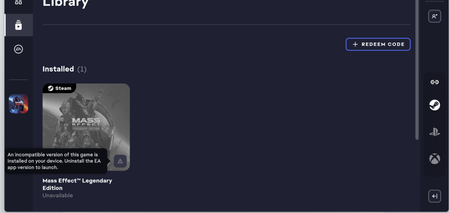
So I've just downloaded Mass Effect Legendary Edition from steam because of the sale. I've been trying to get it to play, but every time EA says the version is out of date and the steam version needs to be uninstalled. Great, so I uninstall the steam version. Uh oh, now it says that I need to download the steam version and uninstall the EA version. The things is that even though it shows the ME:LE in my library. It doesn't offer me the option to uninstall. The download button is completely greyed out. Solutions? Nothing so far! I've tried uninstalling and reinstalling EA app and Steam. I've tried fixing the game files. I've uninstalled and reinstalled the ME:LE several times. I've tried running EA.desktop and EA.launcher as admins in addition to running the ME:LE.launcher as admin. I've tried opening the ME:LE launcher. I've done troubleshooting on EA and I did cache clearing on EA. Nothing has worked so far. I just want to play my game :( Any help is greatly appreciated!