Racenet or ea app not showing wrc
I have done a deep dive both on here and chat gpt. I bought the game on steam and the game is not recognized on the ea or racenet which maybe causing the problem. Crossplay is turned on and I've even tried disabling my firewall to see if that was causing the problem. The steps I've taken so far is Crossplay enabled Firewall is disabled Logged in EA sports app Logged into racent Open wrc through steam, then when I open clubs only one club is available and the QR code is telling me to log into racenet. The only other solution I can find is redeeming a proof of purchase code from steam, (which they are not providing or I can't find) or to pay an annual fee to join some ea membership Please help
Racenet does not show multiplayer stats
At Racenet I don't have stats reflected For EA WRC game multiplayer. I have everything turned on in relevant settings in game including ghost and stats sharing. It states, "Gain stats by playing Multiplayer." But I'm playing multiplayer - I'm doing clubs events and my participation is logged there and results appear on Racenet in club's standings. But when I go to stats for my profile in multiplayer section it says everything is 0. Screenshot is in attach.
Cannot connect to EA
Since the last DLC Update I can't connect to EA. When I start the game Iit says "Connecting to EA" but nothing happens and the login dialog is not shown. The only thing I can do is to skip the access and play offline. I'm running on PC-Steam. After discussing this issue on the EA WRC official channel it seems that I'm not the only one having this issue. Thank you for your attention.2.6KViews11likes23CommentsCant connect to clubs or multiplayer on series x.
I have been trying for 2 weeks to access clubs and multiplayer on series x. It comes up asking to login on racenet website or scan qr code. Which makes no difference, doesnt work either way, Cant access multiplayer, as comes up an issue also. I have hard reset my series x, uninstalled and reinstalled everything, nothing, i have checked xbox servers all green, your servers show fine, but nothing works. When will it be sorted? Disappointed
Unable to connect to online profile
Hey guys, I have EA WRC on Steam and about 4 days ago I have been unable to connect to my online account after game launches. See attached screen shot. It just stays on this screen trying to connect. I can hit escape and play the game in offline mode, but I want to be able to post and compare my times as well as participate in leagues and do the "Moments" content. Since this started happening I have spoken with 4 separate EA support staff and gone through the following troubleshooting steps: Restart Router Restart PC Verify Game files Uninstall/Reinstall Game Uninstall/Reinstall/Update/Repair EA Anti-cheat and ensure it's running in background after launching game Flush DNS Manually set DNS (8.8.8.8 and 8.8.4.4) Manually disable all non-essential Microsoft apps on startup through task manager and sysconfig Completely uninstalled all 3rd party anti-virus (McAffee) None of these steps have worked. I'm running latest Windows 11 service pack (non-beta). I have nearly 100 hours in this game and have never run into this issue before. I am able to play other titles like Call of Duty BO6 online without issue. I have fiber optic internet (1000 mbps download, 150 upload) and am using a Linksys Velop Mesh wireless system to connect on a 5 ghz channel with no noise from neighbors. I am truly at a loss and don't know what else to try. Any help would be greatly appreciated. Thanks.
Stuck driving in the garage when entering a multiplayer race.
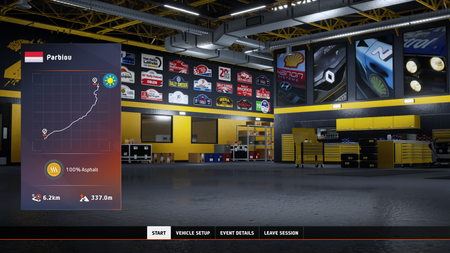
So I've had this weird bug yesterday and today. 9/10 games I join i encounter this bug. See attached screenshots. I get stuck on the start screen, no car is visible. Cant click any of the buttons, and then when the actual race starts, it sends me into the garage where I can drive around and clip through the walls. Making me fall through the map for a good minute before it sends me back to the garage... No menu is accesible so the only fix is Alt-F4. This is extremely frustrating. Please help