[AA] Sims unable to go to work/school due to scheduling issue
It started after installing newest EP and going on a gateway. Once I returned, all Sims in my family could not go back to work or school. When I go to school/work tab, I constantly see "work/school in 2 days" for all of them. Time passes and this doesn't change - still "work/school in 2 days". Does anyone know how to fix it?225Views5likes13Comments
Sims Delivery Error
So today I decided to load up my sims and noticed there was a sims delivery error on my screen after playing for 2 minutes and I have done everything from restoring license to restarting my PlayStation and I'm just not quite sure what to do as it won't resume the download and it was playing this morning earlier with no issue. Is anyone else having this problem or is it just bigger than my own console.1.4KViews35likes56Comments
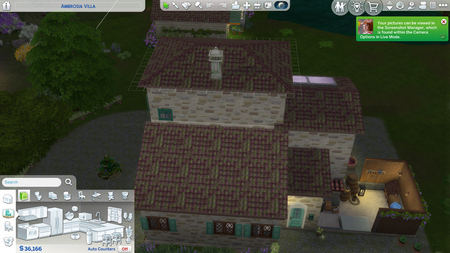
Roof Disappears in Live & Build Mode
EA App/ Windows/PC / No mods/CC I checked the compiled list for this issue and also googled to see if I could find this bug report, but all I found was a couple different general discussion topics related to this and no report, so if this is already a report, sorry for reposting. I've had this issue for years honestly, but used to play with mods. I do not currently use mods as I'm in school, so this is a save file that has never had any mods in it. I find that my roof will vanish most often in live mode, but sometimes in build mode as well. It is very hard to predict if it will be there or not, and sometimes I've fulled had to replace the roof because it seemed like it was gone when I switched between live and build mode to have the roof still missing. Then I come back and it's back and I've got two roofs. When I first noticed this issue when I played with mods, it always seemed to occur when I placed roof objects on the roof and I had just assumed it was the roofing cc that was the culprit. However, now that I've played for a long time without mods and am still having this issue I've been able to gauge the times that the roofs disappear more. It's still a best guess, but I do believe the issue arises from roofing items and I think the issue is more specifically related to roofing items placed on upper level roofs NOT first floor roofs. Again, this is just my best guess and I'm not necessarily always thinking to check or test this when I'm playing, but it is an issue I have with various builds. It does not appear to be tied to a specific roof object, just roof objects in general triggering the disappearance based on what I've observed. Again, I could be off the mark on the roof objects being the trigger (so I didn't include that in the title), but that is what I've noticed most frequently being the issue. Photos for reference: No other roofs on this build disappear. Just the upper most roof with the roofing item on it.62Views0likes5Comments
But I own For Rent... so...
for awhile now when I open ea ,it does not show as own content unless I open game. It hadn't been a problem until now. I had uploaded households to my gallery that randomly went missing, when trying to place the household, I received a pop up saying I don't own some of the content despite the household saying that I own all content... I made these households. When I continue to place the household instead my game automatically closes, no warning. I notice that the only pack that is common in these households is the For Rent pack.6Views0likes0CommentsSims delivery error
It's been a continues error of today Wednesday 1st April on a PlayStation 5 I would like some guidance. Or some clearance if this a April fooles. . Only now it's severely affecting my sims play. The error is a 000000008:0000000000000193 error. Google hasn't help how I can fix this, so I'm here hoping I can get help..77Views2likes3Comments
Game doesn't recognize items in inventory
The game isn't recognizing when items are in my sims inventory when trying to make other items. Example: My sim makes a bunch of components and upgrade materials to make a servo but when I get to the robotics table it says my sim has none of the materials.6Views0likes0CommentsBuy/Build: Can only manipulate one item
When I want to move or delete an item during game play I have to delete an item go into live mode back to build mode to them delete another item or move something around. Same when I want to delete out of household inventory. When I want to build I have to build a wall, click on a tool or cancel, click wall again to make a new wall and repeat over and over until the build is complete. And when I want to place furniture I have to place item, click a new tool then back to the move object tool again to move it or change it and repeat that process for all items on the lot. Edit By Crinrict: Adjusted Title1.3KViews59likes35Comments[GRO]Infant on playmat, looks at toys, caretaker wants to put down
In several saves now, after an infant gets put on a playmat by a caretaker and starts to look at toys, the caretaker autonomously stops doing what is in their queue and starts to go to the infant to put the infant down (on the floor). After this, even if the caretaker's action is canceled before he/she has reached the infant, the infant can no longer look at the toys. The only choice the infant has on clicking on the playmat is to "be carried here". I was able to break the cycle of caretaker autonomously wanting to put the infant down/have the action canceled/wanting to put the infant down by having the infant look at another object in the room, but the infant can still not interact with the playmat to look at toys.6Views0likes0Comments
[LD] Reaper: Dead Sim stuck standing on lot
I've tried resetting the sim, and they are not interactable unless I've collected a witness statement. It then allows me to follow the procedures such as checking the pulse, ect. It's when I listen to the Sim's plea is where the issue starts. After accepting to "revive," the so called deceased sim becomes non- interactable (the same happened before I interacted with the witness), although can be clicked on with cheats. I've had this one lot do this twice, so I'm not certain if it's designated to that one spot or if there might be others. I assume it might be some coding issue where it believes the sim deceased is still "alive" and moving, which might be the possibility of that triggering the issue, but I'm not sure. If anyone else has similar issues with this Reaper career, let me know! Edit By crinrict: Adjusted Title to fit old bug report.3.3KViews38likes48Comments[CL] Sims reset when autonomously using Karaoke Machine during festival
I uh, don't know how to describe this besides... this. I noticed that when I went to a City Living festival (specifically the Romance one), a sim (AI-Controlled) who was attempting to use the Karaoke Machine would pick up the microphone, attempt to sing, and then reset; the sim would go into an A-Pose, and the microphone would teleport back to the machine. I saw the sim attempt to use it autonomously multiple times before I determined it was a glitch. However, I have been going through some troubleshooting to determine criteria for what could be causing it. Here are my findings: 1. The Karaoke Machine works in its base form (no upgrades) on Residential lots, and works on a revisiting of the lot that I found the bug on (Planet Honey Pop!), when no festival is running. Sadly, I haven't been able to replicate this bug yet, as no festival has happened in the fashion district since I saw this, but I wanted to mention it before I forgot to, haha. I will edit with more info when I get some though! This also occured to me on Playstation, so no mods would be involved to edit the processes. No error code appears as well, as the sim just... resets. Edit By Crinrict: Added Tag to Title, Adjusted Title584Views14likes14Comments