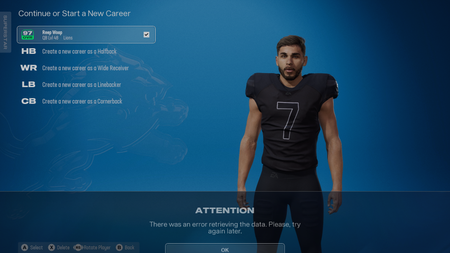
Superstar League Character Corrupted
I think I accidentally corrupted my save game for Madden 26. I had signed to the Lions after completing my 4 seasons with the Bengals. In the offseason I was in the character customization window trying to look over the jerseys for the Lions and I clicked onto something to check it out on my character. It then just showed the default uniforms for the online version of Superstar. Then I couldn't gain access to any of the customization features or change anything. Now it's locked out, only showing an error when I go to character customization. Then if I try to go and delete/change the character it immediately starts glitching and spamming "cannot retrieve information" and effectively soft locks the game. So I can't even delete my save to start all over if I wanted to. I tried to play a game and advance further into the season in hopes to resolve the issue. I tried redownloading the game and deleting my save game. But nothing works. I only started having these issues since the Madden Thanksgiving update, but I can't say I ever looked at the gear menu in the off season after signing with a different team. If anyone has any solutions to these issues please let me know. This is where I can't even delete my character because it keeps spamming that popup over and over again. It soft locks the game because I can't leave the page or anything.147Views2likes2Comments
Madden NFL 26 PC game says already running but will not launch
I am having an issue with Madden NFL 26 on PC where the game will not launch. When I click Play in the EA App, the game never opens. The EA App then says the game is already running, even though no game window appears and Madden does not show in Task Manager. Steps I have already tried: Restarted my PC Closed the EA App and background EA processes Reinstalled Madden NFL 26 Reinstalled the EA App Ran the EA App and Madden as Administrator Checked Task Manager for hidden processes Verified game files Disabled overlays and startup apps Confirmed Windows and drivers are up to date EA Support has already walked me through advanced troubleshooting. I was instructed to run multiple commands in Command Prompt and to create a custom desktop shortcut to launch the game and EA App. Even after completing these steps exactly as instructed, Madden NFL 26 still does not launch and continues to say the game is already running. At this point all basic and advanced client side troubleshooting has been completed. The issue still persists. This appears to be a launcher level or account related issue with the EA App preventing Madden NFL 26 from starting correctly. The game is currently unplayable on my PC. Posting this update as requested so the technical team can review and advise on next steps or request logs if needed. None of these steps fixed the issue. This appears to be an EA App launcher or account synchronization issue and not a hardware problem. The game is currently unplayable. I am posting here as requested by EA Support so the technical team can review this issue. Please let me know if logs or system information are needed.madden 26 connection error and account error
madden 26 wont work on my pc it either doesn't launch ,sometimes it says account error you do not meet minimum requirement's to access ea's online features and other times it launches and lets me play for 5 minutes but then kicks me off of online and says connection lost if you know anyway to fix this please let me know as soon as possible.Madden 26 server issue .unable to connect to ea servers
Having an issue with Madden 26 on PS5 when loading its shows "MISCSERVICEGATEWAY_ERR_SYSTEM" then after a while its says "CONNECTION LOST". After signing back in and loading MUT, would see "Our servers cannot process your request at this time" before going back to "CONNECTION LOST".1.1KViews3likes6Comments
Madden 26 'Preparing game' loop: New Steam license vs Old Revoked key
Hello, I am seeking help with a persistent licensing issue for Madden NFL 26 (PC/Steam) that EA Help chat has been unable to resolve. The Problem: When I launch the game from Steam, it gets stuck on 'Running install script (EA App)'. The EA App then opens with a 'Preparing game' window that disappears after a few seconds. In my EA App library, the game is listed as 'Unavailable', stating it needs to be downloaded on Steam, even though it is fully installed. Technical Conflict: I previously had a copy of the game from a 3rd party seller that was REVOKED. I purchased a NEW, legitimate copy on Steam on Dec 29. I have my Case ID, Steam Transaction ID, and receipt ready to provide to a moderator privately if needed. Support agents have confirmed that my new license IS on the account, but the EA App is failing to authorize the launch because the old 'Revoked' status is likely conflicting in the backend database. Troubleshooting Done: Cleared EA App cache and performed Safe Boot. Unlinked and re-linked Steam/EA accounts. Reinstalled the game and the EA App. I need a Manual Entitlement Override to prioritize my new Steam license over the old revoked one. Can a Community Manager please look into this or help escalate it to the backend entitlement team? Thank you.228Views0likes1CommentMadden 26 Constantly Crashing PC within minutes of start-up
Recently bought Madden 26 on PC and every time I load the game it crashed somewhere between 2-5 minutes of starting it up. There is no specific trigger, it can happen in game, or simply in the menus. Up until the crash there is no performance issues, and my PC is way over the optimal systems requirements to run it. I have already tried: Up[dating graphics drivers, re-installing the same, capping FPS, reducing graphics settings, re-installing anti-cheat, repairing game files. Nothing is working. I can see other people are having the same issue since the recent update. Please offer a solution that works and FIX YOUR GAME. I can't believe I am having this type of issue this long after the launch of the game.503Views2likes2Comments