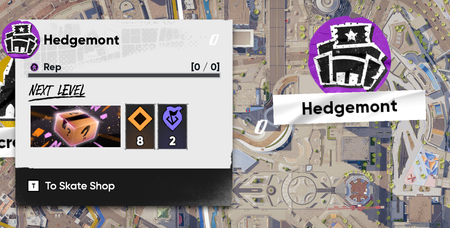
Neighbourhood Progress reset & stuck at 0 / 0
Description of the issue: Right after the Season 3 maintenance was over and I hopped in to check things out, all of my neighbourhood levels and progress got reset/bugged out. They are simply stuck at 0 / 0 and will not update or progress at all. Can't buy any product boxes either, even if it shows that I already have multiple boxes unlocked in said neighbourhood. It's been like this two weeks. Steps to trigger/reproduce the issue: Start the game as usual Look at the 0 / 0 on your current neighbourhood and wonder if all your progress gone Write bug report and hope for the best. I've seen a handful of other people post on reddit and the discord with the same issue. Still no acknowledgement as a known bug, which worries me a ton. Platform: PC (Steam) Troubleshooting steps already performed: Validated files through Steam. Reinstalled game completely. Attempted to run a few missions both old and new in every neighbourhood hoping it would fix things. No luck.2.4KViews24likes69Comments
skate. Error Server Bugs "990104014"
Hello EA Support, I am locked out of skate. due to Connection Lost Error Code: 990104014. I have done all local troubleshooting (DNS, network reset, reinstall) but it still persists. My account session seems to be stuck or bugged on the server side. Please help me to force reset or clear my active game session data. Thank you.16Views0likes0Comments
CPU Heating to 192-195 F
I'm on the Steam version with a 4080 Super, Ryzen 7700, and 32 GB DDR5, but my CPU skyrockets to 195 degrees while playing at 4k 240Hz. I would try 120Hz or 165Hz, but there is no option. This is the only game that gives me this issue, I even have the graphics turned down, but it makes no difference. I love this game, but I fear playing it will just degrade my hardware. Playing at a lower frame rate makes this game significantly less enjoyable, and 1440p on a 4k panel looks pretty bad.Inconsistent performance on pc- brief black screen then worse performance
I’m having a strange issue with Skate on PC. While playing, the screen will sometimes suddenly go completely black for a few seconds. The monitor then shows “DisplayPort” as if the display connection has been interrupted, and the picture comes back. After this happens, Skate runs noticeably worse than it did before the black screen with less frames and worse graphics. Restarting the game seems to restore things temporarily, but the issue can happen again. I originally had the monitor connected via HDMI, but I switched to a DisplayPort cable and the exact same issue still happens, so it doesn't seem to be specific to the HDMI connection. I’m using an AMD RX 9070 XT and a 144Hz monitor connected via DisplayPort. I’ve also tried reinstalling Skate, but the issue still happens. Has anyone else experienced Skate causing a brief display/driver reset like this, followed by worse graphics and performance? I’m trying to figure out whether this is a Skate/AMD driver issue or something else. I havent noticed this in any other game either. I also noticed everytime I boot the game and it verifies shaders it goes up to 11/12% then skips to 100 and sometimes it goes black and says DisplayPort in the top left. Could that be related or is that just how Skate boots? Any information would be much appreciated. thankyou:))13Views0likes0CommentsMEGA THREAD: Board art, Stickers, Trucks, and Tattoos textures low res
After the update, every board, board sticker, tattoo, trucks I put on seem to be in low res. This wasnt an issue before the update. I have messed around with graphic settings and still the same. Im on PC btw. my pc specs are i7 7700 RTX 3050 6gb 32 gb ram 1tb PNY ssd276Views4likes7Comments
DLCs Crew Bounties stuck at Tier 2 and Tier 3 progress not tracking
I'm experiencing a progression bug with the DLCs Crew Bounties in Season 5 All six Tier 2 objectives are completed and show green checkmarks, but the overall “Bounties Completed” counter is stuck at 5/6. This prevents me from claiming the Tier 2 reward I can access and view the Tier 3 objective list, but completing the required actions does not register any progress. The counters remain at zero This has been happening since the beginning of the season. I have fully closed and restarted the game several times, but the issue persists I've attached screenshots showing the stuck Tier 2 counter and the Tier 3 objectives with no progress Is there a workaround, or can you investigate this progression block? UPDATE: I can now progress through the DLCs missions, but I STILL cannot claim the Tier 2 reward. The counter is still stuck at 5/6 challenges completed, even though all six are complete.uninstalled EA app and now i cant play
uninstalled it bc i forgot you need it to play thru steam, now i get error code: 1478078408 every time i launch even tho i have reinstalled the EA app. ive verified game files thru steam, uninstalled/reinstalled Javelin AC, restart game, reset modem, nothing works.39Views0likes4CommentsStill haven't received my Founder's Pack items.
It's been almost a month now and I still havent gotten the mocap cosmetics, san van bucks, founding founder's cosmetics nor the upcoming skate pass. Whats going on? I bought the contents of the deluxe pack after this and got those items just fine but im still missing the stuff from my regular founders pack. sucks a lot especially since season 1 is launching tomorrow and i'm definitely not buying the skate. pass again. proof of purchase (albeit censored) is linked. bought through steam btw618Views2likes41Comments
2 annoying bugs for at least 2 seasons now
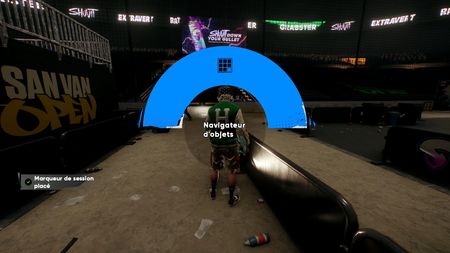
Hi Team, two annoying bugs I’ve been experiencing for at least two seasons now. I’ve already reported both, but they still haven’t been fixed: -No Quick Drops or object shortcuts I don’t have any Quick Drops or object shortcuts available. The quick-access shortcut takes me to the “Object Browser” instead (see screenshot). -My girlfriend keeps disappearing from my friends list I can be friends with anyone and see them in my friends list… except my girlfriend. When we’re friends, she doesn’t appear in my friends list. If I unfriend her, she shows up for a while, then disappears again. I then add her back, which temporarily fixes it, but as soon as I restart the game, the problem comes back. Basically, I can have the entire world on my friends list and see everyone there except the one person I want to play with all the time. I suspect some kind of timing issue broke this two seasons ago, and it’s never worked properly since.