The translation may be wrong
In the Nintendo Switch 2 version of Apex Legends, if you move the perspective slightly upwards, the upward input is not released, and the perspective continues to move up as it is. The controller works normally in other games. I tried to restart APEX and change the button arrangement, but it didn't improve.8Views0likes0Comments 45Views0likes2Comments
Player model flashes blocking screen when moving‑healing or switching heals
Platform: PC Steam Bug: Player character model flashes and instantly blocks the whole screen when healing during movement, and when switching different heal items. The glitch occurs on the first healing state. Reproduce steps: Start healing while moving, or switch between different heal supplies. The character model pops up and covers the screen for 0.3‑0.8 seconds, then returns to normal. This bug triggers when healing on‑move or switching healing items. Standing still healing hardly reproduces this issue. Settings: Borderless window, native resolution, Async‑compute setting: default No network problem, purely local client animation glitch. Video record attached.39Views1like1CommentPlayer model flashes blocking screen when moving‑healing or switching heals
平台:PC Steam Bug:玩家角色模型在移动治疗和切换不同治疗道具时会闪烁并瞬间遮挡整个屏幕。故障发生在第一个愈合状态。 重复步骤:边移动边开始治疗,或在不同治疗材料间切换。角色模型会弹出,覆盖屏幕0.3-0.8秒,然后恢复正常。 这个bug在移动中治疗或切换治疗道具时触发。静止治疗几乎无法重现这个问题。 设置:无边框窗口,原生分辨率,异步计算设置:默认 没有网络问题,纯粹是本地客户端动画故障。 附上视频记录。29Views0likes2CommentsUnable to perform any actions (fix is f1 emote)
THE FIX FOR THIS IS: press f1 chose an emote (not the holos that drop on the ground) after the emote animation has played for 1s you can cancel it using any key and you are back to normal! Hope this helps gl hf! Happened to me since then a lot of times randomly. This is the first time: Got hit by a seer q, while being on bloodhound, not in the ult, just the character, and i couldnt use weapons whey were holstered, couldnt pick up stuff, couldnt respown teammates, couldnt use abilities, legit nothing worked, i was just there in the game, could take damage but couldnt heal. And i got supper ultra stunned by his q when i got hit, worse than last season1.5KViews17likes113CommentsAxle's Ultimate Inconsistent on Switch 2
Axle's drone on Switch 2 will often bypass players in its path. This is random but happens regularly. This happens at close and mid range. Even, for instance, players who are outside a door of a room that you are in the middle of, who are actively firing at you, get completely missed by the drone. At random it will just roll past them and change maybe someone at long distance behind them. Example of steps to reproduce: Be in an open field with many opponents. Use Axle's ult. [ER] The drone hits the closest players who are relatively in the direction the drone is traveling. [AR] You can watch the drone roll past (a) player/players and chase down players at a longer distance away. This happens inconsistently but does happen regularly.11Views0likes0CommentsAxle Nitro Gate on Switch 2 is Inconsistent
Periodically when using Axle's nitro gate, on Switch 2, Axle will just stand up forcing the stop of the slide and causing immediate loss of momentum. This happens at random but does occur regularly. This was introduced, I believe, with season 30. At minimum it didn't happen during Axle's launch up until her ultimate was changed. For an example of steps to reproduce: Take a nitro gate. [ER] Slide instantiates and goes until an object/ledge is encountered or at least until the nitro gate sound is complete-ish. [AR] Slide instantiates but it is almost immediately ended (like sub 1 second) by Axle standing completely straight up. You can still hear the nitro gate sound but Axle is standing/walking. Axle doesn't encounter any object or ledge when this happens to force this. She just stands and immediately looses all momentum. [Bonus]: Another legend slides past you who used your nitro gate and kills you while they are sliding and you are walking standing straight up.12Views0likes0CommentsMap Glitch
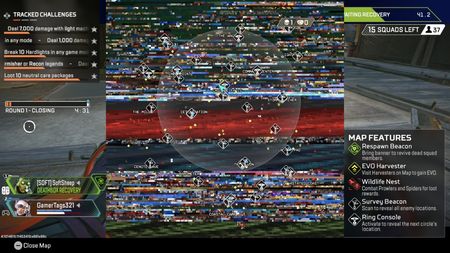
I’m not sure if this is just a me issue or not but my map has been super glitched for probably the last few hours. Has this been happening to anyone else? It started as just these two, covering the top half, but in the next game it was the entire map. Any and all help is greatly appreciated!!55Views1like3Comments