Can't play as one of my household sims
My main Sim just had someone from the university town move in with her into another world. At first everything was fine, then after maybe 5 minutes of gameplay, I suddenly wasn't able to play as the sim that moved in with her. Both of the little icons on the left are still there I just can't select his to get his gameplay, it's just hardlocked on my original Sim. I tried some of the tricks involving evicting and deleting the family and replacing them in, but it just hasn't worked. I tried splitting the household up and putting him alone on another lot and trying to switch to play as him alone, but it won't even let me do that, it just stays on the previous active household. He is entirely unplayable no matter what I do. I do have Nraas story progression, overwatch, etc downloaded, are there any bug fixes in those mods that can help with this? All of the reset commands haven't fixed it either.Any Grab Body Flip causes player to slam
I currently am experiencing a bug on any area of the game where I can perform a body flip with or without a grab. When I am at the apex of the flip if I let go at all it will cause my player to react like he slammed and fell of the board. It can be fully replicatedSplit Fiction Game Not Launching
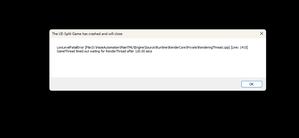
I recently got this game and tried to launch it after installing. Keep getting this error message: "LowLevelFatalError [File:D: \HazeAutomation \MainTMU \Engine \Source \Runtime \RenderCore \Private \RenderingThread.cpp] [Line: 1415] GameThread timed out waiting for RenderThread after 120.00 secs" Tried everything. - Validating game files - Turning off antivirus - Uninstalling and reinstalling game - Resetting my pc and reinstalling everything - Updating all drivers and windows What else can I do to fix this? I'm not super tech savvy so I'm not comfortable with changing /deleting core files, programs & settings that my pc comes with. PC Specs: Processor AMD Ryzen 7 7800X3D 8-Core Processor (4.20 GHz) Installed RAM 32.0 GB (31.2 GB usable) System type 64-bit operating system, x64-based processor Windows 11 Home 25H215Views0likes3CommentsF1 25 FFB or Steering wheel crashes a game
F1 25 Steam Game crashes after a several minutes with input lag or smth with my steering wheel. I have low cost steering wheel - ardor gaming Silverstone V2. The following happens: the career race starts, practices, qualifications - my computer is not bad enough. Core I5 10400, RTX 4060ti, 16 GB of RAM. But at some point in time, the game freezes and steering wheel turns fully to the left or to the right. I calibrated it before the game and the parameters are showing themselves normally. The axles are in place, the pedals are working. Everything responds. I feel a good FFB in the game, but after 10-12 minutes of playing, it freezes. The lags don't end and the game just crashes. In the events journal of my installed Windows 11, I found a log that the EA anti-cheat had unloaded itself due to an unexpected error 0x1 in f1_25.exe . I've tried lowering FFB settings and also with no results. I don't understand what could be the reason. Either it's an input lag with the steering wheel and the game just falls off into a critical error, or what… Without FFB, the game responds normally and works at least longer. Crashes or freezes have not been noticed yet. Help anyone who can at all. The game was purchased on STEAM, by the way. I've already validated the files too.
Low resolution when launching, settings not persisting
Description of the issue: During the "Configuring..." load at the title screen the resolution will be reduced to seemingly the lowest setting. Changing the settings will fix it during the session, but the issue returns every time the game is launched. Steps to trigger/reproduce the issue: Launch the game and press start on title screen. Platform: Steam on PC Troubleshooting steps already performed: Launch in Windowed - resolution scales to window size properly, however the window always opens at a size smaller than full screen. Issue returns when changing settings to Borderless or Fullscreen after this. Launch in Borderless Fullscreen - same issue Launch in Fullscreen - same issue Verify game files - same issue Driver update - same issue Driver rollback - same issue DxDiag attatched