Listen please 🙏 !!
Please bring Star Wars Battlefront back — and give the Clone Wars the game it deserves I’m writing this as a longtime Star Wars Battlefront II player and as someone who still plays the game today. Battlefront II was released in 2017, and even after all these years, the game still has an active and passionate community. The graphics, animations, sound design, combat and overall atmosphere still hold up extremely well. It honestly feels like a game that had much more potential left when development ended. I understand that DICE and EA have other priorities, especially Battlefield. But I really hope Star Wars Battlefront is not considered a finished chapter forever. There is still so much that could be done. The Clone Wars deserves much more The Clone Wars is one of the most important eras in Star Wars, and the Clone Troopers are one of the most iconic armies in the entire saga. Battlefront II already gave us a taste of this era, but there is so much more that could be explored: The 501st Legion and Captain Rex The 212th Attack Battalion and Commander Cody The 104th Battalion and Commander Wolffe The 327th Star Corps and Commander Bly ARC Troopers and Clone Commandos More Clone Wars Jedi More Separatist units and vehicles AT-TEs, LAAT gunships, TX-130s and other vehicles Geonosis, Umbara, Christophsis, Coruscant, Ryloth, Mygeeto and many other battlefields Large-scale Clone Wars battles More space battles And, most importantly, a campaign focused on the Clone Troopers themselves The Clone Wars is not just about the Jedi. The clones fought almost every battle of that war. They lost brothers, formed friendships and sacrificed themselves for the Republic. A campaign following a Clone Trooper and his squad through the war — eventually reaching Order 66 — could tell an incredibly powerful Star Wars story. Battlefront II doesn’t necessarily need to disappear A new Battlefront III would obviously be amazing, but there is another possibility. Why not continue supporting Battlefront II? New maps, new heroes, new Clone Wars content, new vehicles, bug fixes, technical improvements and eventually cross-play could bring an incredible amount of life back to the game. The foundation is already there. And if EA/DICE eventually decide to make Battlefront III, the community would already be there waiting. Please listen to the community Battlefront II has shown that players are willing to stay with a game for years when they love it. We don’t expect everything at once. We just want Star Wars Battlefront to have another chance. Please don’t let this franchise disappear. Give us more Clone Wars. Give the Clone Troopers the story they deserve. And most importantly, give the Battlefront community a reason to return. #BringBackBattlefront #Battlefront3 #CloneWars16Views0likes0Comments
Cannot start campaign missions - crashing to desktop
Hi, I haven't played the game in a while, but for the last couple of days I have tried to go back to it, without success. Multiplayer seems to be working fine and I just completed an Arcade mission without error too. The problems come when starting a campaign mission. 9 times out of 10, I get a crash to desktop when loading up a campaign mission. Otherwise, it crashes within a minute or two. I've tried continuing my campaign, starting a new campaign and also selecting different levels to start it. I get the same results. I have tried both DX11 and DX12 modes, with the same results. My PC exceeds the recommended spec. I hope someone can help please. Thanks574Views0likes4Comments2026 Battlefront II Galactic Assult Phase Camera-Locking Bug
Issue: So I have been playing Battlefront II on PC for quite some time. Ever since January of 2026, there has been this very annoying bug that locks your screen in a direction (commonly up or down) that is impossible to fix unless you respawn which ruins the experience. This bug occurs when playing Galactic Assault and the next phase of the game begins. Solution: I have spoken to countless EA advisors about this and I always am getting the same answer. They claim they will note this issue to game developers and will update the issue on their pages. I am hoping this post gets some attention from a Battlefront II developer, team member, or any sort of people that has the power to do something. Please BF2, we need you!107Views0likes2CommentsAll classes, weapons, star cards etc set back to level 0 on Xbox
I logged on to Battlefront 2 the other day and saw that all my classes and what not were good to go. Jumped into a game and found out everything was reset to level 0. I have tried everything from hopping into a game or two to see if it fixes it, closed out the game, everything under the sun to see if it would fix it seeing as it could possibly be a server communication error but to no avail. Has anyone else run into this problem and know more work arounds?52Views0likes2CommentsMy TL-50
So ive beaten the mission to recieve my TL-50 on Battlefront II, however even though ive checked the missions list to double check its completed, and restarted my xbox, and replayed an entire Co-op and ensured i got at least one more kill, the crate still hasnt popped up and i still havent recieved my blaster, id really like that blaster as i have put hours into the game to kill 400 plus people, any help or can somebody direct me to the EA community service people so they can manually give me the blaster through my account, thank you18Views0likes1CommentBF II don't start
Hello, I am reaching out to support because Star Wars Battlefront II has not been working for several weeks and I have exhausted every solution I could find. Exact symptom: the game launches, the window opens for about 2 seconds, it attempts to go fullscreen, then silently closes and reopens the EA launcher. No error message, no error code, nothing. Sometimes it accepts to launch once or twice, then stops working entirely afterwards, without any changes made on my end between sessions. System configuration: - GPU: AMD Radeon RX 7700 XT - CPU: AMD Ryzen 7 9700X - Secure Boot: Enabled - BIOS Mode: UEFI - Game purchased via Steam, tested via both Steam AND the EA App Troubleshooting steps already attempted without success: - Full uninstall of the game (including system files) and reinstall - Clean AMD driver reinstall using DDU (Display Driver Uninstaller) - Disabled Radeon Anti-Lag - Installed Visual C++ Redistributable 2015-2022 x64 and x86 - Cleared the EA App cache - Verified game file integrity via Steam (no corrupted files detected) - Reinstalled EA AntiCheat via EAAntiCheat.Installer as administrator - Checked environment variables (no GAME_DATA_DIR present) - Disabled DirectX 12 in the game config files - Checked Windows Event Viewer (no error logged at the time of the crash) I suspect the issue is related to EA Javelin AntiCheat silently killing the process, as the behavior matches exactly: silent crash with no message, random between sessions, no trace in Windows logs. I saw that both: SWB2 crashes when the game starts. | EA Forums - 13430650 and SWB2 crashes when the game starts. | EA Forums - 13430650SWB2 crashes when the game starts. | EA Forums - 13430650 seems to have the same problem, I hope you're gonna find what is wrong with it Thank you for your help in resolving this issue.197Views0likes6CommentsSplit screen bug
Every time I do arcade, coop, battle scenarios split screen, on both light and dark side when you get to the level with the starkiller base map, it crashes mid way through loaded and sends me back to the Xbox Home Screen, haven’t seen this happen anywhere else on this map, tried multiple things to fix it, and nothing worked. Please fix this bug because it makes it impossible to progress through the split screen45Views0likes1CommentSupremacy Ship; Holding point glitch
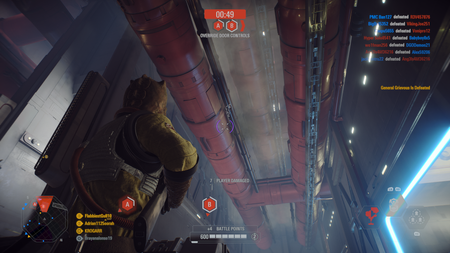
While in a game of Supremacy on the age of the republic game mode, I noticed that my team was unable to take one of the points on the Clone ship, because it remained contested. I was playing Bossk and I threw my Dioxis Grenade around the point multiple times to find where the enemy was to see who was contesting the point.(Bossk highlights enemies who are being affected by his Dioxis Grenade) Eventually I found an aerial clone trooper who was able to get to a spot on a pipe above the point. Even though he wasn't on point directly, he was still able to contest the point, and he was in a position where no one could shoot them. Hopefully this can be patched by either having the pathway to the pipe inaccessible or have the point unable to be contested if a player is not directly on the point.56Views0likes1Comment