Forum Discussion

Re: Can't get Sims Medieval to recognize video card

Thank you for your reply @Tremayne4260! I did add the exact same code as I did to get TS3 to run. I just restored my backups and did the whole thing again, double-checked to make sure everything was correct, but my DeviceConfig still says [Found: 0, Matched: 0].

I did notice another small difference, though. My TS3 DeviceConfig says 

Name (driver): NVIDIA GeForce RTX 3060

Name (database): RTX 3060 

while my TSM DeviceConfig says

Name (driver): NVIDIA GeForce RTX 3060

Name (database): NVIDIA GeForce RTX 3060

Do you think there is any chance this might be why it's not working? I'm honestly not sure what to do anymore. 

6 Replies

  • mate54's avatar
    mate54
    Hero+
    3 years ago
    @pxelskies It doesn't really matter what the card is called in the database.

    Do you mind posting screenshots of the edits you made to the files, as well as the screenshot of the part of the config log related to the Graphics Device Info?
  • Thanks for your replies guys!

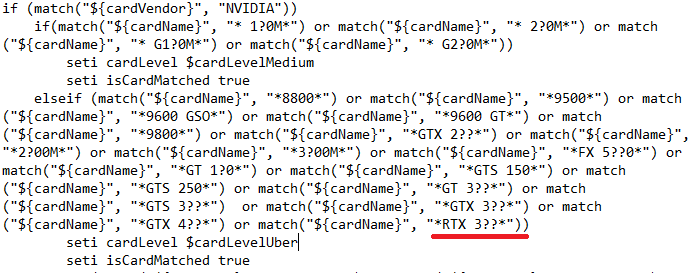
    @mate54 Alright, that's good to know. Here are the screenshots of the edits I've made. I hope these are clear enough!

    DeviceConfig:

    GraphicsCards:

  • mate54's avatar
    mate54
    Hero+
    3 years ago

    @pxelskies Just to recap, did you edit GraphicsDB.sgr or GraphicsCards.sgr? I believe the second one is the up to date version that the game actually reads, so please add the card to that one if you haven't already.

    I am not sure why the game is not picking up texture memory, though. Although I would recommend setting it to 1024 MB because that is as high as The Sims 3 (and presumably, Medieval) can use.

    Finally, in GraphicsRules.sgr, it seems like you only have two question marks after 3 (the part where it is supposed to match the card name), so please make sure it reads either "*RTX 3???*" or "*RTX 3060*" (either should be fine as long as the game can match it to the GraphicsCards entry).

    When you edited these files, did the text editor let you save these files as .sgr files without any errors? Sometimes it might offer to save them as .txt files which the game won't read.

  • @mate54 I edited both GraphicsDB.sgr and GraphicsCards.sgr, just in case. I also just changed the texture memory to 1024 MB. I had no idea the game can't use more than that, so thank you for that tip!

    I'm also... an idiot. The game was automatically installed in Dutch (my first language) but I changed the language to English using Origin. This apparently generated a new folder as well, which I hadn't noticed, so I have been looking at the wrong DeviceConfig.log this whole time...

    Long story short: it is now working! I'm sorry for not noticing sooner and I want to thank you for your help @mate54!

Featured Places

Node avatar for The Sims Franchise Discussion

The Sims Franchise Discussion

Discuss The Sims Medieval, classic The Sims titles, and speculate on the future of the franchise, including Project Rene.Latest Activity: 13 hours ago
7,575 Posts