Forum Discussion
7 Replies
 VoyAMatarloDxD9 years agoSeasoned Ace
@6H05T01 hi 🙂 you need Update your Microsfot Visual c++ Redistributable. https://www.microsoft.com/it-it/download/details.aspx?id=40784
If this was helpful and solved your issue, please press 'Accept as Solution' button to mark this topic solved. Then click the 'XP' button to award me XP.
- Anonymous9 years ago
It doesn´t work bro, *.
I want to play haha
- VoyAMatarloDxD9 years agoSeasoned Ace
@6H05T01 please try Update your punkbuster:
Update PunkBuster
While PunkBuster is designed to update itself, there can be an error and manually updating via PBSetup is recommended.
Occasionally, you may receive various errors regarding PunkBuster Services not running. Some other software programs such as virus scanners, firewalls and Internet security software packages are suspicious of any new services and kernel drivers when they are first released. Some of these will block PunkBuster components thereby causing the "Losing Key Packets" kicking. Until these various packages are updated to correctly identify PnkBstrA.exe, PnkBstrB.exe, and PnkBstrK.sys as components of the PunkBuster Anti-Cheat System, players who experience PunkBuster kicks due to these conflicts need to either manually adjust the settings of the other software running on their system or disable the other software while playing on PunkBuster enabled servers.
Make sure PnkBstr.exe is on your exceptions list of your firewall/anti-virus software to ensure it can communicate properly with the PunkBuster servers. You can check your anti-virus/firewall software manual for instructions on adding exceptions.
Make sure all PunkBuster Services are installed and running by downloading PBSVC.EXE from Even Balance.- Save the file to your Desktop for easy access.
- Double click the file and select Run.
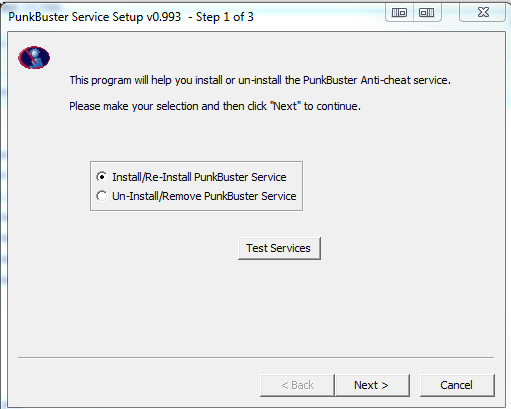
- Choose Install/Re-Install PunkBuster Service.
- This will ensure PnkBstrA.exe and PnkBstrB.exe install and run properly.
- If you still get kicks, such as "Can’t Initialize PnkBstrB.exe”, go to the Start Menu. In the Run/Search bar, type “services.msc” and press Enter.
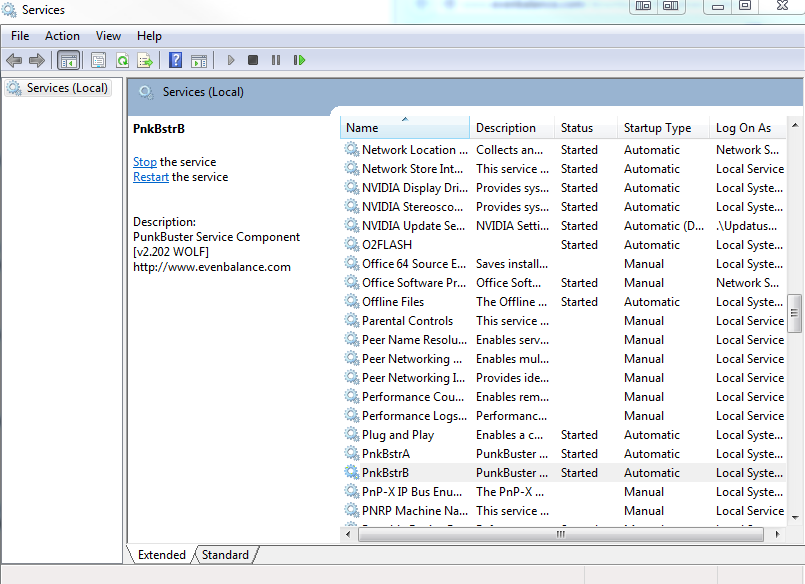
- Scroll through the list and find PnkBstrA and PnkBstrB. If they are not running (Check the Status column), right click each and select Start.
If this was helpful and solved your issue, please press 'Accept as Solution' button to mark this topic solved. Then click the 'XP' button to award me XP.
- Anonymous9 years ago
Still not working man, did everything as you said but nothing :/.
- VoyAMatarloDxD9 years agoSeasoned Ace
@6H05T01 ☹️
Try reinstalling after uninstalling Punkbuster from Control Panel
Origin Games\Battlefield 3\__Installer\punkbuster\redist\pbsvc.exe
or please try follow and search your error on this link create by my friend @Carbonic http://carbonic.dk/punkbusterguide/#punk
If this was helpful and solved your issue, please press 'Accept as Solution' button to mark this topic solved. Then click the 'XP' button to award me XP.
- Anonymous9 years ago
So I need to : uninstall punkbuster, delete battlefield and then re-install it ? Guess I would try that, thanks for your help, really appreciate it.
- VoyAMatarloDxD9 years agoSeasoned Ace
@6H05T01 I think yes, no problem 🙂 I'm sorry for not having done more to solve even the problem. ☹️
If this was helpful and solved your issue, please press 'Accept as Solution' button to mark this topic solved. Then click the 'XP' button to award me XP.
Featured Places