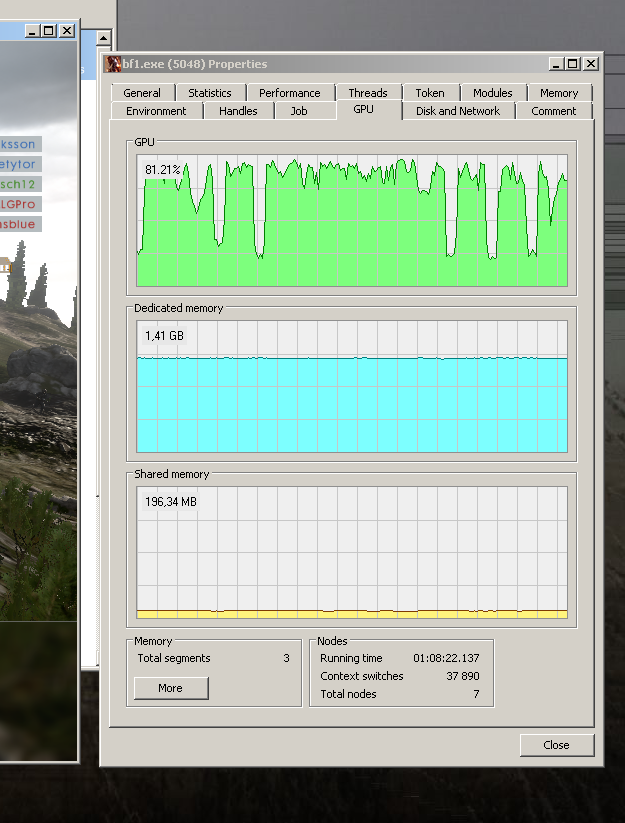
Odd, intermittent FPS drops with low GPU usage
Hi,
I'm running Windows 7 on an Intel i7-2720QM laptop with a GTX 580M graphics card, 8 gigs of RAM and a Samsung 850 SSD drive.
Game performs okay on the lowest settings, at 1080p resolution. However, occasionally (few times a minute) the FPS drops to a crawl for a few seconds. During this time, the GPU usage drops to below 25% (see attached image). CPU usage floats steady at ~65% on all cores. GPU temperature is steady in the low 80's (°C). The GPU is not throttling, core MHz stays steady. No excessive I/O traffic happens. There's no network lag either. The FPS drops don't seem to be tied to what's happening on the screen; I could just as well be in a hectic battle or stare at the empty sky.
Things I've tried:
- Updating all the things
- Every imaginable combination of in-game video settings, including VSYNC, windowed/fullscreen, VRAM limit etc.
- Every individual setting from nVidia Control Panel's 3D settings (I'm not running Experience/Shadowplay)
- Kill all background tasks
- Disable W7 Aero
- Disable Origin overlay
- Roll back drivers from the latest (393.06) to 392.90 (With driver cleaner software)
- Play around with CPU affinity & process priority
- Unpark CPU cores
- Disable RAPID mode (Samsung's SSD feature)
- Sacrifice a lamb
My wit is considerable but I've reached its end. Any ideas?
Thank you.
- ApprovedAnonymous9 years ago
I FOUND THE CULPRIT!
"Windows Audio Device Graph Isolation", audiodg.exe caused the stutters.
Disabling the Windows sound effect engine solved the problem!
Here's how to do it:
Control Panel -> Sound -> [Select your primary audio device] -> Properties -> Enhancements-tab -> [x] Disable all sound effects.
(Or see the attached image)