Forum Discussion

warriorsp's avatar
6 years ago

Game crashes at launch, no error messages

Product: Battlefield V
Platform:PC
Please specify your platform model. PC
AMD or Nvidia Model Number NVIDIA GeForce GTX 1070 with Max-Q Design
Enter RAM memory size in GB 16GB
Are you using any software with an overlay? No
Which part of the game is the issue happening in? Game Menu
In which game menu were you when the bug occurred? At Launch
Please select your region North America
On which server did this happen? Unable ot connect before issue happens
When did this happen? (dd.mm.yy hh:mm) 14.01.20 10.00
Summarize your bug When attempting to launch BF V via origin, a small window comes up to load game > then the window attempts to go full screen and at this time it immediately crashes with no error messages.
How often does the bug occur? Every time (100%)
Steps: How can we find the bug ourselves? 1. Open Origin 2. Select "My Game Library" 3. Select BF V > Then Play 4. Wait for game to go full screen then crash
What happens when the bug occurs? Game crashes completely unable to enter the game at all.
What should be happening instead? I should be able to launch the game

I know BF V has some recent issues that I thought were fixed, Have spoke with EA support and advised to fill out a bug report as t/s they have provided has not fixed this issue. 

Below is an out line of all t/s I have done for this issue. 

- Clear origin cache

- Update Windows

- Update GPU

- Update date

- restart my device

- turned off windows AV and Firewall, ( no additional AV on my device)

- I don't use a VPN

- Repaired Game

- Reinstalled Game

- tried running origin and game as admin

- Disabled origin in game in application settings and in game properties for BF V

- set command -w to try and launch in a windows mode

- Set power options to Max Performance, no energy saver

- Default to use my Nvidia 1070 for Game

5 Replies

  • linzeb's avatar
    linzeb
    6 years ago

    Had a similar issue on both my computers yesterday. For me, the solution was removing the update for Windows released yesterday. With the update installed, game wouldn't start on either computer. With update removed, works no problem again on both computers.

  • @linzeb I went and uninstalled the updates that I was able to uninstalled from Windows for January. One of the updates is a security update 1/14/20 which doesn't seem like I'm able to uninstall, but I'm still unable to fix the bug issue. I didn't have a problem with any updates during Dec. So if it is an update issue it has to be for January.
  • Hello there @warriorsp ,

    Here are some things to try:

    Fix 1: Turn off in-game overlay

    1) Open your Origin.

    2) Click the Origin menu button and click Application settings.

    3) Click More and select ORIGIN IN-GAME, then toggle off Enable Origin In Game.

    4) Try launching Battlefield V again to test the issue.

    Fix 2: Update your device drivers

    Battlefield V is a very demanding game, so you need to have the latest drivers installed, especially your graphics driver. Manufacturers such as NVIDIA, AMD work closely with game developers to keep releasing new drivers to improve game performance and fix bugs.

    Fix 3: Delete settings and repair your Battlefield V

    Deleting the settings file will reset your graphics configuration to default, and then you can repair Battlefield V in Origin to see if this works for you.

    1) Go to C:\Users\YOUR USERNAME HERE \Documents\Battlefield V\settings and delete everything in this folder.

    2) Go to Origin and click My Game Library, then right click Battlefield V and click Repair.

    3) Restart your PC when the repair is done.

    4) Launch your Battlefield V again to see if the crashing issue still persists.

    Fix 4: Stop Overclocking

    Battlefield V is very sensitive to overclocking, so do NOT overclock your GPU and CPU. Overclocking may cause your Battlefield V crashing or freezing. In that case, we suggest resetting the processor or GPU to the manufacturer specifications.

    Fix 5: Run Origin and BFV as admin

    If run into a game crashing issue, you can always try running both your game launcher and game executable file as administrator. Your Battlefield 5 crashing issue can be caused by limited access to your game file.

    To make sure you always have a full access to all the game files, you can run both your Origin and Battlefield V executable as admin permanently.

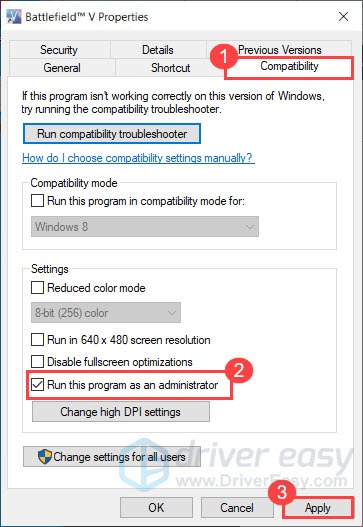
    1) Go to C:/Program Files (x86)/Origin Games/Battlefield V, right click your Battlefield V executable file and select Properties.

    2) Click the Compatibility tab and check the box next to Run this program as an administrator.

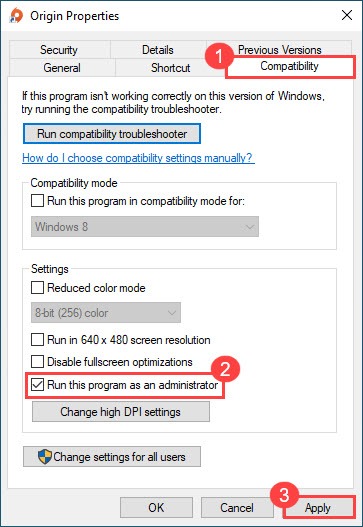
    3) Run Origin as administrator as well.

    4) Try launching your game again to see if Battlefield V crashing issue still persists.

    Fix 6: System File Checker

    Your Battlefield V crashing issue can be caused by corrupt system files. Try running System File Checker to scan for any missing or corrupt files.

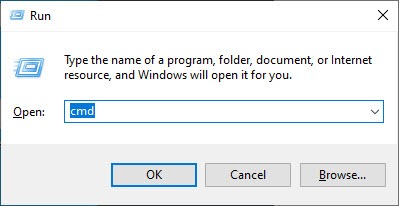
    1) On your keyboard, press the Windows logo key and R at the same time to open the Run box. Type cmd and press Ctrl + Shift + Enter to run Command Prompt as admin.

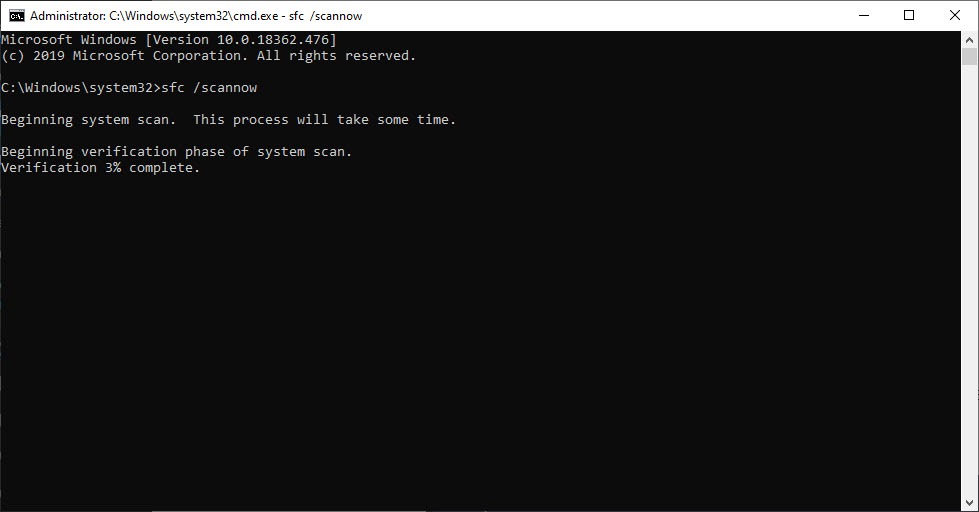
    2) Type the command: sfc /scannow and hit Enter. Note that there’s a space between sfc and /.

    sfc /scannow

    3) Wait for the verification process to finish. This may take 3-5 minutes.

    4) When the verification finishes, you may receive one of the following messages:

    • Windows Resource Protection did not find any integrity violations.
      It means you don’t have any missing or corrupted system files. You can go ahead with the next fix to solve your problem.
    • Windows Resource Protection found corrupt files and successfully repaired them
      You can perform a restart and try to relaunch the game to see if Battlefield V not launching issue is gone.

    I hope this helps!

    Happy Gaming,

    -Rare

Featured Places

Node avatar for Battlefield V

Battlefield V

Join the Battlefield V community to learn all you need to know. Find game information and updates, talk tactics and share Battlefield moments.Latest Activity: 19 minutes ago
15,756 Posts