Forum Discussion

13 Replies
 holger14051 year agoHero+
- Press the Windows key and "R" at the same time.
- Type or copy and paste "%ProgramData%\Electronic Arts\EA Services" (without the quotes) into the new Window > ENTER
- Delete the "License" folder.
- Test
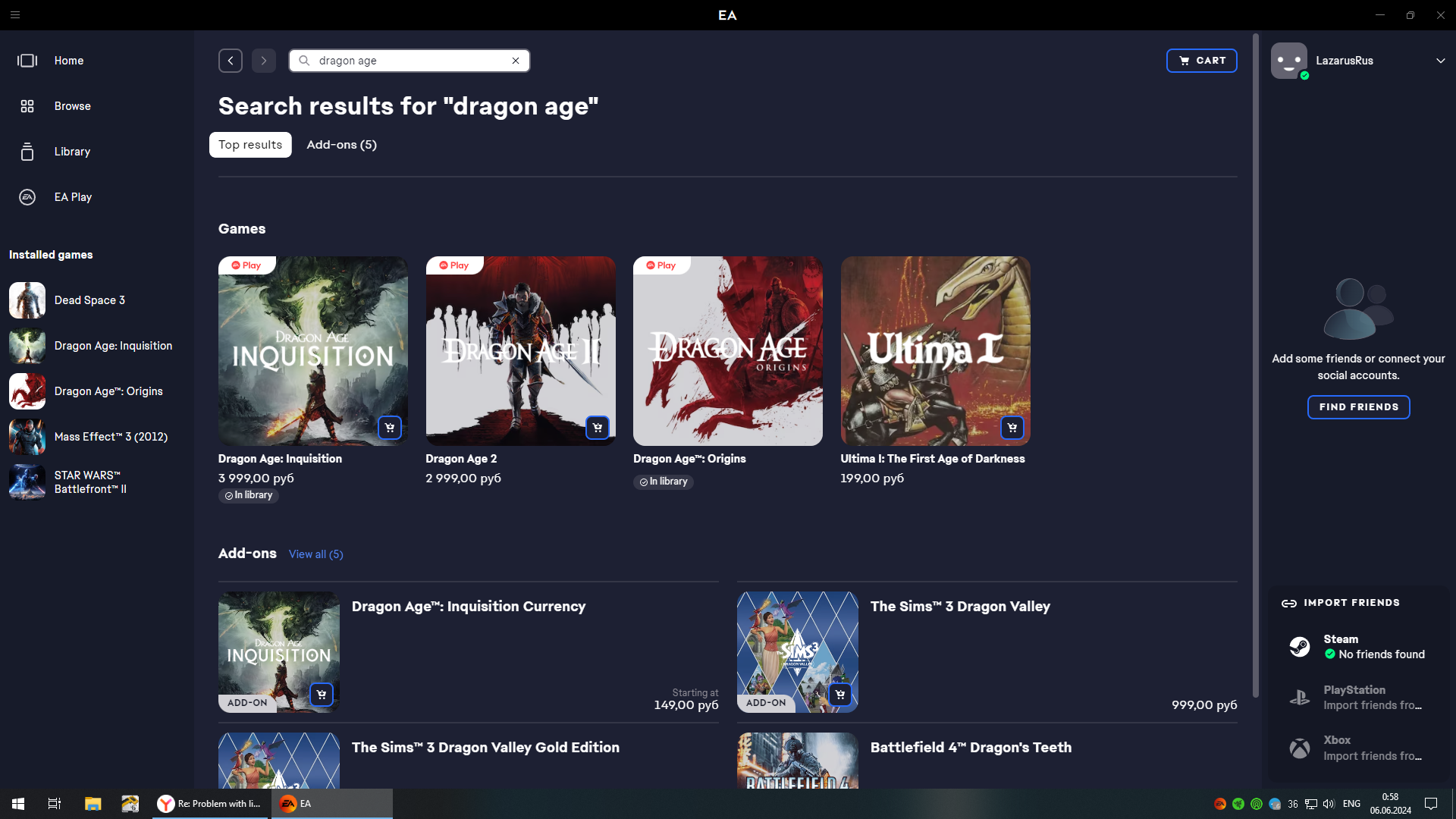
Its not help. support ticket closed like No FIX. say him report next level support employee. when i try find game in store EA. it say like i dont have it in library and must buy it. but in keep save all my achiv and characters.
 EA_Shepard1 year ago
Community Manager
@LazarusRus I took a look at your account, and the account side is fine. Replacing a game on your account wont fix this issue. The code itself isn't the issue. If i replace the code on your account, you are downloading the same version of the game because the game is digital. The issue is local: The EA app, corrupted files, the license folder, registry entries, etc.
There are other titles that have the same error. The best thing to do if the above steps didn't work is uninstall the game and the EA app, and then clean out the PC as much as you can. Clean out temp files, clean out the registry, make sure there are no BioWare folders, or EA app folders.
If games are showing sometimes, and then they go missing, that is not a license file issue, that is an app issue. that is what we have to solve for the games to keep appearing. The EA app forums boards have a lot of threads with games not showing up and a lot of troubleshooting steps for these types of issues, so the issue is not related to just Dragon Age.
Dear @EA_Shepard i absolutely sure the problem is not on my side. I even installed the application on the newly installed Windows. I found a licensed client image of the game on the Internet version 1.0. But it requires a key that I do not remember. I tried to install patch 1.4 for this version from the EA website. after installing the patch, EA asks me to log in to activate the game. I enter my username and password from my account (absolutely correct) in response, he writes to me that they are not correct. When the exact same activation window appears in other games, everything is fine when entering the same data. Just as I wrote above on the page of the Dragon Age 2 game, I do not have it written that it is in the library like other games in the series and offers me to buy it again. Perhaps some data was corrupted when transferring to Origin and then to the EA app. Please try to replace the license key. delete the old one and add a new version as if I bought it again. I think this should help. This is a 100% technical problem and it is not on my side. And you say "If i replace the code on your account, you are downloading the same version of the game because the game is digital" . i cannot even download it cause i dont see it in library. no way to download EA version.
- EA_Shepard1 year ago
@LazarusRus So to clarify the above response.
When you say " I found a licensed client image of the game on the Internet version 1.0." this sounds a bit like downloading a copy of the game not through the EA app, or through Steam after purchasing the game.
We do not replace the license if the game was not purchased through the EA account.
"EA asks me to log in to activate the game. I enter my username and password from my account"
This error only happens for a handful of reasons.
- The game was not a legitimate purchase
- The game is being shared by another account
- The game was played through a subscription which has expired
This account does not have the base games for DA or DA2. Where and when were the original purchases of the game made? If the base game(s) were downloaded online and not purchased from the EA store, we would not be able to assist.
That does not make it a technical issue in any way. This makes it a purchase issue which is an account issue and therefore we can replace any codes on the account. ok. lets clear some. i buy game in internet magazine about 13 year ago ( i buy key ). I remember i entered it on the bioware website.
"When you say " I found a licensed client image of the game on the Internet version 1.0." this sounds a bit like downloading a copy of the game not through the EA app, or through Steam after purchasing the game."
When I say that I have found a copy of the 1.0 license. this means that I want to test my theory, I cannot download the game client from EA because it is not in my library. So last 5 days I tried to find a client on the internet. the image of the licensed disk. but he asks for a key during installation so i cant use that method. Cause i cant install it with EA. its what i say you.
"The game was not a legitimate purchase"
How it possible? how can i add game to my library from outside?
"This account does not have the base games for DA or DA2"
Support said that I have this games on my account. him say i need wait. and u say you check my account before and dont see any problem. from DA1 i have key in EA app.
May u just try help me? not say about I did something illegal. May be your system have some bug and my data lost when u transfer it to Origin or EA APP.
Screen when u can see i have da1 and 3 now but not 2.
- EA_Shepard1 year ago
@LazarusRus Thank you for the clarification. So what you would need to do if the game was purchased is try to locate the keys if you can. The account does not show as owning the base game but does own DLC for the games. So we cannot replace codes on an account that doesn't show the base game as being there. Live support will not simply replace the game because a player requests it.
If the game code was used, it would show linked to the account as a game and not as a DLC. As Community Managers are not support, we don't make changes to accounts. If live support can verify ownership of the game on an account, they may be able to merge accounts, but as of now, we cannot make those changes.
The problem is i cant find this code now. it be very long ago. and i think if imagine i find it i cant use it 2 time anyway. so no reason. What u mean merge account? i have data from this game ( Dragon Age Keep see it too ) on this account. this means that the game was on this account. nothing to merge. Support say me him report about this problem to game team ( as him say ) and say me to wait. but how much i need wait and read that message team or not i dont know. so now I'm at a dead end. I asked the support to replace the key. But at the last request, I was told that while the problem has been transferred to the game team, they cannot make any movements. You said there was a problem with buying the game and if so, you can replace the keys. I indicated this as a technical problem because I do not know what my problem is related to. I didn't know it wasn't the same thing. You also wrote that you don't see DA1 and DA2 on my account. But as I showed in the screenshot, there is a DA1. does this prove that something happened to my account? which is seen in different ways from different sides. because the support says that I have all 3 games on my account. Can you give advice on what to write to the support that they fixed the bug with the purchase of the game?
- EA_Shepard1 year ago
@LazarusRus Being that support are the only ones who make changes, if they stated that it is being looked into, we cannot make any changes. And by merge account sometimes players have more than one account when they play a game that is 5-10 years old or older. They would have to locate the account or the code that was connected. A screenshot of the game does not prove it no because we can see all of the data on the account. I do not see the base game itself but I do see DLC. If there is no base game, and a code was added or (replaced) it would come off as we just gave you the game which is why we have to locate the account or code the game was used on first. This is why players have to go through support. The forums are not actually a place of live support which is why we don't make changes here. We only provide troubleshooting and have issues reported to the specific game teams. Community Managers are more engagement, and content over actual account/technical support needing to make changes to an account.
So as i say before i dont have any another account. so key be used on this account only. i understand u just community and cant do licence changes. support say me create thread here. may be somebody found solution. but u help me more understand what problem is. so as i say before its looks like i dont have license data, but i have synchronized achievment and characters in cloud. how it can be possible? my cloud proof about i have game on this account. so can i ask support to add me new key? if i dont remember old. thank for your time
- EA_Shepard1 year ago
@LazarusRus Support will not grant you a new game no because there is no base game linked to the account. If you do not have the original keys that are linked with the game, that would stop a new key from being added. They would have to find the account the keys are linked to first before changes can be made. Regardless if there is another account out there, unless they have the right one pulled up and verified, they will not change the game.
If you have the game listed in the EA app, it would show the code to you when you click on manage game - view properties. If you provide that code to them, they will be able to verify it.
But before when i contact with support him say i have game on account. u say i dont have it from your side. and what about Dragon age keep? if i have data there from this account. how u can explain it? its not possible my account data can be corrupted or some lost data on datacenter?
UPDATE.
In the end support not help me. they like robot do only instructions or dont have tools for help. i tired wait. just buy new code of game, activate it and all ok now. u can close thread.
- EA_Shepard1 year ago
@LazarusRus Happy to hear the issue is resolved. Will pass along the feedback to the team for review with live support.
We will consider this issue resolved at this time. If you run into any other issues, please open a new thread or add onto a new one!
Cheers!

Featured Places