Forum Discussion

SpiffyBuzzard20's avatar
SpiffyBuzzard20
Seasoned Newcomer
2 years ago

EA App 'Taking a little longer than usual to load'

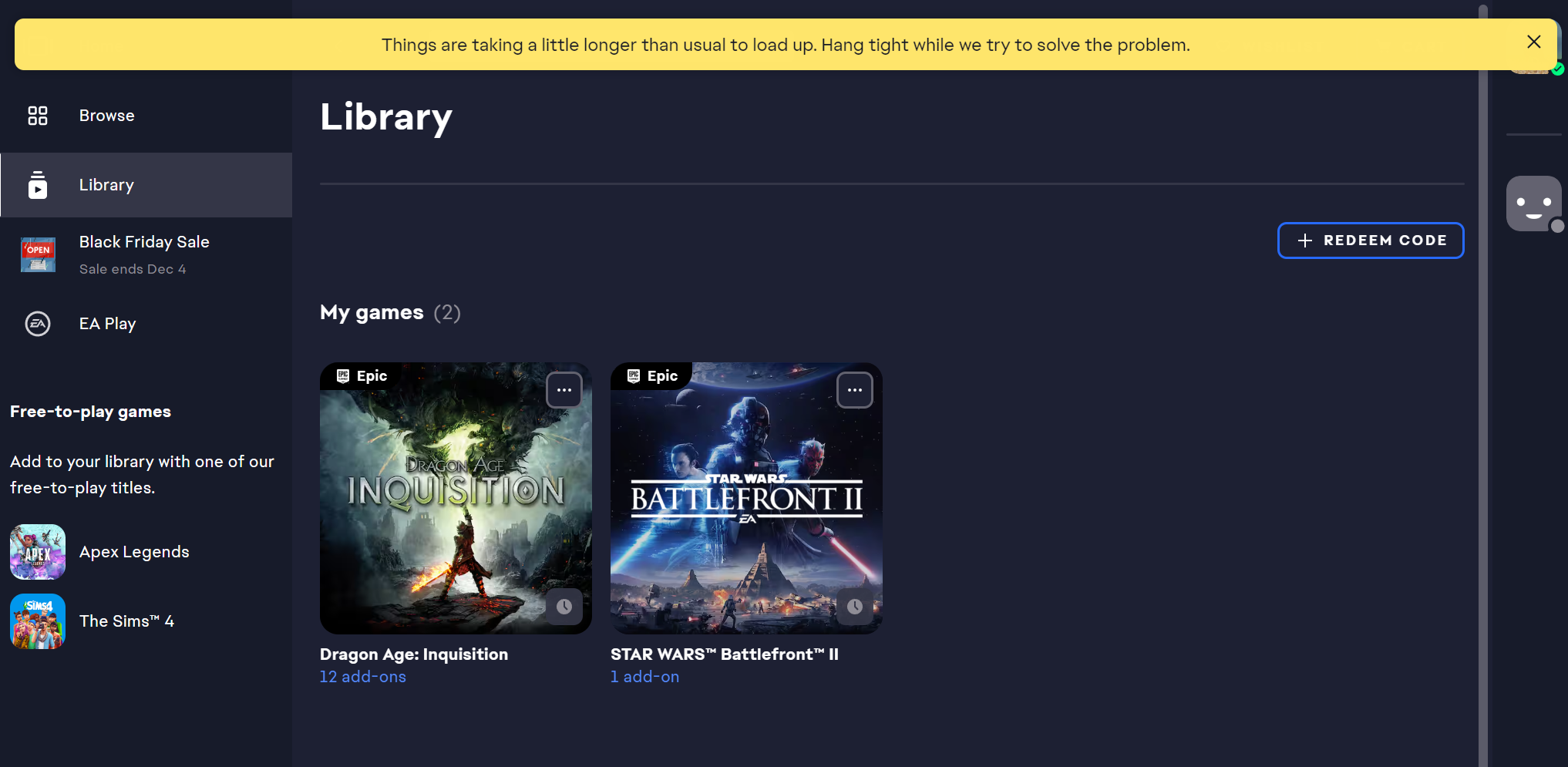
Hi, I've been having an issue with launching the EA app for a few months now. I have two games through the Epic Games launcher, and one of them (SWBII) worked fine (I never tried the other one--Dragon Age Inquisition). Now, whenever I or Epic Games launches the app, I see a yellow banner appear across the top: "Things are taking a little longer than usual to load. Hang tight while we try to solve the problem." 

The main symptom is that when I go to my library, I am unable to launch any games--when I click on them, the box which would have the play button simply has the three, pulsating loading circles--everything else (that is, anything not in that box, whether I own the game or not) in the app appears to load just fine.

Things I have tried:

- Uninstall/reinstall

- Killing EA background service (and sometimes restarting it)

- Using with and without a VPN

- Manually refreshing app

EA Bug Reporter ID: 0fe71c5e-a6d8-4142-a300-4af3328d56e0

5 Replies

  • EA_Pulsar's avatar
    EA_Pulsar
    Icon for Community Manager rankCommunity Manager
    2 years ago

    Hey @SpiffyBuzzard20, To help resolve this issue, please follow the steps below:


    1. Perform a cache clean or App Recovery in the EA App.

    2. Close the EA App and end the EAappbackgroundservice in the Task Manager.

    3. Navigate to the EA App folder, which is typically located at C:\Program Files\Electronic Arts\EA Desktop\EA Desktop.

    4. Once you find the folder, locate and double-click on EAUpdater.exe to update the app.

    5. Add the EA app to the exclusions list in your antivirus and firewall. 


    Let me know if you need any further assistance!

  • SpiffyBuzzard20's avatar
    SpiffyBuzzard20
    Seasoned Newcomer
    2 years ago

    Okay, closed and reopened the app this morning (after doing it multiple times last night) and it appears to have fixed itself. Not sure what the problem is, and I don't know which side it was on--nothing should have changed on my end, as my computer didn't even go into sleep mode overnight, just the lock screen. Once you listed those solutions, I remembered that I had already tried all of these (replacing running the updater with a fresh install) last night.

    Thanks for your help!

  • SpiffyBuzzard20's avatar
    SpiffyBuzzard20
    Seasoned Newcomer
    2 years ago

    And... I'm back. Cleared the cache for the app after it spent about 50 minutes spinning around saying 'installing' when I tried to download SWBII--no progress in the download was evident anywhere.

  • SpiffyBuzzard20's avatar
    SpiffyBuzzard20
    Seasoned Newcomer
    2 years ago

    And... it's back to normal? Something seems to be acting up on a case-by-case basis, and I can't figure out what. I had relaunched the app, and it was back to normal when I looked at it after a while. No clue what's going on, sorry.