Forum Discussion

TwiceBakedGooch's avatar
3 years ago
Solved

Battlefield 2042 not launching after switching to EA app (Steam & Epic)

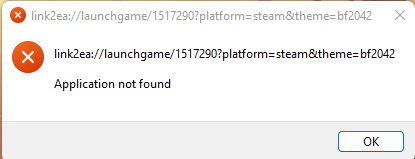
Game unable to start via Steam or Origin. Every attempt I've made to redownload, verify files, reboot in safe mode, log in and out of the system, etc have lead to the same outcome of an error message displaying "Application not found". I don't claim to be the most tech savvy * in the world, but I'm hoping someone is able to hold my hand through this exquisite little journey. Thank y'all for your time and knowledge and the topic in advance! Have an excellent day.

CM edit: edited title for clarity.


  • Accepting as solution for visibility purposes only.

    Update:

    We wanted to let you know we will be closing this thread.

    The main reason behind this decision is that Origin for Windows is no longer supported, which means that any discussions related to it have become outdated. Additionally, we would like to acknowledge the numerous updates and changes that have taken place in the EA app and Battlefield 2042, making the content of this thread no longer relevant.

    Thank you.


    Hi all,

    We've noticed that some players are having trouble launching Battlefield 2042 through the EA app (or Steam) after switching from Origin to the EA app.

    It has been found that in many of these cases, the cause of the problem is that some players own (and have installed) multiple copies of the game through different launchers, causing problems. This is a solution for that:

    • Uninstall all BF2042 installations (especially the ones installed through Origin or the EA app),
    • Reboot the PC,
    • Install & launch BF2042 through Steam or Epic,
      • It's important that the games bought from Steam are installed through Steam and launched from Steam for the first time.

    Make sure that you have the right permissions to launch the EA app and your games
    If you don't have multiple copies of the game through different launchers, but are still unable to launch the game, it's possible that your current local Windows account doesn't have the proper permissions to run the game (and its Easy Anti-Cheat).


    This problem can in many cases be solved by making sure you install and launch the EA app, game and/or Easy Anti-Cheat with Administrator privileges. It is also advisable to make sure that your local Windows account generally has the right permissions, you can check this in the following way: UAC in Windows.

    Read this on how to create a local Windows Administrator account.

    Check if your Antivirus is also not blocking the EA app, Battlefield 2042 or Easy Anti-Cheat.

159 Replies

  • D-BOI_27's avatar
    D-BOI_27
    2 years ago

    I would also like to second this statement and the EAC fix

    Other issues for those that I have found to effect the game launching through steam are 

    -DS4windows(MOST RECEN ISSUES)

    -razer apps(yeah all of them have caused me issues in the past)

    -soundPad

    -spotify

    -GOG

    if you have any of these installed and enabled in the start up in your task manager then disable them one by one and restart your PC, if that doesn't work then it will definitely be the outdated EAC, EAC is simple to download and install from their website 👍

  • Jeklund6's avatar
    Jeklund6
    2 years ago

    Everyone troubleshooting, I would try this method first and then try others.

    Wow,
    M1sterRogers your solution was literally the only one that helped me. I tried reinstalling this 80 GB game 3 times. I tried reinstalling EA Launcher 5 times. I gave administrator permission to 5 different folder/files. I restarted my computer multiple times throughout the process. I validated steam files at least 4 times. I clear multiple caches. I deleted multiple files and tried to clean up rogue existing files. I searched for withheld ports. I disabled my firewall and antivirus. I uninstalled VPNs and Hamachi. I set compatibility mode up for some things. I reinstalled/repaired EAC twice and also gave it administrator permission. I tried literally every single suggestion on every thread on this topic. NOTHING, after all of that NOTHING, my game would not boot past the EAC loading box it would open the EA app and close the EA app and that's it. 

    Until I read your comment, it was literally the only thing that worked, so thanks for the help.

  • I realized my reply got put to the back of the queue so I'll reiterate @M1sterRogers's solution. Open (C:\Program Files\Electronic Arts\EA Desktop\EA Desktop). The executable "EADesktop.exe" needs to be set to allow to run as administrator (compatibility tab). Right-click the  executable "EADesktop.exe" and follow the image below, then try to launch via Steam.

  • @Jeklund6 Ohh my godddd! It works!!!!!!! Finally My One year follow this toppic is worthed !!!! This guys should apply to be an EA support instead of "Uninstall & reinstall the game and ea app" support BOT lollll
  • A bit late but I managed to get it working!

    The trick was I did not have the EA app installed. Once I installed, I was able to launch from EA after downloading on steam. It works!

  • I did exactly what you told me and I got my game running perfectly, thanks for that one, I was afraid I would have to refund my game but you saved me here.

    The only extra steps I did were to also activate the "Run this program in compatibility mode for: Windows 8" and after that restart my pc.

    I wish the best of luck to those who get this issue.

  • Turning off all hyper-v options helped me. Previously used them for subsistem for android. For some reason this game doesn't work with hyper-v enabled.
  • EA_Leeuw's avatar
    EA_Leeuw
    Icon for Community Manager rankCommunity Manager
    2 years ago

    Hello everyone,

    We wanted to let you know we will be closing this thread.

    The main reason behind this decision is that Origin for Windows is no longer supported, which means that any discussions related to it have become outdated. Additionally, we would like to acknowledge the numerous updates and changes that have taken place in the EA app and Battlefield 2042, making the content of this thread no longer relevant.

    Thank you.

Featured Places

Node avatar for EA app Technical Issues & Bugs

EA app Technical Issues & Bugs

Having issues with the EA app? Join us to report bugs, and find help with downloads, DLCs, purchases, and login errors.Latest Activity: 48 minutes ago
8,546 Posts