Forum Discussion

3 Replies
 EA_cuervo1 year ago
Community Manager
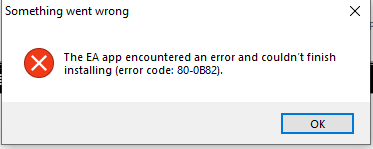
Thanks for sharing the screenshot. It seems that the EA app is not being recognized as installed anymore but some cached/registry files might still be there which are probably causing this issue. Ccleaner has the option to clean the registry and cached files. Please try that, restart your device and try to install the EA app again.
 ghork71 year agoNew Novice
I am desperate ☹️
1. I cleared all registry
2. Restart PC
3. Tried EAappInstaller
But still....it says "launch" and do nothing or "repair" with error code. ☹️
- ghork71 year agoNew Novice
Ha.....something is new......error code is now 80-0B82
Featured Places