2 years ago
EA App Install Error Code 09-D8A2
Product: The EA app Platform:PC Error Report ID (learn how to create an Error Report ID in the sticky post) Which client functionality are you experiencing this bug with? Application Installer ...

 Community Manager
@ghork7 thanks for the additional information.
It seems that there are some old installation files in your device that are preventing the app from installing again.
Can you please try using CCleaner to clear out issues and errors?
For instructions on how to use Ccleaner to uninstall apps, click here.
While we suggest using CCleaner, EA does not provide user support for this program–use it at your own risk. Please follow any installation guides straight from CCleaner when installing and performing program set-up. You can find help on CCleaner’s support page.

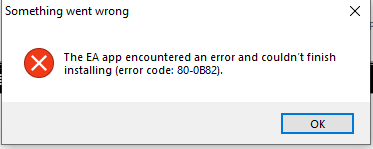
I allready uninstalled EA App....1-2 weeks ago, but i have this error code.
Community ManagerThanks for sharing the screenshot. It seems that the EA app is not being recognized as installed anymore but some cached/registry files might still be there which are probably causing this issue. Ccleaner has the option to clean the registry and cached files. Please try that, restart your device and try to install the EA app again.