Forum Discussion

Re: How to fix Error Code EC:10000 or EC:10500 in EA app?

@EA_Shepard 

  • EA App/Steam/Epic: EA App
  • EA ID/Steam user ID: redroguegambit
  • Windows OS: 10 
  • Windows OS version: 22H2
  • GPU model and driver version: Intel(R) Core(TM) i7-7700K CPU @ 4.20GHz 4.20 GHz, 27.21.14.6109
  • Antivirus installed: Norton
  • Connected via VPN: No
  • Region: North America
  • Are you using an internal or external drive? internal
  • Are you using an HDD or SSD? SSD
  • Date this issue started (is it still happening?) Since I installed EA App (not sure exactly when); yes it is still happening
  • Any other errors?
  • If possible, share a Screenshot or Clip:
  • Attach a DxDiag:
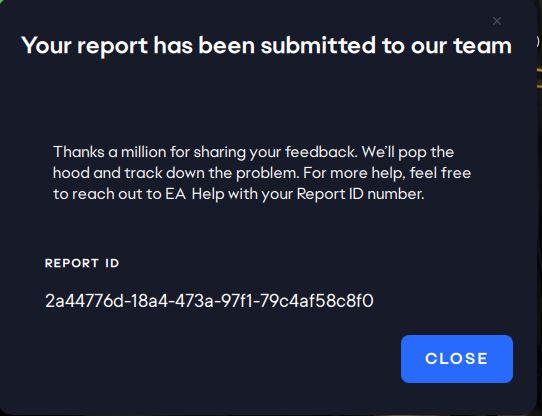
  • Attach the EA App Error Report ID Here: 2a44776d-18a4-473a-97f1-79c4af58c8f0

3 Replies

  • EA_Shepard's avatar
    EA_Shepard
    Icon for Community Manager rankCommunity Manager
    2 years ago

    Hey Everyone.

    Thank you all for the information. I have sent all the info along to the team. When I get an update I will post one here. For the meantime, I am continuing to look around at these errors as they seem network based in some way.

    I would like to as if everyone could try the following as well.

    • Untick the options in LAN Settings (make sure nothing is checked under Proxy Server)
    • Change DNS settings (You can use the public Google DNS primary: 8.8.8.8, secondary: 8.8.4.4)
    • Change TCP/IP Settings
    • Reset Windows Host File

    DNS Flush

    1. Click the Start button. It’s the Windows logo in the bottom left corner.
    2. Select Command Prompt.
    3. To open the command prompt console, you could also simply press the Windows and R keys at the same time and enter cmd.
    4. You may see a popup asking if you want to allow Command Prompt to make changes to your computer. If you do, select Yes.
    5. If you are asked for an administrative login at this point, then you’ll need to contact your system administrator to proceed.
    6. In the command prompt window, type ipconfig /flushdns.
    7. Press Enter.
    8. You should see a message confirming that the DNS Resolver Cache was successfully flushed.

Featured Places

Node avatar for EA app Technical Issues & Bugs

EA app Technical Issues & Bugs

Having issues with the EA app? Join us to report bugs, and find help with downloads, DLCs, purchases, and login errors.Latest Activity: 19 days ago
8,809 Posts