EA_Illium EA Staff (Retired)
EA Staff (Retired)EA Staff (Retired)Signing in on a different name on the same Xbox that new account can play online and receive the add ons but not the one I bought the game on
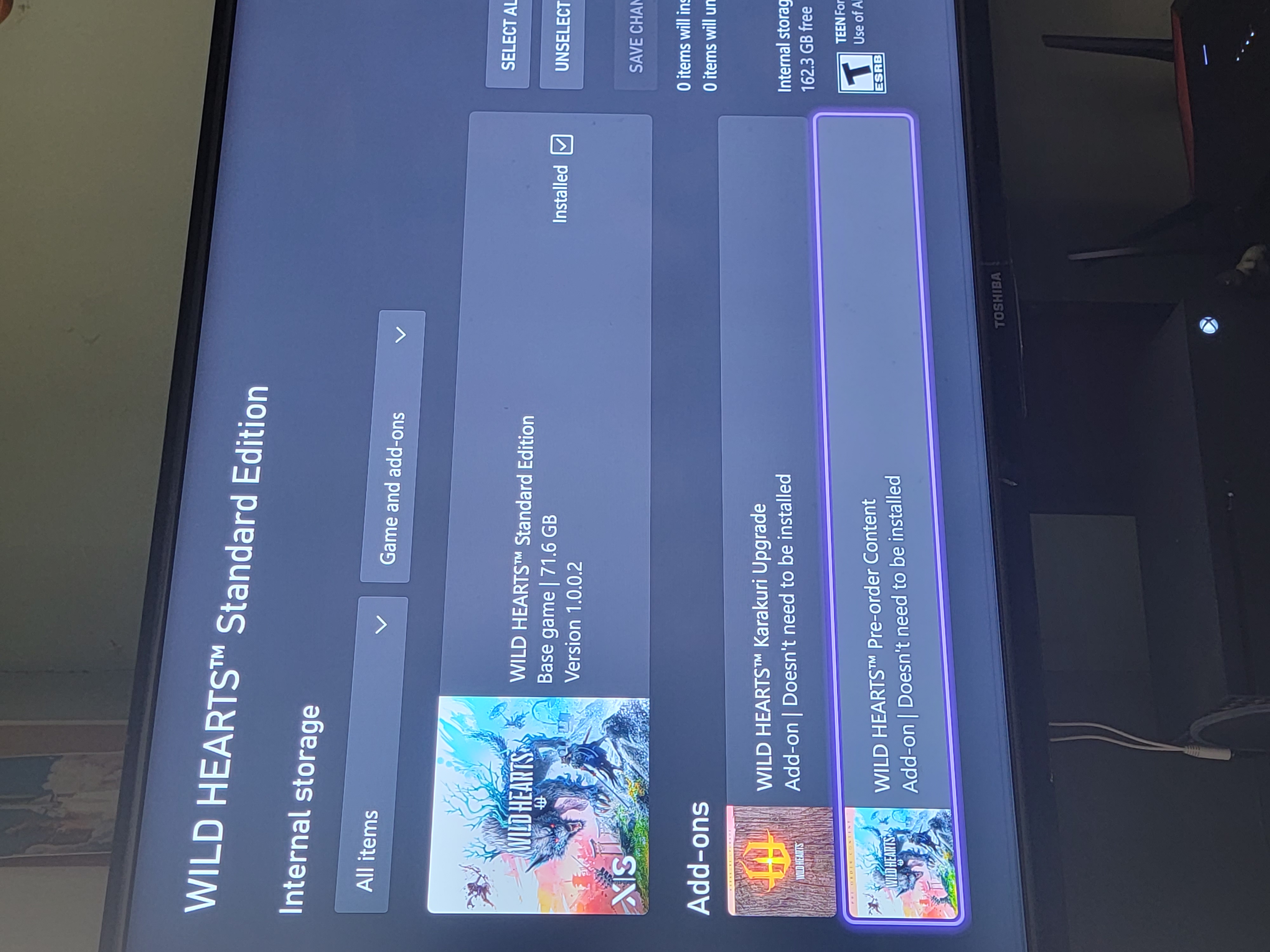
Same error code on series X, as my wife and I cannot access the preorder upgrade. I have tried reinstalling and manually inputting DNS network settings. Still nothing. I preordered the upgraded version she game shares. All other games and add ons work. We can both play the game together and with others online.
Would it be better to refund the extra cost for the upgrade and just buy the upgrade alone? Or would this still have the same issue?
@gijoe8988 so honestly the only way that refunding would do anything is if you owned it on separate Xbox accounts. Game sharing is an Xbox feature, not an EA feature so one getting it and one is kind of working as intended. Typically extra content doesn't apply to all Gamertags who access the game unless that one Xbox is the home Xbox for both, but even then there is no guarantee.
I am going to put together a mega thread of all Steps that worked for players. It is hard to keep up with the me toos and no other information. I am hoping something eventually fixes it for people.
Hey everyone, I know this has been rough with all the online access and the missing DLC so I tossed together a mega thread hoping this will help. If none of this works. I ask that instead of replying back with something like me too or didn’t work, please just click the me-too option on the thread. Those who get it to work seem to be an account/entitlement interaction that triggers something. The whole online vs offline feature for the game. If you find a step that works, just DM me and let me know I will add it to this list!
First, run through the following and check if the error continues.
Alternate Mac:
Go to settings > Select General > Then Network settings
Go to advanced settings > Alternate Mac address > Select clear
Select restart
Network settings
First, try a hotspot to access
Uninstall and reinstall through the console’s website and not the console itself from your purchase history. Change the DNS Settings from here https://help.ea.com/en/help/faq/problems-playing-online/
Hop on a PC or laptop if you can.
Press Win key + R, type CMD, then press Ctrl + Shift + Enter to open Command Prompt with admin rights
Copy and paste the following code (press Enter after each line):
ipconfig /flushdns
ipconfig /registerdns
ipconfig /release
ipconfig /renew
netsh winsock reset
Restart your computer and try to connect to EA now
Or changing the DNS on the console Steps here Google DNS
Go to Settings and select All Settings
Go to Network and press Advanced settings
At DNS Settings, click Manual
Set Primary DNS to 8.8.8.8
Set Secondary DNS to 8.8.4.4
Save settings and try to connect to the game again
In Game
To access the Karakuri Samurai and Karakuri Ninja armor sets, a decorative Tsukumo Lantern, and three Emotes you'll need to summon a Forge
Then select the Forge and choose Change Equipment.
The armor sets will be found to the right of where you would equip your Headpiece.
On Xbox, as silly as this may be gotta throw it in. Xbox DLC Issues
I have read that Account A that purchased cannot access content/get online but guest account B can. If you log in and play on Account B, then remove the guest account, and go back to Account A, some say it shows up both others do not. This leads me to believe that it is entitlement related but I am not 100 on that one.
I will add, the game has been review bombed pretty hard on the Xbox marketplace with 1-2 star ratings (pic is not my review lol) with even more people that probably haven't even seen this thread that have the same issue. This is definitely something out of the user's hand. No one is gonna be able to troubleshoot and magically fix it client-side, this is on the back-end for EA or Microsoft or both.
@Zst0rme I understand what you are saying but I think we are missing the point of the post. IF some worked and some did not then by default they do actually work. What does not help are 10 pages of just saying yeah me too, or posting reviews on someone else's marketplace. Saying a game had X star review doesn't help either which is why these boards are for assistance for other people playing, not to debate the game's rating.
The version in the store that i pre-ordered is store number 9ngj00qgplbh and the version with the same name that is in the store now is 9nh0692fhfjq.
EA and Microsoft need to either give us the second version if we bought the first or link the first to the database saying it is valid.
Full store links:
pre-order version - https://www.microsoft.com/en-gb/p/wild-hearts-karakuri-edition/9ngj00qgplbh?activetab=pivot:overviewtab
current version - https://www.xbox.com/en-gb/games/store/wild-hearts-karakuri-edition/9nh0692fhfjq?activetab=pivot:overviewtab
@Zst0rme You're not wrong here. I get it. Ive seen half of solutions work and not work. The CMs here are looking for info that does and does not, so nothing towards yourself honestly but when it's pages of me too, they want players helping players and not just me too. That isn't engagement. This also isn't the only thread with these steps or the console being affected either.
@Firestar2k I hadn't even noticed that and I've looked at those many times. That is a good callout too.
Microsoft Case Number: 7013396081
I went ahead and reached back out. The Microsoft rep was able to confirm the product ID for what is attached to my account does not match the Karakuri edition that is in the Microsoft store. Being a customer service rep, it's no surprise he couldn't resolve the issue, but it's been added to the case. I'm not sure what they plan to do on their end, but I've added my case number here in case anyone else reaches out to Microsoft as well so they have information to reference. I'm not sure whether or not this will fix things for all of us once Microsoft resolves the case, but I'll keep my updates posted here in case this ends up being the root cause.
Microsoft Case Number: 7013396081
I went ahead and reached back out. The Microsoft rep was able to confirm the product ID for what is attached to my account does not match the Karakuri edition that is in the Microsoft store. Being a customer service rep, it's no surprise he couldn't resolve the issue, but it's been added to the case. I'm not sure what they plan to do on their end, but I've added my case number here in case anyone else reaches out to Microsoft as well so they have information to reference. I'm not sure whether or not this will fix things for all of us once Microsoft resolves the case, but I'll keep my updates posted here in case this ends up being the root cause.
@hamburgerprime Fair enough, this is the only thread I've looked through so I can't confirm if the network troubleshooting worked for anyone elsewhere. I'm inclined to believe that if the product ID is the root cause, then people who purchased it post-release rather than pre-ordering might not be experiencing the same issue anymore and could've resolved things with network troubleshooting. I agree the generic responses with no info aren't helping currently
Microsoft Case Number: 7013396081
I went ahead and reached back out to Microsoft. The Microsoft rep was able to confirm the product ID for what is attached to my account does not match the Karakuri edition that is currently in the Microsoft store. Being a customer service rep, it's no surprise he couldn't resolve the issue, but it's been added to the case. I'm not sure what they plan to do on their end, but I've added my case number here in case anyone else reaches out to Microsoft as well so they have information to reference. I'm not sure whether or not this will fix things for all of us once Microsoft resolves the case, but I'll keep my updates posted here in case this ends up being the root cause.
@Zst0rme That is step in the right direction. That means that whoever has to can look at changing the version which does kind of prove my original theory that it is infact an entitlement issue with which version is being added to an account. Now EA can see that and get things sorted.
It's getting long.... there's still no official response from EA. Xbox Deluxe Edition buyers feel robbed. why is ea not reacting???
😤😤😤😤😤

Platform Purchase on: xbox series x
Gamertag name: insanephantom
Did you play the trial version? Yes
Did you play a trial on a different client/platform, than the one you purchased on? Nope
Are you on the account that purchases it or one game sharing? Yes
Did you get the standard edition, then upgrade later( did you play trial, then get the deluxe edition)? Pre order Deluxe edition.
And it say I Owen them
Okay, so got a few more bits, This really only applies to anyone who is NOT game sharing your account/console
Close down the game
Close down the console
Unplug the console for 1 min
provided that no one is game-sharing with someone else who already has claimed the Karakuri and preorder rewards, they should pop up.I am testing out different ways to get this done and that was from someone with the same issue.
@hamburgerprime i close the game, unplug Xbox 1 minutes but still always error 4....
😭😭😭
@GhaleonSama I am sorry that didn't work. The good news is that they are looking into these and now have more accounts to go off of with Microsoft since the different versions were called out.
@hamburgerprime thank for your help, i hope EA and Microsoft found a issues quickly.
@GhaleonSama I have talked to a few people on EA's side. The whole two versions thing IMO is what is tripping things up. I feel like once that is fixed with Xbox (to no actual faulty of their own) everyone's game will just update connect and grant the content. That is my hope.