Forum Discussion

363a0c053d96741's avatar
1 year ago
Solved

Disconnected

I keep being disconnected, doesn't matter what I do I just disconnected, all my settings were the same till a week ago, but everyday this week I've had exact same issues, every time I log in I get DC after 2-3 mins, means the games totally unplayable, I can play other games totally fine with no interruptions, I'm entirely sure this is an ea issue with my account.

  • EA_Aljo's avatar
    EA_Aljo
    1 year ago

    @363a0c053d96741f 

    After switching your connection, it would be good to power cycle your modem/router and console. Please do that with these steps: unplug your modem, router and console. After 2 minutes plug in the modem and router. Let them come back online completely. Then plug in your console and start it up. Let me know if that helps or not.

    If that doesn't help, try using alternate DNS settings. From the Xbox home screen, go to Settings > Network > Advanced settings > DNS settings > Manual. (If Settings doesn't appear on the home screen, select My Games & Apps, then Settings). From there, enter the Primary DNS as "208.67.222.222" and the Secondary DNS as "208.67.220.220". If that doesn't help, try using the google DNS servers which are: primary alt number 8.8.8.8 - secondary alt number 8.8.4.4.

6 Replies

  • EA_Aljo's avatar
    EA_Aljo
    Icon for Community Manager rankCommunity Manager
    1 year ago

    Hi there, @363a0c053d96741f 

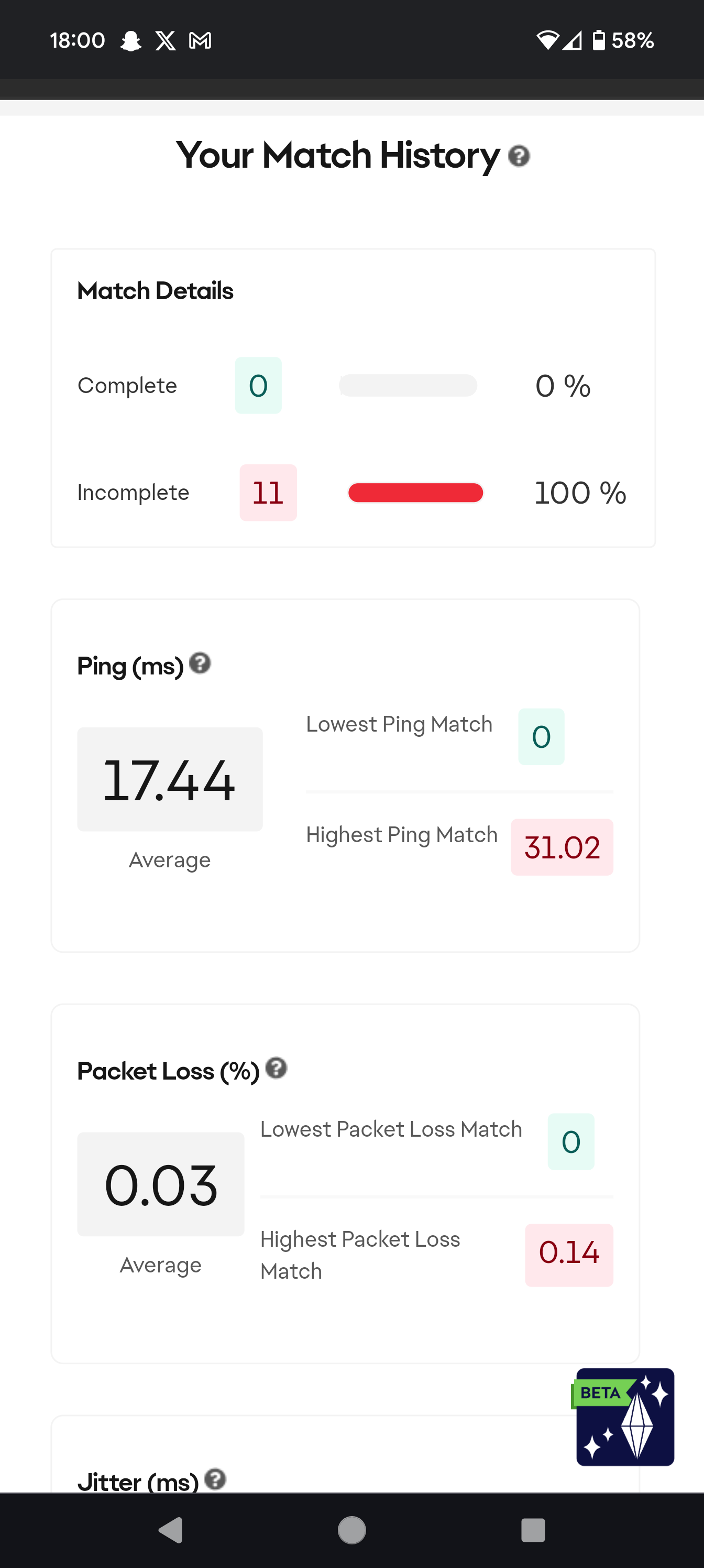
    Thanks for reaching out. I'll try to help with your disconnects. First, I'd like you to run the Connection Quality Report and get me a screenshot of the overall score as well as the match history. You can find the button for that on the left side of the screen.

  • EA_Aljo's avatar
    EA_Aljo
    Icon for Community Manager rankCommunity Manager
    1 year ago

    @363a0c053d96741f 

    Each match should be listed with it's connection details. Also, I see you're switching between a wired and wireless connection. Are you unable to play all games on a wired connection? Which platform are you playing on?

  • Here's the most recent games, I changed to ethernet cable expecting it to help and it wasn't any better

  • EA_Aljo's avatar
    EA_Aljo
    Icon for Community Manager rankCommunity Manager
    1 year ago

    @363a0c053d96741f 

    After switching your connection, it would be good to power cycle your modem/router and console. Please do that with these steps: unplug your modem, router and console. After 2 minutes plug in the modem and router. Let them come back online completely. Then plug in your console and start it up. Let me know if that helps or not.

    If that doesn't help, try using alternate DNS settings. From the Xbox home screen, go to Settings > Network > Advanced settings > DNS settings > Manual. (If Settings doesn't appear on the home screen, select My Games & Apps, then Settings). From there, enter the Primary DNS as "208.67.222.222" and the Secondary DNS as "208.67.220.220". If that doesn't help, try using the google DNS servers which are: primary alt number 8.8.8.8 - secondary alt number 8.8.4.4.

Featured Places