"""Solución""" y ojalá lo corrijan, caída FPS
la caída de los fps se debe a la reescritura de archivos de FC26, deberían de corregir ese proble.
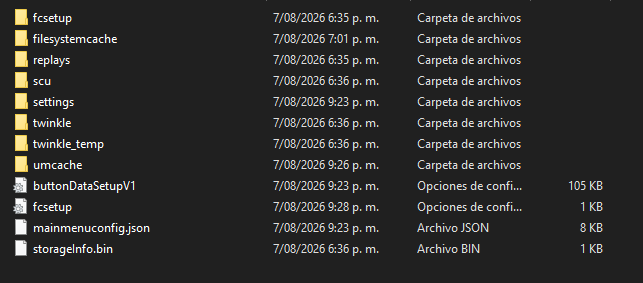
fcsetup
y
overrideAutodetect
estos archivos se encuentran en APPDATA, Windows + R y escriben %AAPDATA% e intro.
en la carpeta LOCAL y la carpeta de FC26 en settings.
overrideAutodetect.lua:
FullscreenEnabled = 1 # 1 = fullscreen, 0 = windowed
FullscreenScreen = 0 # Monitor index (0 = primary)
ResolutionWidth = 1920 # Change to your resolution
ResolutionHeight = 1080 # Change to your resolution
OverallGraphicsQuality = 0 # 0 = Low, 1 = Medium, 2 = High, 3 = Ultra
VSyncEnabled = 0 # 0 = disabled, 1 = enabled
FullscreenRefreshRate = 165 # Change to your monitor's refresh rate
MaxFrameRate = 87 # Your desired FPS cap
TargetFrameRate = 87 # Same as MaxFrameRate
ResolutionScale = 0.850000 # 0.5-1.0 (lower = better performance)
PresentInterval = 0 # 0 = no frame pacing
WindowedBorderless = 1 # 1 = borderless windowed
StrandBasedHair = 0 # CRUCIAL - 0 = disabled
UseGoalNets3d = -1 # -1 = auto, 0 = disabled, 1 = enabled
NisAtFullFps = 1 # NVIDIA Image Scaling
CrowdQuality = 0 # 0 = Low, 1 = Medium, 2 = High
GrassQuality = 0 # 0 = Low, 1 = Medium, 2 = High
MotionBlur = 0 # 0 = disabled, 1 = enabled
ClothQuality = 0 # 0 = Low, 1 = Medium, 2 = High
DynamicAOQuality = 0 # Ambient Occlusion quality
DynamicResolution = 1 # 1 = enabled (helps maintain FPS)
MinWindowWidth = 1280 # Minimum window size
MinWindowHeight = 720 # Minimum window size
fcsetup.ini:
AUDIO_MIX_MODE = 0 # Audio mixing mode
CONFIG_APP_LOCALE = en-US # Language setting
FULLSCREEN = 1 # 1 = fullscreen
FULLSCREEN_OUTPUT_INDEX = 0 # Monitor index
MSAA_LEVEL = 0 # Anti-aliasing (0 = off)
RENDERING_QUALITY = 1 # Base rendering quality
RESOLUTIONWIDTH = 1920 # Your screen width
RESOLUTIONHEIGHT = 1080 # Your screen height
REFRESH_RATE = 165 # Your monitor refresh rate
VOICECHAT = 0 # Voice chat (0 = disabled)
WAITFORVSYNC = 0 # VSync (0 = disabled)
MAX_FRAME_RATE = 87 # FPS cap
TARGET_FRAME_RATE = 87 # Target FPS
RENDERING_SCALE = 0.85 # Match overrideAutodetect.lua
WINDOWED_BORDERLESS = 1 # Borderless windowed mode
STRAND_BASED_HAIR = 0 # CRUCIAL - main FPS killer
USE_GOAL_NETS_3D = -1 # 3D goal nets
NIS_AT_FULL_FPS = 1 # NVIDIA Image Scaling
CROWD_QUALITY = 0 # Crowd detail level
GRASS_QUALITY = 0 # Grass quality
DYNAMIC_RESOLUTION = 1 # Dynamic resolution scaling
GRAPHICS_PRESET = 0 # 0 = Low preset
MOTION_BLUR = 0 # Motion blur effect
CLOTH_QUALITY = 0 # Cloth physics quality
DYNAMIC_AO_QUALITY = 0 # Dynamic ambient occlusion
RESOLUTION_FOR_DISPLAY_MODE_LIST = 0_125830200|1_125830200|2_125830200|
Step 2: Lock the Files (CRUCIAL!)
- Right-click each file → Properties → Security → Edit
- Select your user account
- Check "Deny" for "Write" permission
- Apply and OK