Forum Discussion

Rappeldrache's avatar
9 years ago

(Still) Rendering thread exception problem - does this help?

Hello,

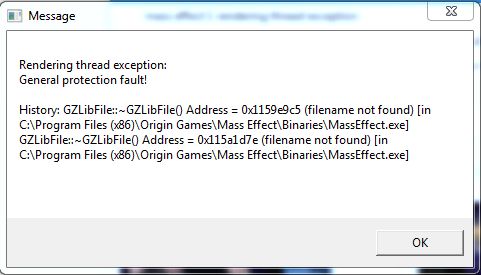
I STILL have a "good old problem": The "Rendering thread exception".

- I have Win7

- Everything is up to date!

- I have Mass Effect 1, via Origin (newest installation), with all patches and DLC's of course

- MEUITM Mod ( http://www.nexusmods.com/masseffect/mods/1/?tab=2&navtag=http%3A%2F%2Fwww.nexusmods.com%2Fmasseffect%2Fajax%2Fmodfiles%2F%3Fid%3D1&pUp=1 )

- File: No brow fix for female NPC's (from the MEUITM site)

- Mod: Eyelashes for MEUITM ( http://www.nexusmods.com/masseffect/mods/4/? )

BUT: I had this problem two years before, when I played WITHOUT any mods, too.

I tried really a lot of things. All this:

- Chance a few things in the BioEngine.ini(written in the MEUITM mod information)

- Double check for typos or format errors in the "BioEngine.ini"

- Game compatibility WinX (service Pack3) & as administrator (or try comp. Win7)

- Starting game NOT via origin and the MassEffect.exe (not launcher), from Binaries folder (Launch as Admin by using the MassEffect.exe)
- Ingame: No Hardware Sound
- In /program files/Mass Effect/Binaries locate the OpenAL32.dll and wrap_oal.dll files, Rename OpenAL32.dll to OpenAL32.bak, Rename wrap_oal.dll to OpenAL32.dll
- If that don't helps, make sure the game is closed > rename the "BioEngine.ini" to
"old_BioEngine.ini" > start the game  (don't change the "BioEngine.ini")  > test.
- making a Repair in Origin
- Don't skip cut scenes.

I found a page, with a download. Somebody knows it? I wanted to try it, but I'm not sure if this isn't dangerous or not. Could be spyware or a virus, whatever. Somebody knows this page and this file: http://mass.effect.error.rendering.thread.exception.digiwiki.org/ ? 👮


Thanks and Greetings 🙂


14 Replies

  • holger1405's avatar
    holger1405
    Hero+
    9 years ago

    @Rappeldrache

    Please go to your Reliability monitor (Press the windows key and "R" at the same time and copy or type "perfmon /rel" (without the quotes) in > ENTER and look if it has ME entries.

     If yes double click at the last one, copy it to the clipboard, (Bottom left corner) save it to a text file and load it up together with the DxDiag. You can do that with the "choose file" button at the bottom right corner of the reply window.

  • I just finished Mass Effect 1 .... and I could play ... a bit, with me: "Don't ask to mutch-trick". It was not easy and I got a few crashes, but I finally got it ....

    So I will move on to Mass Effect 2 now .... sorry. ☹️

  • Anonymous's avatar
    Anonymous
    8 years ago

    I've been having the same issue as the guy above. I tried his solution in the end but it didn't do anything. I don't really know what to do. I attached a pic with the exact problem that displays. 

    Thread exception

    unused mip #0 for Texture 2D

    and so on. 

    The pic has the actual lines but yeah. I'm lost.

    May I also add that I'm using MEIUTM and ALOT texture mods. I really don't feel like reinstalling but if I have to then maybe.

  • holger1405's avatar
    holger1405
    Hero+
    8 years ago

    @Oilujreyes

    This is with high probability a mod problem.

    Did you edited the ME1 INI files?

    Do you have a backup of your vanilla game files?

Featured Places

Node avatar for Mass Effect Franchise Discussion

Mass Effect Franchise Discussion

The fate of the galaxy lies in your hands. Join the Mass Effect community forums and tell us how you'll fight for it.Latest Activity: 15 hours ago
19,256 Posts