Forum Discussion
9 Replies
I am having the same problem. I live near Seattle and am doing split screen only with my son, entirely locally. We do NOT have Xbox Live Gold.
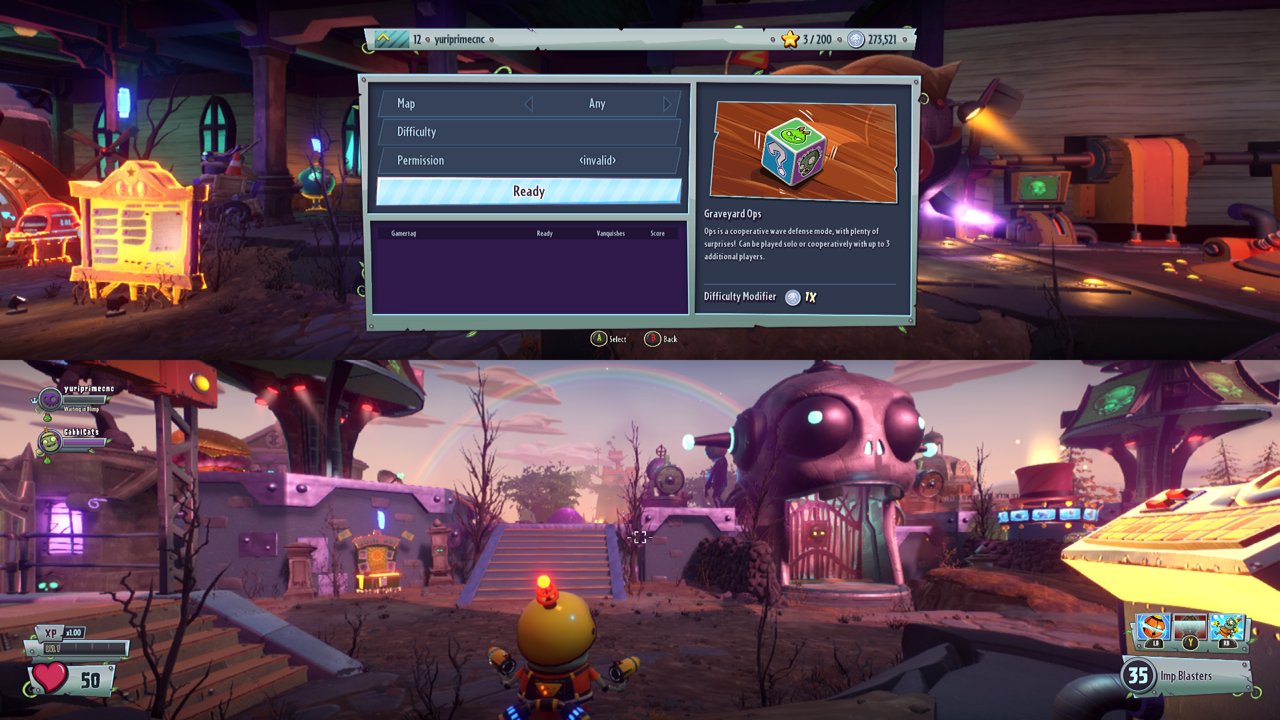
When I, as leader of the local split-screen party, walk up to Dave's trailer and choose B for Garden Ops, I get a "Creating game session / Waiting..." dialog. There is no "B to cancel" prompt with this dialog, and in fact it cannot ever be cancelled. No buttons on the controller do anything, except for the round Xbox button that takes me out of the game.
My son is able to walk up to the same door of the same trailer and press B. When he does so, he gets a "Waiting... (B to cancel)" dialog. No amount of waiting makes the game actually start. He is able to hit B to cancel. I am not, and in fact the only way out is to end the game altogether.
There is definitely a serious issue here of some kind. Please ask for any more details, I am happy to try to reproduce this and answer questions.
- Approved
 Anonymous10 years ago
Having the exact same issue. We can do backyard battleground and the multiplayer maps split screen just fine, but for both Garden Ops and Graveyard Ops the game will not start/continue. Soon as you click A to start the part where you would pick a map/setup/etc...the screen just sits at the "Creating Game Session" message for the first player indefinitely. There is no way to get off of this screen either, you have to either stop split screen on the 2nd players screen, or restart the game.
This is on Xbox one. My account has gold. My son's account does not.
The only way we got it to work was the 2nd player had to be a guest account.
- ApprovedAnonymous10 years ago
Some updated info.
I talked with EA Support and they had me try a few things. We removed both accounts from the Xbox and reset the network settings. Then added both accounts back. After that, the issue still occurred with it freezing up trying to start Garden/Graveyard Ops.
I then tried the above posters example with them of using a guest account. That worked and Ops would start. Support then wanted me to try and start again with the Xbox account and we ran into an issue where the game would no longer allow us to pick the account for split screen, it would always default to the guest account. It would even do this after quitting the game and turning the controllers off. Only rebooting the Xbox allowed us to select the account for split screen again. However, even after all that the Ops would not start when back on two Xbox accounts.
They escalated the issue to their specialist and said they would be getting back to me by email to discuss more.
- ApprovedAnonymous10 years ago
I was able to get it working!
My son's account is setup as a family account to mine, and it was set to the "kid" security settings. I tried changing it to the "adult" security settings and instantly Garden/Graveyard Ops started working.
This still seems like a bug to me, as the account security shouldn't matter for local co-op, but at least this work around works for now.
I will confirm that it worked on ours as well. Very silly on Xbox One's part since my son's account is a clone as mine but only Xbox One's settings was set to custom/child instead of adult under privacy/settings. Thank you! Bravo! Well done! Thanks EA for never getting back to us on this!
@Picpok wrote:My son's account is setup as a family account to mine, and it was set to the "kid" security settings. I tried changing it to the "adult" security settings and instantly Garden/Graveyard Ops started working.This still seems like a bug to me, as the account security shouldn't matter for local co-op, but at least this work around works for now.
That fixed our problem also! Thanks Picpok!😃
ciao
Well that works, but it still sucks. My kids have their own accounts, with their own characters etc, and now they can't use them in co-op with me :/. EA/PopCap really needs to take a look at this and patch it in.
@Stray2617 wrote:Well that works, but it still sucks. My kids have their own accounts, with their own characters etc, and now they can't use them in co-op with me :/. EA/PopCap really needs to take a look at this and patch it in.
Hey there Stray2617. How are they not using their characters, etc, that they have earned? They are not logging in as a guest here, they are using their regular accounts, you are just modifying them to be adult level instead of child level. I just tested with my daughters account that she has separate on Xbox Live from Xbox 360. It is a full XBL account and not a shared one. All her characters that she has earned are here. She did not lose anything at all. Popcap/EA just needs to fix it so that we DON'T have to modify the privacy levels every single time for only this ogame since it leaves our kids open to all areas unprotected. Now my child can open/play my adult/teen games without issues if I am not there watching. But it works fine with separate accounts without any lose of XP, characters, or achievements. Maybe you can explain more in detail on how you are missing those on your side. Hope this helps a bit more.GT: YuriPrimeCnC
SpoilerPopcap/EA NEEDS to patch & identify this issue! Still love their games!!!


Featured Places