Forum Discussion

Re: Star Wars: Jedi Fallen Order - M & K Control Customization Extremely Limited

@nospaferr, @Synapt , @skill-or-die , and @Wundering_Taoist ; Thank you to all of you for giving this issue the attention it deserves to everyone's benefit, and it's hoped that our attention together, along with future attention from others will bring these problems to the forefront of the developers' minds with the result being a patch that addresses the PC version's major shortcomings that include left-handed accessibility ( that's to you @Synapt 🙂 ) where such accessibility is nearly impossible without major rebinding of all of the controls.

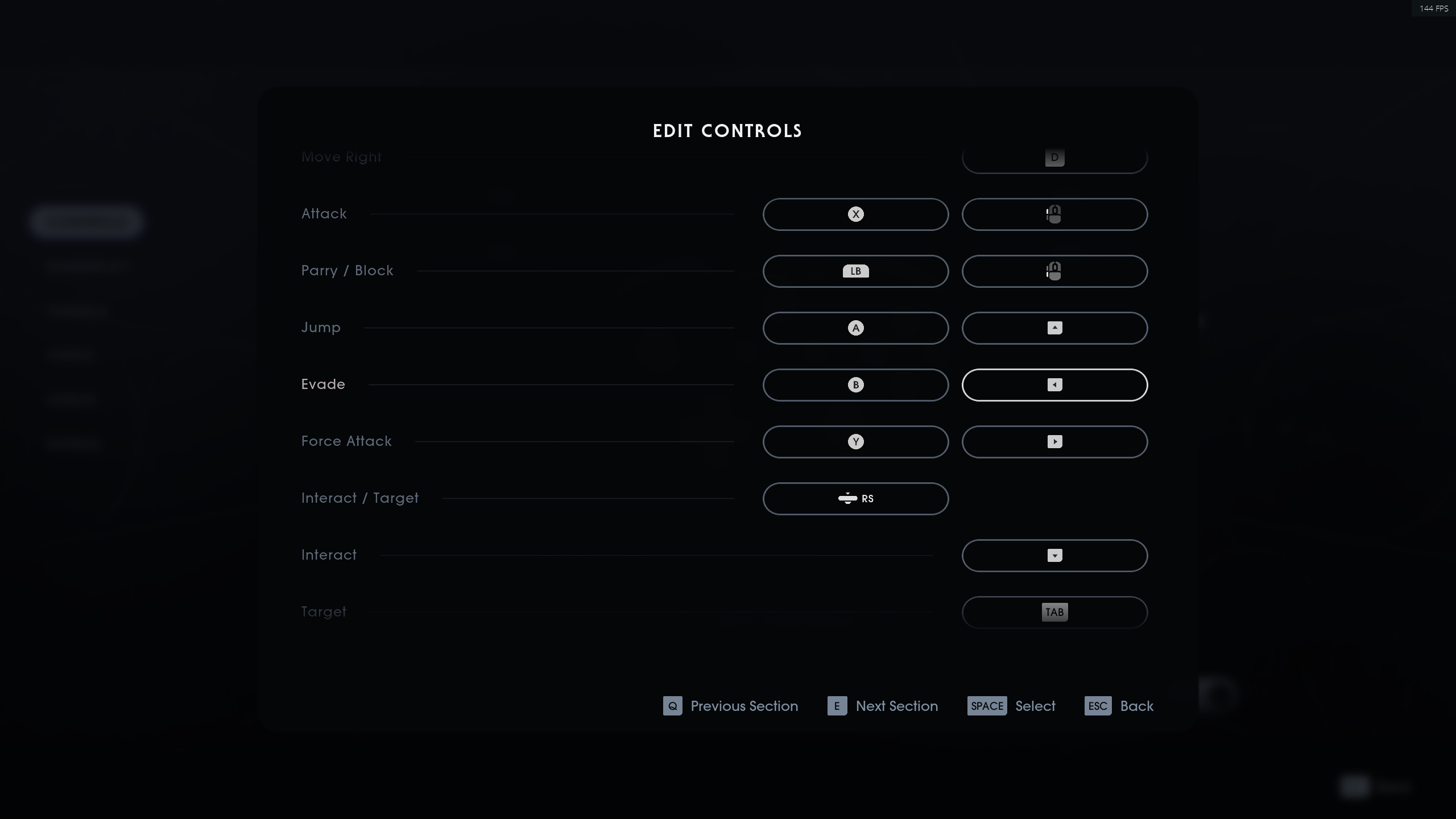
As promised, I've put together a complete rebinding scheme in the form of a long screenshot using features that need to be made available in a future patch for Star Wars - Jedi: Fallen Order.

IMPORTANT NOTE: Nothing listed in the image is actually real or even available in-game at this time, and is a product of having assembled the necessary graphics and information through a series of screenshots in-game that includes using parts of existing icons to create new icons.

The hope is that by having done this, developers are more attentive to what's expected by PC users regarding control rebinding and customization. Additionally, the control schema I'm representing in the graphic can be flipped for left-handed users like @Synapt ; making this an ideal control schema and template for Star Wars - Jedi: Fallen Order , and any similar games being developed for release in the future.

ATTENTION DEVELOPERS: Please feel free to use the created image as a guideline for patching Star Wars - Jedi: Fallen Order with the features PC and accessibility PC users require and should be able to expect out of the box every time a title is released.

Thank you.

21 Replies

  • PartyFarter's avatar
    PartyFarter
    Seasoned Ace
    6 years ago

    Dont know what you guys are doing but I can perfectly fine bind my arrow keys and side mouse button in settings.

    While I do not use arrow buttons myself to move the camera I just tested to see and it worked fine.

    I use all 5 buttons on my mouse in game with no issues. I use side buttons for evade and force attack. See the picture I uploaded that shows those 6 buttons being bound to something in game.

    As far as I can see you can bind any button to anything in this game. At least there are no button I havent been able to bind. I can even bind print screen, scroll lock and pause button....

    The only thing I cant do as pointed out is that I cant "free look" with my mouse while walking which I agree is a weird decision.

    But as far as rebinding goes, there are no limitations on which button you can bind.

  • Agingamer52's avatar
    Agingamer52
    6 years ago

    My big complaint is the sluggish response of my mouse while running.  That being said, I only had a limited time to play last night.  I will try to adjust the in-game mouse settings to see if I can make my mouse a bit more responsive.  However, considering I have really nice gaming mouse, I should not have to make this adjustment.

    Also, thank you for posting your mapping suggestions and problems.  I will try remapping some of the controls this evening as well.

    As for "W,S,D,A", I've gotten pretty used to using these moves for other games.  Even though it is a bit annoying, it is not a deal breaker for me.

    I am also a bit annoyed that I have to use a control key to look around.  Seriously?  You could not have integrated that into the mouse control at the beginning? 😞  This makes doing the athletics (jumping, climbing, etc.) a bit of a hassle.

  • @3DiE9djua2According to your image, you've assigned the arrow keys what is pretty much the ONLY place that the game will allow bindings for them. People have a million different ways they like to use the arrow keys besides manually positioning the camera that's basically a non-feature feature anyways because mouse look is a more favorable means of positioning the in-game camera.

    To better understand what they rest of us are going through, try binding an arrow to the map functions for example, and you'll get nowhere.

    As to your use of 3rd & 4th mouse buttons, you bound them to climb and drop. IMOO; the binds you're using for your 3rd & 4th mouse buttons are pretty much useless because most of the game is NOT spent climbing, and I'd think most PC gamers would feel similarly.

    It's typically considered by most people to be much better to be able to use buttons like the 3rd & 4th mouse buttons that are readily and quickly accessible for combat functions such as "Evade" & "Parry" / Block, but the game will NOT allow binding of 3rd & 4th mouse buttons to those functions.

    If you can show everyone bindings for the 3rd & 4th mouse buttons to combat functions without having to create something artificially out of several screenshots that was a required process to demonstrate what the control editing menu should look like with an ideal configuration, then perhaps the bindings menu is simply an extraordinarily buggy feature of the game the way that it is presently causing it to be a simple luck of the draw as to whether or not a PC user will have the exact type of mouse and keyboard the game wants for whatever fickle programming of the in-game binding UI cause this sort of "controller , mouse & keyboard roullette " if you will..

    Regardless, the stuff I use is high-middle of the line, and pretty common hardware that works fine with everything with only a couple of exceptions as follows that are ironically also newer Star Wars Games:

    The 2015 through 2017 Battlefront games that pretty much also require an xBox gamepad due to being completely incompatible with ANY other controller types were also problematic in the same manner as experienced for Star Wars - Jedi: Fallen Order; although were arguably worse. I simply didn't like those games, or their general concepts enough to actually care, so I just don't play them, but Jedi: Fallen Order is a very different story because what I've seen so far in various articles, game play videos, etc. impresses me, and I'd like to be enjoy Jedi: Fallen Order to its fullest.

    Neither Battlefront 2015 or 2017 have any compatibility with any type of flight simulator style joysticks (think of using a Force Feedback Pro on Roque Squadron on Windows 98SE back in the day that was blast to play) or a Force Feedback Pro II (USB) that's compatible with Windows 10, and I happen to have one that still works to this day.

    Jedi: Fallen Order for PC needs to maintain the malleability for custom key and mouse binding that many PC gamers expect, and that may mean that the UI for custom bindings needs to be rebuilt / patched by the developers, it could mean that the developers need to patch the game to be compatible with a broader spectrum of controller types as well as mouse & keyboard hardware, or perhaps a patch covering a combination of the previously mentioned potential remedies is in order.

    Those of us in the gaming community can only go so far in trying to figure out what's wrong in a given situation because once the most experienced gamers and PC users and/or admins out there exhaust all the potential solutions on their end ( ...and I think I speak for a lot of people who've been thorough like myself in researching their options without much, if any success regarding the control binding limitations... ) until it's uncovered to be a problem that requires a patch via developer intervention.

    Jedi: Fallen Order needs a patch to fix the custom control binding features, and at this point, the fact that it's necessary for a patch to be done by the developers to fix the problem is the ONLY reasonable solution left.

  • PartyFarter's avatar
    PartyFarter
    Seasoned Ace
    6 years ago

    @Unverschamter No offense but no need to write a wall of text for every time you write something. it makes it tedious to read what you want and people will stop reading without getting to your point. Not meaning to be rude but just a friendly tip.

    And see the attached screenshot. Is that what you are after? Now my side buttons are bound to attack and parry and arrow keys to jump, evade, force attack and interact. (thanks for making me mess up my bindings btw :P ) If not please tell me what to bind where and I will do it.

    btw, if your game is lagging try click then hold for the button to bind. Kinda like a double click but the second click you hold instead of let go.

  • @3DiE9djua2You've probably noticed I occasionally bring up the 1990's, and I remember BBS posts that influenced my tech writing style decades ago. I'd guess there's probably a bit of a generation gap if you're used to things being shorter; while on my end, things are too short from my own perspective; often lacking detail.

    Anyway, while my writing style's not going to change, I do understand where you're coming from, and appreciate your taking a respectful approach to broaching the subject.  I did find out other people were having problems with button assignments and tried a solution similar to yours that was suggested by @skill-or-die in another one of their posts, and a facsimile of the solution did work for assigning the secondary mouse button because instead of double clicking, I had to hold the secondary mouse button, and then single click the function I wanted it assigned to.  Unfortunately the same method doesn't work for the 3rd & 4tjh mouse buttons, and neither does the one you or @skill-or-die recommended, but I do appreciate the suggestion because when I read @skill-or-die 's post with the same advice it did get things moving in the right direction for the secondary mouse button.  🙂

    I took a look at your screenshot, so whatever it is that's specific to your PC's configuration is apparently working well with Jedi: Fallen Order. It seems that the experience I've had along with many others is the more common.

    In short, I'm glad ( and a little envious ) that it's working for you as well as it is. It would simply be great to see the developers patch the game so everyone else, myself included can say the same. :D

    Happy Holidays. :D

  • PartyFarter's avatar
    PartyFarter
    Seasoned Ace
    6 years ago

    @Unverschamter no problems. I'm no youngster myself but I know that most people these days just skip long posts. The Twitter generation if you will.

    Did you try the double click method? Just select what you want to rebind so the long text is shown (hold button etc), then double click (but the second click should be held) the button you want to bind.

    And I agree that the devs should patch it so the the text hold the button... actually was true for all. 

  • @3DiE9djua2 Yes, and only a facsimile of it worked. I added the details to the second paragraph of the initial reply. Forgot to include it the first time.

    Basically anything that gets persistently assigned L Alt ... being the 3rd & 4th Mouse Buttons along with the secondary mouse button didn't require any double clicking.

    The solution ONLY worked for the secondary mouse button, and it was that I had to hold it down, and then click the function I wanted it assigned to once.

    The Control Binding UI is definitely not consistent for anyone, that's for sure.
  • nospaferr's avatar
    nospaferr
    6 years ago

    AND!!! an option to toggle/hold walk/run. That is very very important for me, sorry. And by the way, thank you for doing this, I hope we get recognized, because the game is unplayable for sure like this.

  • PartyFarter's avatar
    PartyFarter
    Seasoned Ace
    6 years ago

    I just noticed if I sit in the menu for a little while I could just hold and bind everything (like the instruction says) afterwards without even having to to do the double click trick.

    Makes me believe the client is using all resources on something else (aka poor optimization) making it not registering every click you make in the key bind ui.

    @Unverschamter 

    I just got another hint from a friend who had similar issues like you to use the double click method.

    He found out that using the double click method with his left mouse until it started to bind, then switch and hold the key he wants to bind would work. if just hold the key didnt work he would do the left mouse again until it started to bind, then switch and do the double click method with the key he wanted.

    Its stupid but he also managed to bind all keys just like he wanted to in the end.

    Basically it looks like that if you are persistent enough it will eventually work. 

    This definitely needs to be patched but I dont see a patch coming in the first week due to all the stuff devs need to go through to release a patch.

  • @3DiE9djua2 Yup, saw similar behavior myself too, just a little different because the UI's not going to take most of the buttons and keys I want to assign to the functions I want to assign them to just like a lot of people are also experiencing.

    Basically, the system I'm using is overpowered on resources for what I'm using it for because I'm running a Studio Grade E-Mu sound card with just about every Dolby & DTS codec since 1998, on a Xeon with 12 cores , 2 GTX 1080Ti's with a Total of 16G/B RAM, and 256G/B of ECC RAM. My storage tally alone is nearly 16TB altogether with almost half being free.on all drives. I know, overkill, but for something I only build every three years, I like things to last.

    Also, I'm running on Windows 10 Enterprise, so resources for hardware and software aren't really an issue.

    NOTE: If anyone's wondering about the heavy duty specs, truth is I try to build a couple systems every 3 years for use at home, and I don't know what I'll be using them for ( work or leisure ) when I start building them because my goal's just to stay on up to date hardware, so occasionally I wind up with a server grade system for running my regular activities.

    I'm thinking along similar lines to you in that the game's just having problems interfacing with some hardware through its own background processes and some people are affected while others aren't because with PC, there are tons of choices for hardware, and everyone's got something a little different with some configurations having more common sets of hardware than others.

    Hopefully the developers figure out why the binding UI's so wonky for so many people. You're just one of the lucky ones while most of us, well, not so much. 😉
  • canadiancookie's avatar
    canadiancookie
    6 years ago

    i really would like to know who doesn't reassign wasd to the arrow keys for movement ....bizarre i can reassign a bunch of keys but not those ones

    i have to think they expected this - there is a warning at the beginning saying the game is meant for a controller ....such crap

  • My issue is with targeting, specifically with cycling targets and selection. I have a track ball so I have to re-assign keys. But target selection isn't an option.

    Update: I couldn't get it to work with my trackball. Since you only have 24hrs to get a refund, I figured I'd wait till EA fixes it.

    Aloha!

  • PartyFarter's avatar
    PartyFarter
    Seasoned Ace
    6 years ago

    @Unverschamter For some reason I have no issues at all today. The key bindings work perfectly every time. Don't have to use any of the double click workarounds.

    It's like someone pulled a fix without needing me to patch anything. Some cloud sync that was overloaded yesterday?

    @Wundering_Taoist Targeting in this game is kinda silly. You enable and disable the targeting then you use movement to cycle. For k+m users you use the mouse and move left or right.

    You can assign your desired keys to look left and look right which will make it possible for you to cycle left or right with keys. But you still need to enable the targeting system first each time or you have to enable auto target in settings.

    Regarding rebind issues.

    Could Origin play a role here? Maybe if someone who still cant rebind keys could try to disable Origin overlay or clear the Origin cache and report back afterwards.

  • Bobajobbobxbob's avatar
    Bobajobbobxbob
    6 years ago

    Key binding is a disaster in this game as with most EA console ports. Can’t believe this wasn’t tested. Some buttons work, some don’t. The UI is horrible. Puts me off the game immediately. 

  • @3DiE9djua2the problem is that I can't target without the mouse button. My trackball doesn't have it and there is no way to rebind that key.

  • PartyFarter's avatar
    PartyFarter
    Seasoned Ace
    6 years ago

    @Wundering_Taoist I guess I dont quite understand what you want to do.

    All keys can be re-binded and I thought you wanted to cycle with keyboard key instead of the trackball. my mistake.

  • @3DiE9djua2  there's a whole thread on keys that can't be re-binded. In my case the middle button on the mouse doesn't have the option.

  • PartyFarter's avatar
    PartyFarter
    Seasoned Ace
    6 years ago

    @Wundering_Taoist I know there is a whole htread but all keys can be bound. I have changed the layout myself even posting screen shots of keys people had problems with showing me having bound them. I have also written how to do it. Middle mouse button can be bound to another function.

    The only keys I have found not to be able to bind are special characters on international keyboards like øæå from Scandinavian keyboards.

  • enzotron's avatar
    enzotron
    6 years ago
    @Unverschamter I just think it's great that you guys can even get your controllers to work, with or without customizations. Don't wanna derail the conversation, but plenty of us are just trying to get Respawn to make it so that our buttons do absolutely anything.
  • Sithtiger's avatar
    Sithtiger
    Seasoned Novice
    6 years ago
    @Unverschamter BBS, 300 Baud manual connect modem..... Oh Yeah! Do ya remember "GUNSHIP!" or Paradroid? Anyway, I'm that way too. Millennials just don't understand the greatest generation. I'm speaking of Gen X of course!

Featured Places