Forum Discussion

Re: SWTOR Security Key

@elysuse

You have to remove the old one from your account.

Log in only with your Account Name and Password, then you get a second screen asking for the sec Code, under that field is an text lost Token, click that and you get a one time password entering that you have removed the old Token and then can set up the new one.

11 Replies

  • Anonymous's avatar
    Anonymous
    9 years ago
    Approved

    Every time i`m logging i have text "Login Failed", but password and login are correct. So i can`t remove my security key by this way.

  • Is this option no longer on the account screen 

    I lost my security key in a house fire..

  • Anonymous's avatar
    Anonymous
    9 years ago
    Approved

    Hi @FatalKain

    Use the steps below if: 

    • You lost your Physical Security Key
    • Your Security Key stopped working for some reason
    • You've lost or upgraded the mobile device you had your Security Key installed on

    To remove your Security Key from your account:

    Go to www.swtor.com and click on Log in.

    Enter your display name and your password, leave the Security Key code box blank, and click on Log in.

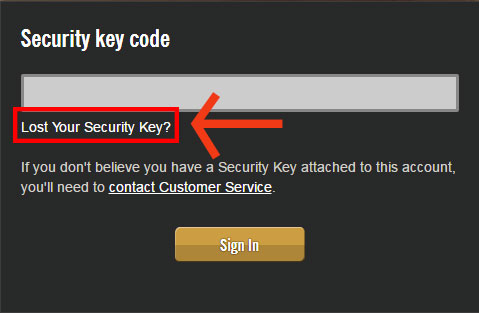
    We’ll ask for your Security Key Code. Under the Security Key code box, click on Lost your Security Key?
    Instructions will appear on how to remove your Security Key. After reading them, click Send One-Time Password.
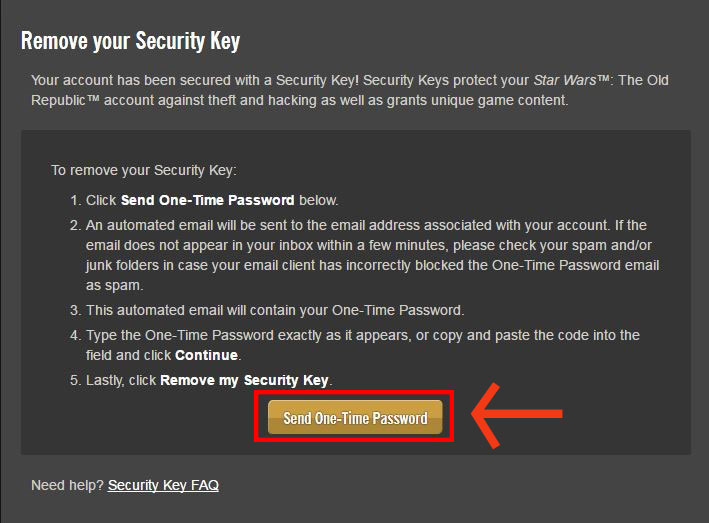
    We'll send a One-Time Password to your SW:TOR account’s registered email address.

    • If you do not see the email in your inbox after a few minutes, check your spam/junk folders.

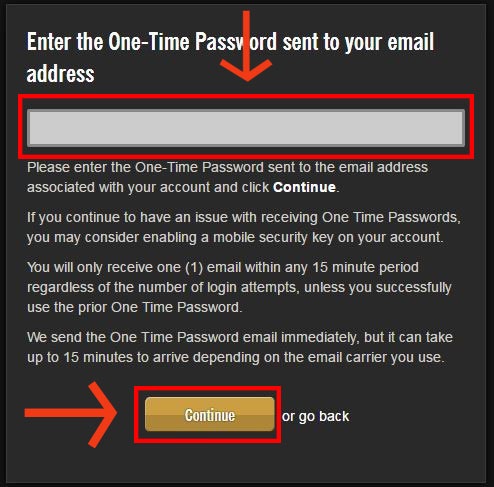
    Enter the One-Time Password exactly as it appears in your mail into the box on swtor.com and clickContinue.
    Click Remove my SecurityKey to confirm you want to remove the key from your account.
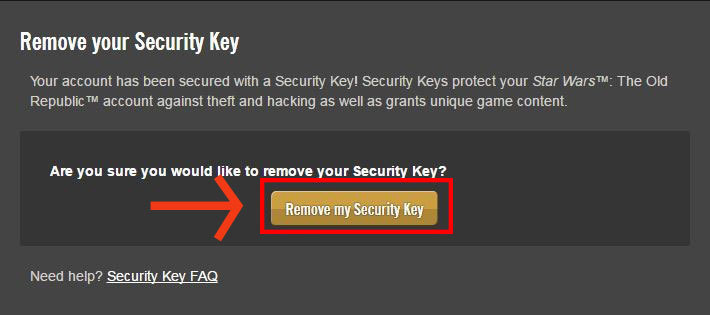
    You’ll see a confirmation message on-screen.

    You will no longer need to use your Security Key to log into the game and website, but you may be asked to enter One-Time passwords when logging in.

    (Source)

  • Anonymous's avatar
    Anonymous
    9 years ago
    Approved

    Okay, there should be a link to remove the security key. But i do not have that link.

    (screenshot attached).

    What should i do?

  • Anonymous's avatar
    Anonymous
    9 years ago
    Approved

    You'll need to contact the support team in this case @FlameInDeepress

    If you need help with your account, encounter an error while making a payment, or are unable to log in to the game, please contact the Star Wars: The Old Republic Customer Service team by phone.

    Contact our team by calling the numbers listed below:

    • For details on how to contact SWTOR support you can follow the steps outlined in this article here: How to get help with STAR WARS™: The Old Republic™

      [CM Edit - Edited post to provide an article on how to contact support for STAR WARS™: The Old Republic™ - EA_Illium]

  • Ahrngrim's avatar
    Ahrngrim
    9 years ago

    @EA_Zoe

    Can You make a Extra post from that above an link that in the Common Issue Thread.

  • Anonymous's avatar
    Anonymous
    9 years ago
    Approved

    No worries! 🙂

Featured Places

Node avatar for STAR WARS™: The Old Republic™

STAR WARS™: The Old Republic™

Check this forum for STAR WARS™: The Old Republic™ help, or to chat with other SWTOR players.Latest Activity: 4 hours ago
19,330 Posts

