Crimson Cliffs Inhabited - latest update 13.4.2026
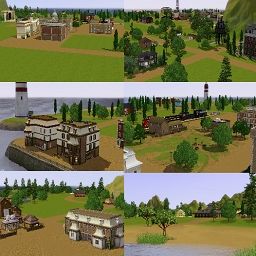
Crimson Cliffs Inhabited bird's-eye view
Creator's note: I avoided unnecessary game objects in CAW (without making any compromises with the collectibles) to avoid unnecessary lag while playing, but since CAW's EIG can be pretty unstable, I recommend resetting the whole neighborhood with Master Controller when you start playing. I haven't had any problems in my game even without resetting, but I still recommend doing so for this world - and to be honest, for every world, even (or specially) official EA ones.
Your world is looking lovely :)

Скажите пожалуйста, у вас как версия CAW? Я спрашиваю потому, что тоже хочу поработать в CAW, но у меня версия игры 1, 69, к сожалению, и я читала, что, в CAW для этой версии нет редактирования в игре
I'll try to explain how to make it work...
1. Save your world file in CAW and close it.
2. Bypass the launcher. Go to your Sims 3 folder (the one where game is installed, not the one in My Documents) -> Game -> Bin
I have it in C:\Program Files (x86)\Origin Games\The Sims 3\Game\Bin
3. Rename Sims3Launcher to Sims3Launcher.old in you game folder.
Then make a copy of TS3 (right click -> copy -> paste) in the same folder and rename it to Sims3Launcher.
4. Open a command shell in your Sims3 game directory (click the row and type cmd -> press enter).
5. This will open
Type there:
TS3.exe -nosound -disableDumpCopy -NoObjMgrsFile: -speed:0 -editInGameMode:true -worldFile:C:\Users\example\Documents\Electronic Arts\The Sims™ 3 -create a world\UserToolData\Worlds\Crimson Cliffs Inhabited.world
The last part (bolded) is the path to your world file, so go to your CAW folder (in My Documents) and copy the path.
6. Press enter and EIG should open (it may take some time).
Note: EIG won't work with cc, so you need to make sure you don't have any third party cc installed when editing your world.
When you are done, just go back to your Sims 3 folder (-> game -> bin), delete the new Sims3Launcher you made and rename Sims3Launcher.old back to Sims3Launcher.
Hope this made any sense and you are able to make it work 🤓