[CURRENT ISSUE 64-bit] Base game incompatible with expansion pack error
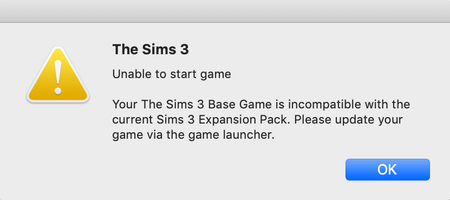


I've done this and it still isn't working.. It'll act like its going to load but it just makes my screen smaller and has the rainbow loading wheel... any suggestions please? I just want to play Sims 3.. I've tried uninstalling and reinstalling everything..
@Chanasl5 Try moving your entire Sims 3 folder out of Documents > Electronic Arts, if you haven't already. The game will create a new folder the next time you open the launcher.
If that doesn't or didn't help, open that Sims 3 folder and find the file labeled options.ini. Open it (TextEdit works fine), cmd-F to search for "fullscreen" (without quotes), and set it to 0 rather than 1.

Im having the same issue @Chanasl5 is having. I did what @puzzlezaddict recommended, and the game did indeed work, but i lost all of my save files and downloads. Good thing i didnt delete that folder 😅. So back to square one I suppose...
@xXHOLYSHIZZLEXx The file causing the issue is Version.tag, which I didn't know when I wrote the first comments. So you could delete that and put your original Sims 3 folder back if you wanted. Or you could move your saves and other content from the old Sims 3 folder to the new one.
@puzzlezaddict I removed the version.tag file, and It still won't work. It's making my screen tiny and rainbow wheeling, and not responding. I don't know what else to do.