Poor graphics/low-resolution/graphics glitches (TS3 64-bit)
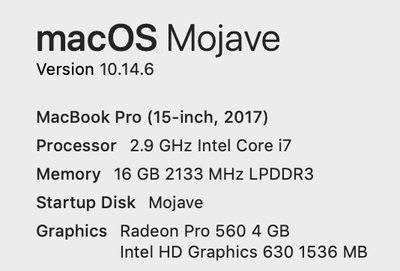

@Rhazya Thanks for all the info. It's interesting that you can't use cmd-enter to switch to windowed mode; someone else with an iMac said the same. What you can do is edit options.ini, in Documents > Electronic Arts > The Sims 3, to set fullscreen to 0. (Use cmd-f to search for the line.) When the game launches in windowed mode, try switching the resolution a couple times and see whether it works.
I wouldn't be surprised if the full resolution of your screen didn't work as an option though: it seems like in windowed mode, the game window takes up more space than it should given the chosen resolution. I'm not sure why. But try 2560x1440 and see how it looks. If you still can't switch it, you can try editing options.ini again: there's also a "resolution" line in the file.
For the way the map is rendered, I see that too, and I'm not sure how to fix it, except maybe to play on a different resolution. You might need to experiment a bit.

@Rhazya Edge scrolling doesn't work in windowed mode for me either, which is how I prefer it. In Windows, I have to disable it when switching to windowed mode or else the game camera keeps moving in the direction my mouse went when it left the game window to click on something else. I think this was also the case in the 32-bit version in macOS. I'm not sure it's a bug or glitch, probably more by design.
The GPU usage can also drive up the fans, since the cooling apparatus is attached to and (hopefully) attuned to both. When you were playing in fullscreen, you were also playing at a lower resolution than you presumably are now; fewer pixels to render means less work for the graphics card. I wouldn't worry about it, but if you want, you can download a monitoring app like iStat (there's a free 14 day trial) or Macs Fan Control (I think the free version doesn't expire) and see what your CPU and GPU temps look like when playing.
We still haven't figured out exactly how the game recognizes our cards—they're not in the .sgr files, which look like they haven't changed from the 32-bit version. But yes, it's nice not to have to edit the files manually.


