Forum Discussion

anothersimnut's avatar
11 years ago
Solved

Sims 3 Roaring Heights Lot, The Stage (Marks family), is missing buttons to make as active household

There is a problem with one of the lots in Roaring Heights. The one called The Stage located at 39 Palm Tree Avenue. The buttons that are missing are: Switch this family as your active household, evict option, merge with & split up household. Only the Save copy to Library and Share buttons are showing. I am unable to play this family. When my Sims went to visit this family, they found there were five brothers and four dogs (which they are not feeding) living there. Does anyone know how this lot can be fixed? The graphic designers for the Sims 3 have created some really impressive homes, and unique families. I am trying to play each and every one by playing and saving each active household, and I only load the ones I will be playing. This is the first time I have come across this problem with a lot. Please let me know if there is a solution.

  • I had to delete that saved game. When I started a New Game, then I was able to choose the Marks family in Roaring Heights. I am beginning to think in Sims 3 you cannot have multiple saves in one town, ex. constantly changing active households and saving them. The game gets befuddled. So now I am just starting New Games each time I want to save an individual family. EA's game designers created so many beautiful lots and unique families, I would like to play each one (if my computer lets me - arrrrgh!). The problem is solved. I'm just curious what caused The Stage to be missing buttons. More than likely it was a computer malfunction. Gamers, make sure you backup your saved games.


6 Replies

  • rumbutter's avatar
    rumbutter
    Hero (Retired)
    11 years ago

    this is interesting hmmm I wonder if there is something wrong with the lot i'll check this family out later to day , probably what i would do is save the game save as new name since you say you can save a copy of them  save the copy to the library and place them in another lot to see if youI can play with them then go to edit town and see if the other button's work again

    edit typo

  • Anonymous's avatar
    Anonymous
    11 years ago
    Approved

    Ill have to check this once I reinstall the game. I play my own sims in roaring heights so I never noticed any issue with the Marxs house only that glumbo (I Think) gets stuck in the neighborhood and I had to reset him few times.

    And I have to agree EA put some effort into roaring hieights and I love deco. Better hair too and I love the cloths. Rita Wells Davis is my fave premade sim. I even love many of the houses though you may have t knock down some walls in the premade houses. EA put up too many walls in some of the houses where your sims will bump into each other.

  • rumbutter's avatar
    rumbutter
    Hero (Retired)
    11 years ago

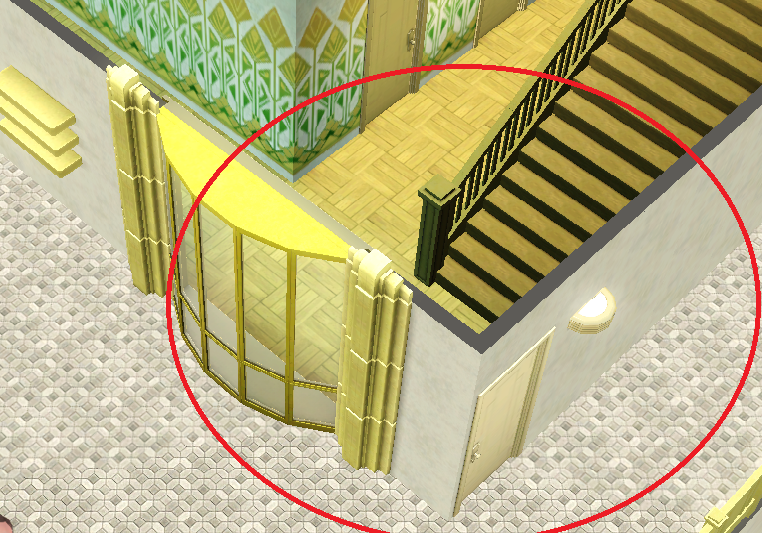
    ok I went to roaring heights put my own sim in and went to edit town the buttons where fine for me  switched to the family and one of the brother's had a routing issue in the house the red circle/feet can't go there over his head in image 2 the issue was around this area in red

  • I had to delete that saved game. When I started a New Game, then I was able to choose the Marks family in Roaring Heights. I am beginning to think in Sims 3 you cannot have multiple saves in one town, ex. constantly changing active households and saving them. The game gets befuddled. So now I am just starting New Games each time I want to save an individual family. EA's game designers created so many beautiful lots and unique families, I would like to play each one (if my computer lets me - arrrrgh!). The problem is solved. I'm just curious what caused The Stage to be missing buttons. More than likely it was a computer malfunction. Gamers, make sure you backup your saved games.

  • I've noticed when Sims cannot go to a certain spot, it's because there is something blocking the door (or the spot where they want to walk to). Something as simple as a light or plant placed too close to the door can prevent the door from opening and closing. Could be another Sim trying to open the door at the same time your Sim is trying to open the door. If I can't see what my Sim sees, I usually go into Buy/Build mode to see what their problem is. Sims are strange creatures. Hope this suggestion helps. I no longer keep changing active households. Noticed when I do this a lot, the game will stop working. So if I want to play a new family, I just start a New Game and save that family. You can always place copies of custom families with their homes (if you saved a copy in your Library) back into the game you started if you want the new family to interact with them. Have a SIMply marvelous day.

  • rumbutter's avatar
    rumbutter
    Hero (Retired)
    11 years ago

    yep that light in the image I posted caused the routing issue for the sim once i moved the light  no issue..silly sims