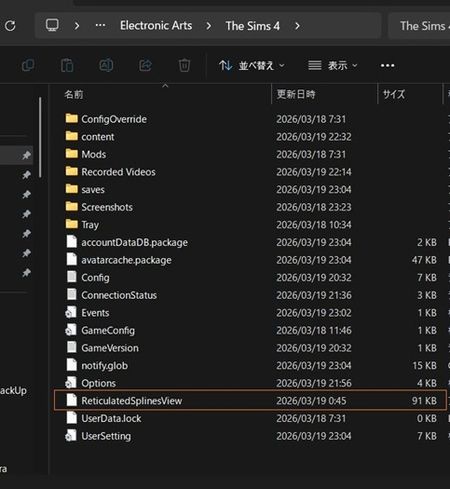
Weird ReticulatedSplinesView file size


Pick-a-boo_doo I have no idea what that file's purpose is. Based on what you have said, it goes up as you add packs. What I can tell you is this: In my current user folder (new save), it is 155 KB. In my previous user folder (corrupted save), it is also 155 KB. I have all packs. It appears that 155 KB is the max if and until another pack comes out. Then I suspect it will increase in size. I'm not going try deleting it, but you can if you want. You can always start a new user folder if it messes something up. But I suspect deleting it will cause nothing as the game either won't start or it will create a new file like it does with the cache and some other files. So, go for it if you want to.
Hope this helps.
Hi, thank you for your reply.
First, about this 'ReticulatedSpinesView file'.
This file is related to addons as you know. It's can delete, then recreate when run the game. And it relates about highlight new items, I know from my experience though I'm not Tech well. You can check about detail this file in the Crinrict's web site:
User files explained – Crinrict's Sims 4 Help Blog
But, I had be able to know that this issue does not on everyone from your comment. Because your RSV file size not increase.
One thing I ask you, if you keep the Sims 4 folder that you stopped to play before April/2026, could you check that folder's RSV file size? If that size is same as now you playing one, I will be able to get more.
Well, of course I already had try to delete the RSV file, but the result was same.
Thanks again.

RSV file size January and April 2026:



