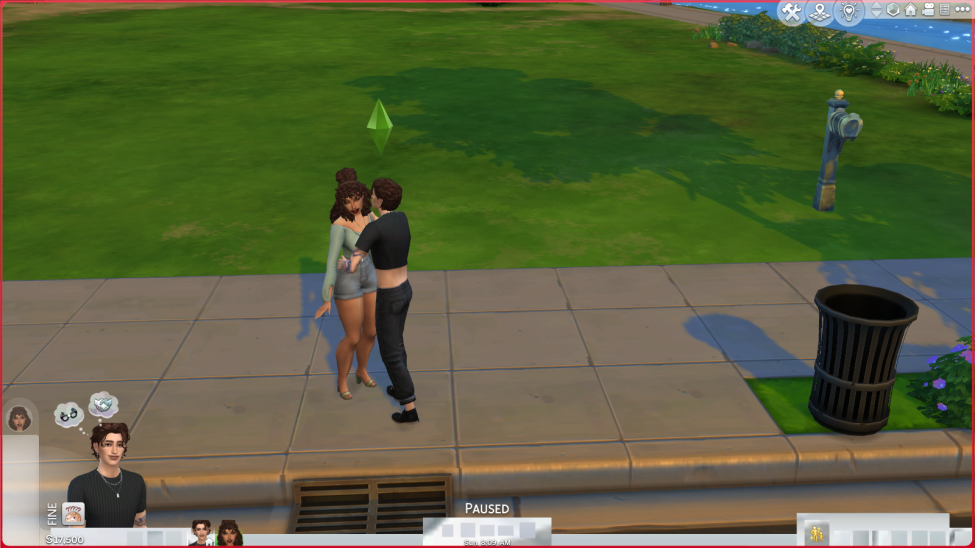
[MOD RELATED] Icons are blank squares/ UI Glitching
As you can see the timer at the bottom is invisible and the other icons at the bottom, this has just happened today so I'm not sure what it could be. Any help would be great 🙂 thanks!
I'm not really sure what is wrong with my Sims 4 UI (or if the thing on the bottom is even called the UI), but there's somethin' whack going on with all of the icons at the bottom of the screen. I'm playing with a lot of CC and mods (which probably is not helping!), but this started happening today. I also had a mild glitch in CAS that was fixed by taking out the 'more columns in CAS' mod - so I'm not sure if this UI problem is already known to be caused by a certain mod, or if someone else has this problem too. I attached a picture of what it looks like - hopefully it's a common issue with an easy fix! Fingers crossed haha.
Move your Mods folder to the Desktop and delete localthumbcache.package. Then test the game in a new save. If it works now check for updates to your Mods and CC. Add it back a little at a time while testing until you have found all that are broken.
I was trying to play sims but all the bottom buttons have disappeared, I have already tried verifying my files on Origin, I have restarted the application but nothing sims to work, the only mod I have is MC Command.
Move your Mods folder to the Desktop and delete localthumbcache.package. Then test the game in a new save. If it works now check for updates to your Mods and CC. Add it back a little at a time while testing until you have found all that are broken.
ok so my two teen sims went to the pre-prom get together like normal, and then the "prom is about to start" pop-up appeared. i clicked "choose sims" and it sent me to the loading screen for a long time before taking me to the 'choose worlds' screen. if i click on the household i'm playing as and select to play as one of my teen sims at the auditorium, it loads and then sends me back to the 'choose worlds' screen. if i choose to play as either the dad or the little brother, who are not teens and are both at the house, it brings me to the house, but the ui is all screwed up. the first image is the less extreme example and is the one that happens most often- where the sim panel in the bottom right corner is covered up by this image of a completely different sim (idek who that guy is, i don't think he's in my world) and the spot where the moodlets should be is covered by blue squares. in the second image, which has only happened to me a few times, the ui is even worse, with this really weird incoming phone call that i can't answer or exit out of. if anyone has had this happen to them before, please tell me because i've never experienced anything like this-
Try moving the Mods folder from your "The Sims 4" folder [Documents > Electronic Arts > The Sims 4] to your desktop (save it for reference) and delete the localthumbcache.package file in your “The Sims 4” folder. Then check in a new game save to see if this issue is still occurring. You can test without saving in order to identify which CC/Mods are causing the issue, then remove or add updated version(s) of the Mod/CC causing the issue.
Oops... Sorry, @jpkarlsen ... just saw your reply, so this is redundant. 🤭
@sims4supremacy... perhaps my mistake can be useful to you... do you use Mods/CC? If so, you could try the directions in the spoiler tag above to see if it fixes your UI issue.
When i enter my saves, my MCC command center has disappeared but also importantly, the problem is that the options/buttons have been scrambled and are all glitchy and buggy during gameplay. I’m not able to tell whether i’m pausing the game or putting it in 2x speed. It’s frustrating and it’s been the case since I have had the High School Years Pack. I hope today’s patchy update fixes it because it makes it unplayable due to the messy layout. I don’t think it’s due to my mods, does anyone else have this issue?