Forum Discussion

paj14's avatar
3 years ago

New patch is breaking my game!

Sul Sul felllow simmers,

I have seen some bugs/crashes/glitches appear in my game that I would like to let our sims team be aware of, if anyone else is experiencing these problems please feel free to chime in. 

1. The sims are aging too fast and my sim's aging is turned off.

2. All my sims, townies, and NPC's are gaining celebrity status for no reason, I noticed this while playing in the geek con festival, and every sim is either a "rising star" or a "proper celebrity". 

3. No birthdays are showing up on the calendar of my households.

4. Sims age bar in the simology panel is full as if sims have completed a full life stage cycle but have only been playing for an hour in-game..

4. In Sulani on the shipwreck island sims cannot use a public bathroom, they only sit on the bench outside of it.

5. Sims and dogs glitch and idle while performing the dog walk feature

6. Sims in "My Households" and "Other Households" are still experiencing neighborhood stories even though I have it disabled in the game options.

7. A sim under "My household" has disappeared completely: no death, marriage, or move-out notification has shown.

P.S.

No, I do not have any cc/mods installed. I have updated and even repaired my game. 

3 Replies

  • I am a new player. No mods or cc ever. Most of my Sims have died or near death. After this July 2022 update. It's like Covid and The Stand hit my game. I started in November to get stress relief, now it's worse than real life. I worked many hours making families I enjoyed playing with now it's a bunch of elders who were toddlers before the update. I am mourning my game and don't want to go to each house to clean up urns ⚱️ 😢 

  • Neechan1's avatar
    Neechan1
    New Veteran
    3 years ago
    @RPowser If you haven't saved yet, just exit the game and reload

    Before you resume play, change the aging to normal and turn off auto aging for played sims, this setting is found in the gameplay tab option

    I've attached a file to show how I have it set up in my game

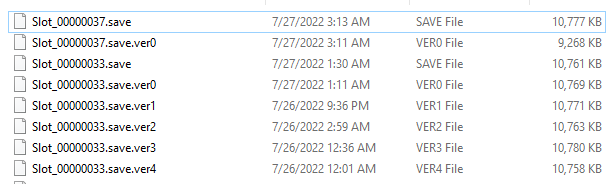
    If you did save, you can recover an earlier version as well, you have to click load game and it will bring up a list of your saves, you'll notice there will be a little floppy disk by the delete button, click on it and it will bring up a list of the saves.

    Slot_00000037.save (This is the Main or Newest Current Save)
    Slot_00000037.save.ver0 (Backup 0) - this is the Newest back up to the main save.
    Slot_00000037.save.ver1 (Backup 1)
    Slot_00000037.save.ver2 (Backup 2)
    Slot_00000037.save.ver3 (Backup 3)
    Slot_00000037.save.ver4 (Backup 4) -  The Oldest backup

    in this case, you'd want the ver0 or BU0

    I hope this helps you
  • EA_Solaire's avatar
    EA_Solaire
    Icon for Community Manager rankCommunity Manager
    3 years ago

    Hey all,

    As this report contains multiple bugs and we may already have active dedicated bug report threads opened for them here "Compiled list of reported issues" this thread has been closed.

    If there isn't an active thread dedicated to each of the bugs you're experiencing in the link above, please go ahead and create a new bug report, one per each individual bug after testing if the issues persist after installing any mods/cc. That way, we can track things easier and provide relevant information regarding the specific bug.

Featured Places

Node avatar for The Sims 4 Mods & Custom Content

The Sims 4 Mods & Custom Content

Find tips, tutorials and troubleshooting for mods and custom content, and The Sims 4 patch files here.Latest Activity: 13 minutes ago
16,596 Posts