Solved
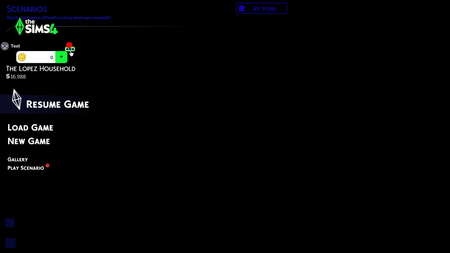
[patch 1.122] Game launches to black screen with main-menu words but no picture


itstenneo Please see Broken and Updated Mods and CC for broken and updated UI mods. And see How to Use Mods and CC on how to manage your mods when the game updates. UI issues like this are to be expected.

I'm quite aware this is a widespread issue right now because of the new updates. Idk how many others that their Home Screen just looks like this when you open the main game menu. last time I tried removing my mods temporarily, and it fixed my game accessibility, however I just updated with the new update after the last one last week and it still shows this on my screen when I load up the game in with mods. I truly don't understand why even after the new update; my mods might be causing a problem and not even allowing me to play my game. does this mean my entire mod folder is broken because of the update (I just repudated today to make sure my mods worked compared to last weeks update) and so yeah I have to manually restart my computer just to close the sims window though by the way while its like this. how do I get my game functional with mods and not show this again? is it a matter of troubleshooting, updating, or will I have to download entirely new cc alltogether?
It’s the same problem for me too! I’m not sure if this happens to you, but the game doesn’t close when I try to close the window by several methods unless I completely restart my laptop. I don’t understand, before the March 17 update all of my CCs ran just fine.
another thing for me was that I ran a Check File Integrity in Steam and it said 61 of my files couldn’t be checked and Would be re-acquired automatically, but that didn’t change anything.
mine is doing thee exact same thing. the only way i can play is to put my mod folder on my desktop.. i have been building a new random property just to play.
You should check this thread to see if any of your mods need to be updated. It's likely you need to update a main menu or ui mod.