Solved
[patch 1.122] Game launches to black screen with main-menu words but no picture


itstenneo Please see Broken and Updated Mods and CC for broken and updated UI mods. And see How to Use Mods and CC on how to manage your mods when the game updates. UI issues like this are to be expected.
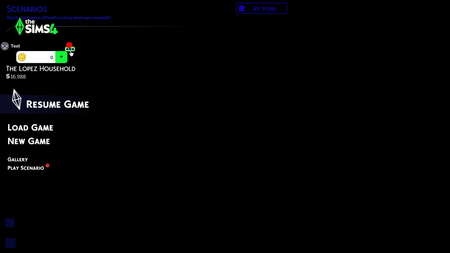
I did move the mods folder to the desktop, along with turning off the cc/mods option in the Sims 4 settings. I cleared as much cache as possible, including the localthumbcache, and I also cleared the cache through EA app > about > app recovery. As I stated in the post, I wasn't able to capture a screenshot directly from my own laptop due to the issues with the main menu. However, someone uploaded their own picture, and it is exactly what issues I am also having.
I have done the 50/50 method with the mods, breaking it down into much smaller portions to check mods/cc, and have made sure all are updated. The image provided is not mine, but it is exactly how my screen looks as well. Since removing and slowly re-adding mods to see if it was a mods/cc/UI issue, I noticed the issue wasn't any outdated mods, but having any mods at all. Even after removing and disabling script mods, just having cc in the game resulted in the same issue as pictured. Unless I have no mods/cc allowed via settings and moving the folder itself to the desktop, the Sims 4 will not go beyond the main menu as pictured.
Gambler91A Multiple mods that are either broken now or already updated cause this. Just use the pinned Broken and Updated Mods and CC list.