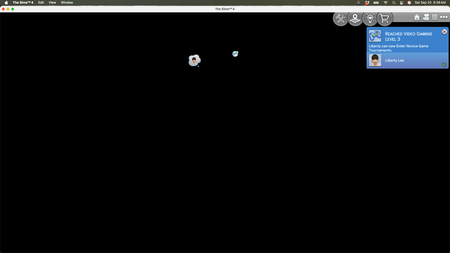
Black Screen, Sims Still Active, Can't Close

Absolutely! I'll try all of these things, hopefully later today when my husband, who's more tech savvy can help me. Thank you for responding!! I truly appreciate it.
I'm a bit in panic mode, to be honest. Sims is very important to me, and if it's truly a Mac problem, I would have to settle on a lower screen resolution and not being able to buy any more additional packs. It might sound stupid to some, but these are the flower bouquets from my husband (I wasn't ever a flower bouquet kinda gal, so he bought me these instead and I collected/collect everything). I would be devastated if I couldn't buy another pack!
Thank you sincerely for trying to help! I'll let you know if it works.
PS. I know how to use force quit, but I couldn't do that either.

If it were truly a Mac issue then all Mac players with the same machine/OS as you would be experiencing it and we haven't seen any other reports here. Common issues on specific configurations can accumulate quickly, see this Catalina/NVIDIA issue as an example.
Maybe your Mac has an issue, although I doubt it as you're only experiencing issues in TS4 right?
If you can't Force Quit how have you been closing the game? By holding down the power button on your Mac until it shuts down?
Your Mac is more than capable of running the game. Hopefully the new clean TS4 folder will fix it.
I backed up my most important saves and I'm about to begin trying the suggestions in the link you gave me. It might be awhile before I know since it sometimes takes hours of play before it happens. Since Sept 18 update it happened about 4 times, some right in a row, others over hours time.
I tried to Force Quit because that's what I'm used to when I get stuck. It just had "Quit" without the option to force quit, but it wan't responding at all. The store button did, lol, so I know it wasn't my mouse. I minimized it just fine, tried to find a way to force quit as I've done before, but didn't have access to the option and regular quit wouldn't respond. Yes, all four times, I ended up holding down the power button until it shut down, finding no other way. Then I would restart my computer, repair game and try again. After this happened the fourth time, I didn't want to push it any further and reported the bug and quit trying to play.
Yes, I'm only experiencing problems with TS4. Everything else I normally use is working fine.
I'm super relieved to know my Mac is capable of playing the game! I will try everything I can to make it work. Thank you for your continued help. I've got my techie husband on standby. I don't mind loosing my saves, but loosing my sims game would be heartbreaking!
Thanks.
I tried to Force Quit because that's what I'm used to when I get stuck. It just had "Quit" without the option to force quit, but it wan't responding at all.
Force Quit is not accessed by the active app menu. It is always available when you click on the Apple in the top left of your Desktop. Apple have a support page here that explains it https://support.apple.com/en-gb/102586
If you are in fullscreen mode you could use the keyboard combination to bring it up. Or use the Trackpad and 3 finger swipe to the right to take you back to the Desktop then click on the Apple logo (there is probably an equivalent mouse gesture for this but I don't know what it is).
Please let me know how you get on with the clean Sims 4 folder 🙂
Testing the game without any of my saves, reloading it essentially (although I backed up my favorite saves) has been working wonderfully! It's very weird to experience the game with all the tutorials and my library empty, etc. Anyway, I've been playing for quite some time with no issues at all, full screen and windowed screen. (P.S. I know how to use force quit as it's my go to when I get stuck. It just wasn't an option like normal).
The only thing I haven't tried yet in the test game is to use the pack selection that's new in the menu. I'm testing with all packs active right now, as I've been doing since loading the game fresh as your link described. But when it went black, I was just starting a Lepacy, and had used the pack selector to only use base game. I'm curious to see if that breaks my game again, if I use it. I've been trying to use the game in the ways I was, but I've been nervous to go as far as using the new pack selection again. That's my next move is to see if that breaks anything.
However, I'll be off grid for several days attending a family wedding, so I won't be able to test it immediately.
I don't mind if you combine our threads. Whatever would help solve the issue for everyone.
Thank you for your time!





