Game crashing or not loading especially after updating? Post here.

Since last night, I've been having an ongoing issue of trying to play the sims 4. Whenever I try and open the game, the game loads the title screen and the first plumbob loading, but after that the screen turns black and plays the main menu music. I've tried removing my mods folder, updating my mods, repairing the game, testing a clean game, uninstalling and reinstalling the game, and nothing works. I would also like to note that when I tried a clean save, the game didn't force create a new folder, so I have no clue where to go from here. Please help!
For Reference (if needed):
MacOS: Sonoma 14.5
Memory: 16 GB
Year: 2024
Model: Macbook Air
Storage Available: 724.09 GB of 994.66 GB
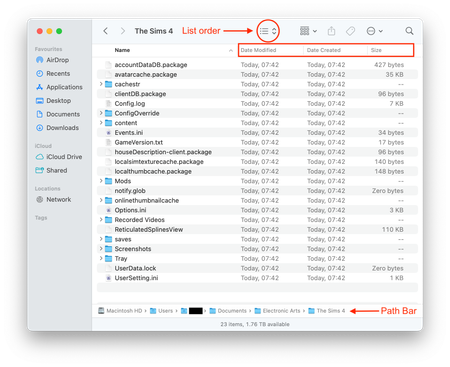
Could you post a screenshot of the contents of the Documents > Electronic Arts folder please. Instructions on how to post a helpful Finder screenshot are in the opening post in this thread I have moved your post to.
I'd be happy to, but I'm currently being told that the screenshots that I'm trying to publish with this are saying "File Not Allowed". I legitimately have no clue as to why this is happening, and I was wondering if there's any other way that I can post these. I apologize for the trouble.
That's frustrating. Are you trying to upload it via the Insert Media button?
For Reference (if needed):
MacOS: Sonoma 14.5
Memory: 16 GB
Year: 2024
Model: Macbook Air
Storage Available: 724.09 GB of 994.66 GB
Screenshots Below:
Another file screenshot (if needed)
I tried to see if I could send a DM, but couldn't, I'm so sorry, hopefully this works!
Thanks! Your Documents folder is on the Desktop (really needed the file path to be clearly visible as set up in the instructions above). Your game will not look there for any data, it looks directly in Macintosh HD > Users > Your User account > Documents > Electronic Arts > The Sims 4 and if it cannot find an EA > TS4 folder it creates one. That is where you need to look for the TS4 folder. In Finder click on Go in the menu bar then Go To Folder. In the popup box type ~/Documents and hit Enter. The Finder window will now show your Documents folder. Make sure you have the file path enabled before doing this so you can see the folder location. Please post a screenshot so I can see it all looks right (with the path bar visible).


