Unable to start: The Sims 4 is already running - Mac only

Hi,
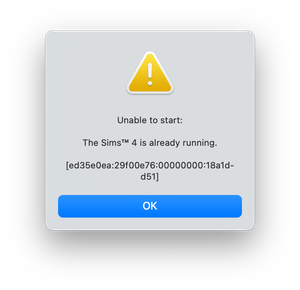
I have a new Mac and I've downloaded all my addons in the EA app to play The Sims 4. When starting the game up, I get this error message:
Unable to start:
The Sims™ 4 is already running.
[ed35e0ea:29f00e76:00000000:18a1dd51]
I have tried most things several times. I've reset the computer, uninstalled everything including the EA app, restarted the EA app, reinstalled everything and done recovery on the app. Nothing is working. I have also gone into the folders in my computer and only have the game application itself and a folder called 'The Sims 4 Packs'. There's no mods, saves etc that I had on my previous comp. I'm thinking this is because the game hasn't been launched yet?
The computer I have is as follows: Apple M4, 16GB (but plenty of space as brand new), Sequoia 15.5. Im using an internal hard drive.
I have given permissions for EA to access Full Disk Access, Local Network and Files and Folders.
Help please. I would really like to go back on my game.
Thanks.
See the opening post in this master thread on the error message.
Bluebellflora I have done all of these things and it's still not working. Please help.
Are all of the suggestions relevant to you, in that you have created a symlink to your Electronic Arts folder stored on an external drive, and you had iCloud Drive enabled and now do not? I'm assuming so if you said you have tried all these things.
Please describe, in detail your exact set up - where is the game installed, a screenshot of the Electronic Arts folder on the external drive together with a screenshot showing the working symlink in Documents. Please post screenshots showing this in Finder and also a screenshot from System Settings showing the game has full access. Also a screenshot showing your iCloud Drive setup.



