[CURRENT ISSUE] Several Issues after incomplete Installation


Product: The Sims 4
Platform:PC
Which language are you playing the game in? English
How often does the bug occur? Every time (100%)
What is your current game version number? 1.59.73.1020
What expansions, game packs, and stuff packs do you have installed? Cats and Dogs, Get famous, Island Living, Holiday Stuff, Grim's Ghoulish Guitar
Steps: How can we find the bug ourselves? No clue- something may possibly be missing in my files and I could have accidentally deleted it thinking it was a mod but I have to clue what it is
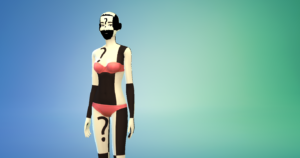
What happens when the bug occurs? I can't see my sims in CAS or build anything because it doesn't appear correctly
What do you expect to see? The correct graphics- or any graphics at all
Have you installed any customization with the game, e.g. Custom Content or Mods? Not now. I've removed them.
Did this issue appear after a specific patch or change you made to your system? Neutral/Not Sure
Graphics issue
My Sims 4 game has been bugging when it comes to graphics, such as in CAS my sims have red errors all over them and some of the objects in build mode are covered in red and black. I thought it was something with my mods so I got rid of all of them and disabled custom content, but the same problem still appeared. I don't know what to do!! HELP!!!!

I’m also having the same problem with red question marks showing up on sims. I have no mods to my game and haven’t had any for months now, so I know it has nothing to do with your mods, but I really don’t understand why it’s happening. Sims that looked perfectly normal the last time I played now have these red and white color blocks on them. I just got the university pack and updated my game, the update said it was going to fix bugs but I haven’t noticed it actually FIXING anything. So if you, or anybody else, figures out what’s going on, I’d love to know too





.png)
.png)
