Game Will Not Start
Until yesterday I did not have this issue. Windows 11 Desktop PC. All packs, no mods.
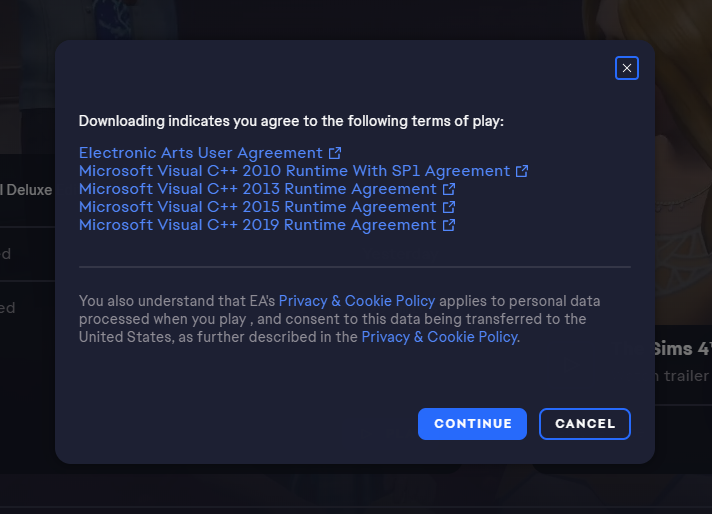
On my PC I only have the EA Beta application and run all my games directly from there. All games run, except for The Sims 4. It is up-to-date but each time I click on "Play", a window opens up saying:
"Downloading indicates you agree to the following terms of play:" followed by a few links.
In the bottom corner, you can either click "Continue" or "Cancel". If I click "Continue" it does only close the window and the game does not open up. Just as if I clicked "Cancel". I also tried opening all links, but the outcome is still the same. Restarting the application or PC does not change anything.
@smilisa Try manually installing the VC++ runtimes in the screenshot: that might bypass the issue. First, uninstall your current versions, if you have them. Hit Windows key-i, select Apps, and scroll down to the Microsoft Visual C++ Redistributables. For any version from 2010, 2013, or 2015 or later, click on it and select Uninstall. If you have versions from other years, leave them alone. Next, download fresh copies from Microsoft:
2010: https://www.microsoft.com/en-us/download/details.aspx?id=26999
2013: https://www.microsoft.com/en-us/download/details.aspx?id=40784
2022: https://docs.microsoft.com/en-us/cpp/windows/latest-supported-vc-redist?view=msvc-170
The 2022 versions encompass everything from 2015 going forward. In each case, you need both the x86 and x64 versions, but you can skip the IA and ARM versions, which are for different classes of devices. Restart your computer after installing these and before trying to play.
If you still have issues, please install Origin and try running Sims 4 from there. The EA App has hiccups from time to time, and it's not always clear whether a given issue is on the user end or the EA end.