Forum Discussion

Re: Accidentally Changed My TS4Script Files...

@Darkennd  Are you trying to remove any file association, or just change the current one to something else?  To change the current one, just right-click, select Open With > (the app you want), and make sure the box is checked to always use that app.

If you're trying to remove any association, you can try resetting all default apps.  I'm not sure it would have the intended effect though.  Hit Windows key-i, click Settings > Apps > Default apps, then Reset.

The more complicated way involves editing the registry, which is never a good idea unless you know exactly what you're doing and why.

But this isn't really an issue.  As long as you don't actually open the .ts4script files, it doesn't matter what file association Windows has for them.  The game will read them the same no matter what.

6 Replies

  • Darkennd's avatar
    Darkennd
    5 years ago

    I really appreciate the help and also sorry for the late reply.

    The problem is my files are now associated around this app and I get the error message, saying it cant open the game because game data is damaged or missing...

    I have removed the mods and the game works fine but whenever I have them it doesn't. So I know it has something to do with the mods.

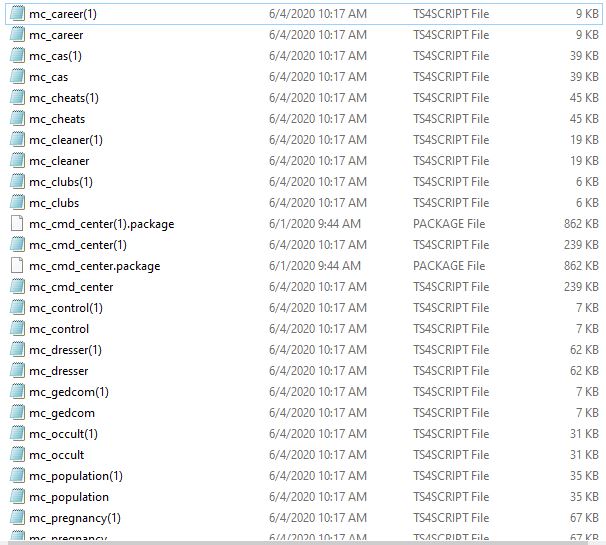
    this is the image of my mcc folder (look at the files that aren't a sheet of paper. Those are the ones causing problems)

  • puzzlezaddict's avatar
    puzzlezaddict
    Hero+
    5 years ago

    @Darkennd  It looks like you have two copies of all your mods.  Get rid of one of each and see whether it helps.

    If you still get an error, download a new copy of one mod, and when your browser asks you what to do with the download, be sure to select "Save file" rather than "Open."  If you're not asked, that means the browser is set to open the files by default; reset your preferences, or use a different browser instead.

  • Darkennd's avatar
    Darkennd
    5 years ago

    Just woke up from a wonderful sleep. :D

    I agree with what you said and I will try it.

    The problem Is my internet is down right now. But right when I get it fixed I will keep you posted.

    ————————————————————

    Again thank you so much for helping me out.

    ————————————————————

  • Darkennd's avatar
    Darkennd
    5 years ago

    Thx so much it worked!

    I am soo grateful that you could help me. 😃


    Thanks again.

  • Hi, I'm having the same problem you were having where I accidentally changed my ts4script mod file and now it won't let me download custom content anymore. I hit use this app by mistake and now everything changed

  • puzzlezaddict's avatar
    puzzlezaddict
    Hero+
    5 years ago

    @Jaleesa92  When you download a mod or custom content item, choose "Save file" rather than "Open."  If you don't get that option, use a different browser instead.