Forum Discussion

18 Replies
@Seantofik I don't care about the folders inside Delta; they're irrelevant here. I care about the folders that are directly inside a folder with "The Sims 4" in its name.
If you want to uninstall the CAS Demo, go right ahead. The only reason not to is if you want to keep it for some reason, but you already have the full game, so that's probably not a concern. You can uninstall it through Windows: through the control panel or through Windows Settings > Apps. Make sure the EA App isn't running, and neither is the EABackgroundService—check the Task Manager for both.
@puzzlezaddict I didin't have cas demo installed
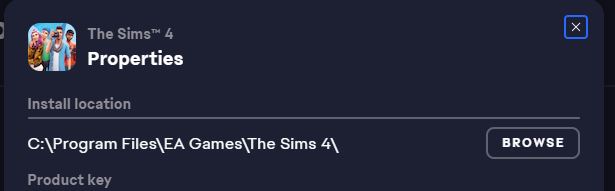
@Seantofik Okay, just to be clear, please list all the packs that you've installed but are not showing up in-game. Please also launch the EA App, open your game library, click Sims 4, select Manage > View properties, and find the file path to the game's installed contents, like this:
Please list that file path or post a screenshot.
In game it shows that none of the packs i have is installed
@Seantofik The problem is that your packs' folders are here:
Program Files (x86)\Origin Games\The Sims 4
And the EA App is looking for them here:
Program Files\EA Games\The Sims 4
You can try copying the folders from the first location to the second one and repairing the game (again). If that doesn't work, you'll need to do a clean uninstall and reinstall of the game and the EA App. Start with Sims 4:
- Put aside your Sims 4 folder in Documents\Electronic Arts and rename it to something that doesn't include the words "Sims 4."
- Download Revo Uninstaller (the free version is fine) from here.
- Launch Revo, select Sims 4 from the list, and click Uninstall.
- Once the game is uninstalled, select "Moderate" under "scanning modes," and click Scan.
- Review the list, in case there's something you want to save; otherwise, click Select All, and then Delete.
- Close Revo, and restart your computer.
Uninstall the EA App with Revo as well. I don't have instructions for that at the moment, but the process should be straightforward. Restart again when you're done.
Install the EA App and Sims 4, but please install only one pack at first and make sure it loads in-game. If not, stop here and let me know.
It finally worked, thank you so much for your time and help
So I Don't Have A EA Games Folder Only An Origin Games File So I Can't Copy The Files Into The Right Folder, If You Could Help That Would Be Ever So Helpful. 🙂
Feel Free To Look At The Files Below
|
|
|
\ /
- @Roblox_Boy22 P.S I Bought Cats & Dogs , Dream Home Decorator , Tiny Living On Origin And It Doesn't Show Up On The EA Store But On My Saves It Shows The Packs I Used In That Save But It Says That A Restart Is Required But I Tried Restarting It But It Just Isn't Working
@Roblox_Boy22 The EA Games folder would be in Program Files, not Program Files (x86). Please look there.
If that doesn't help, please run searches for two or three of your missing packs. Open a File Explorer window, click This PC in the left panel, and enter the folder name for one of the missing packs in the search field in the upper-right corner. This is the full list of packs:
https://sims4.crinrict.com/eng/extras-2/available-packs-dlc/
For example, if you're looking for Cats & Dogs, you'd search for EP04 . Wait for the search to finish, then make sure the full file path is showing under each result. If it's not, expand the window sideways as necessary. Take a screenshot using Windows key-shift-S and attach it to a reply here. Then repeat for one or two more packs.
I Moved The Files From Origin Games To EA Games And Deleted It From Origin Games. Have I Done It Right?
@Roblox_Boy22 No, you don't have Sims 4 installed into EA Games, so simply placing the folders there won't accomplish anything.
Instead, please do a clean uninstall of Sims 4 and the EA App using Revo Uninstaller. Start with Sims 4:
- Put aside your Sims 4 folder in Documents\Electronic Arts and rename it to something that doesn't include the words "Sims 4."
- Download Revo Uninstaller (the free version is fine) from here.
- Launch Revo, select Sims 4 from the list, and click Uninstall.
- Once the game is uninstalled, select "Moderate" under "scanning modes," and click Scan.
- Review the list, in case there's something you want to save; otherwise, click Select All, and then Delete.
- Close Revo, and restart your computer.
Uninstall the EA App with Revo as well. I don't have instructions for that at the moment, but the process should be straightforward. Restart again when you're done.
Install the EA App, then the Sims 4 base game and one pack, just to make sure it works. Once you launch the game, the other packs should start downloading, but this means you won't need to wait in order to test. And if the one pack you do install doesn't show up in-game, you can pause the downloads of the other packs and reply here to let me know.
@puzzlezaddictShould I Select The DLCs, Sorry For Being A Nuisance I Just Don't Want To Mess Anything Up
I Have Re Installed The Sims 4 And EA And Installed The Holiday Celebration Pack But The Other Packs Haven't Showed Up, I Will Restart And Clear Cache Just I Case
@Roblox_Boy22 The idea is just to see whether the content from the one pack you installed shows up. If you can't tell whether the Holiday Celebration content is in-game, install another pack, one whose content you can recognize, and let me know whether it loads.
The Holiday Celebration Pack Is In Game And Obvious And It Has Loaded Successfully
@Roblox_Boy22 Great, then download the other packs and check them too. Everything should work correctly, but test anyway to make sure.
Do You Mean The Packs I Am Missing Or Just Some Random Ones?
@Roblox_Boy22 Open your EA App game library, click Sims 4, choose Manage > Manage Add-ons, and click Download for any packs listed there. When the downloads finish, go in-game and let me know whether any packs are still missing, and which ones.



Featured Places









.png)

.png)
