Forum Discussion

layniiiiii's avatar
layniiiiii
Rising Novice
2 years ago

Saves not reading in game

Hi all,

Aware that there's a megathread, though I've stalked it and haven't found any success with the suggestions. Recently moved my game to a new laptop and put my saves in the folder, thtough they're not reading in game. I'm certain they're in the correct folder -- below is the filepath that Game Options presented in Screen Capture:

C:\Users\[my user]\OneDrive\Documents\Electronic Arts\The Sims 4\Screenshots\

And here is the filepath for my save folder:

C:\Users\[my user]\OneDrive\Documents\Electronic Arts\The Sims 4\saves

Also unsure why OneDrive is in their addresses, I don't have it connected to this laptop. Any suggestions/anyone have any idea what the problem could be? Any help is appreciated, thank you!

7 Replies

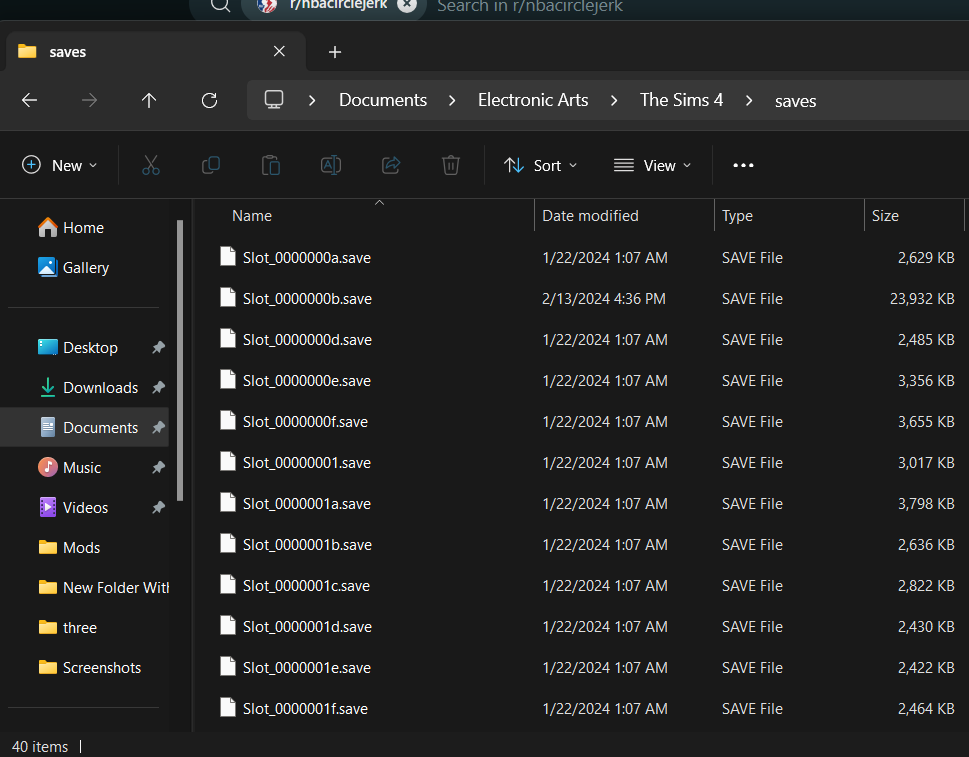
  • @layniiiiii  Please post a screenshot of the contents of the saves folder, as in, I'd like to see the file names and sizes.

    I would also suggest moving your computer's Documents directory out of OneDrive entirely.  If OneDrive truly isn't running, use this method to move Documents:

    https://support.microsoft.com/en-us/topic/operation-to-change-a-personal-folder-location-fails-in-windows-ffb95139-6dbb-821d-27ec-62c9aaccd720

    I will say it's odd that your Documents directory is in OneDrive even though it's not running on this computer.  Was it running at one point, and did you uninstall or unlink it without first telling it not to sync your data?  I ask because you're not the first person I've seen who is sure they haven't allowed OneDrive to sync their files but who nonetheless report the same location for Documents.

  • layniiiiii's avatar
    layniiiiii
    Rising Novice
    2 years ago

    Here's my saves folder, as far as I'm aware OneDrive has never ran on this laptop -- I only set it up in January. @puzzlezaddict 

  • puzzlezaddict's avatar
    puzzlezaddict
    Hero+
    2 years ago

    @layniiiiii  Your saves folder is directly in Documents, where the game won't read it.  The folder needs to be here:

    Documents > Electronic Arts > The Sims 4 > saves

  • layniiiiii's avatar
    layniiiiii
    Rising Novice
    2 years ago

    @puzzlezaddict my bad, I accidentally sent a screenshot of my backup folder. As mentioned in my original post, the actual folder is in the correct location, as indicated by the filepaths I provided.

  • puzzlezaddict's avatar
    puzzlezaddict
    Hero+
    2 years ago

    @layniiiiii  Okay, but I'd still like to see the screenshot of the saves folder that's in the correct location, the same way you posted the original.  The location isn't the only detail that matters here.

  • layniiiiii's avatar
    layniiiiii
    Rising Novice
    2 years ago

    @puzzlezaddict apologies for the long gap in my responses -- I'm a uni student and I've had midterms.

  • puzzlezaddict's avatar
    puzzlezaddict
    Hero+
    2 years ago

    @layniiiiii  You're right, that does look fine.  Sometimes saves can get renamed, by OneDrive or for other reasons, which would prevent the game from reading them, but that hasn't happened here.

    If you want to move Documents out of OneDrive, I'd suggest doing that first, as described in the link I included in post 2.  From there, you'd launch the game once, to create a new Sims 4 folder in the proper location, then copy one save to that folder and see whether it shows up.

    If the save isn't available in-game, try a different one.  If that doesn't work either, you can send me a few saves to look at, to see whether they show up on a different system.  To do that, zip them together, upload the .zip to a free filesharing site (Google Drive, Dropbox, etc.), and either post the link here or send it to me via private message.