Forum Discussion

3 years ago
My conversation was one and a half year ago!!!!! And we are still waiting for the patch?
Also they never admitted publicly, or telling us they are working for a fix....
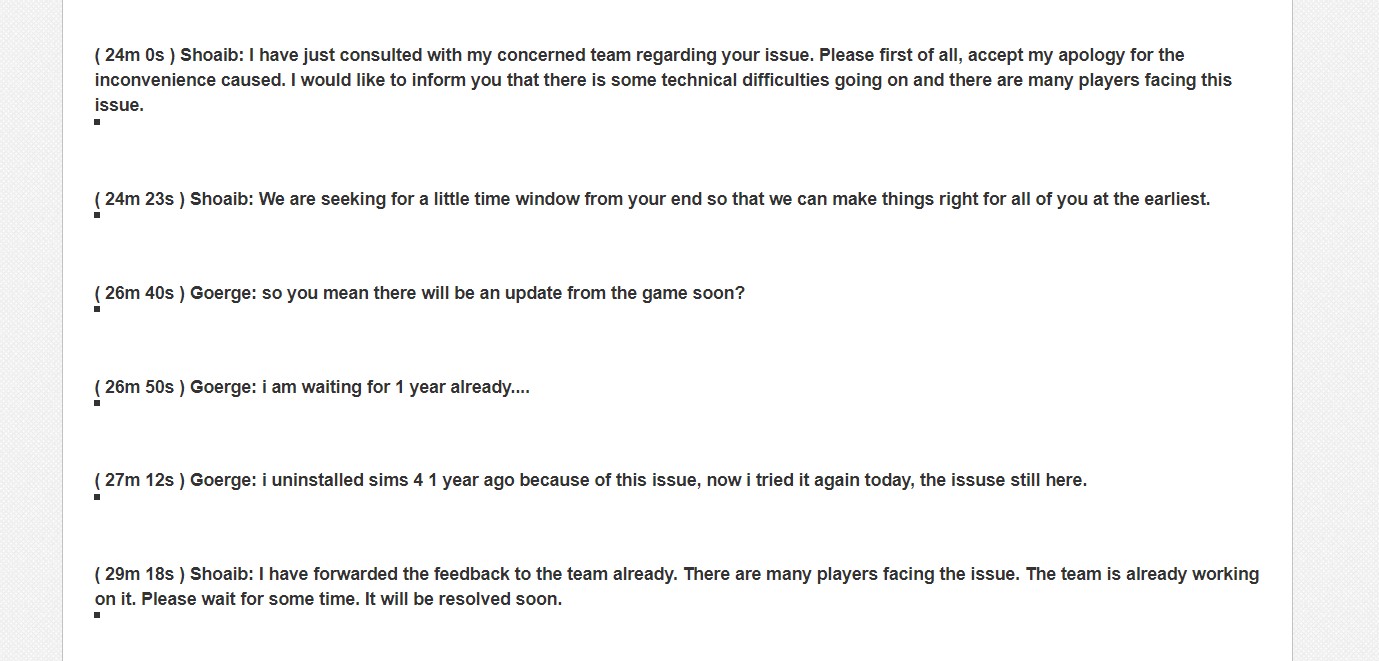
This is my official conversation with the EA team, as you can see they are completely aware of this bug. But since my last conversation, it passed 1.5 years. You can see they said with their own words “
( 24m 0s ) Shoaib: I have just consulted with my concerned team regarding your issue. Please first of all, accept my apology for the inconvenience caused. I would like to inform you that there is some technical difficulties going on and there are many players facing this issue.
( 29m 18s ) Shoaib: I have forwarded the feedback to the team already. There are many players facing the issue. The team is already working on it. Please wait for some time. It will be resolved soon. (if needed i can attach the whole conversation, name of person, date or any information you want.)
I am not going to argue with you how consoles or computer works. (since we will spend days). The thing is that this specific lag is universal on all platforms. I am not saying that the normal performance lag on consoles is the same as this specific lag. The console can lag indeed because of their reduced power, but this specific lag when it happens on consoles makes the game under 10Fps. And you know it is the same lag since you “fix” it in the same way of pressing the “Escape button”. And game will go back to let’s say on 30 fps on consoles.
I also have access to many computers, with different settings, the 3 PCs I mentioned are in different places, different internet. All of them are clean booted and I tried many “fixes” of not having internet at all and all the list the official sims team told me to do.
CLEAN BOOT YOUR PC and then log in back to the Origin client and check if you're able to launch the game.
To Clean Boot the PC, I would ask you to follow the below provided steps:
1. Beside your start button, you'll see a magnifying glass icon. Click on it to open search.
2. Type msconfig in the search box, and press enter to bring up the System Configuration window.
3. Click on the Services tab.
4. On the window that opens, check the box to Hide all Microsoft Services, then click the Disable All button to the right.
5. Click on the Start Up tab, then on Open Task Manager.
6. Let the Task Manager list populate (this can take a few seconds), then right-click and choose Disable on each of the start up programs listed.
7. Close the Task Manager window to return to the System Configuration window.
8. Click OK to save your changes, then restart your computer.
FLUSH DNS CACHE: Clearing your DNS cache will help you get rid of outdated data in your internet that may be causing the connectivity issue that you are experiencing. Please see this link for the steps on how to do so: https://help.ea.com/en/help/pc/connection-troubleshooting-advanced-pc/ DISABLE FIREWALL AND ANTI VIRUS: http://windows.microsoft.com/en-ph/windows/turn-windows-firewall-on-off#turn-windows-firewall-on-off=windows-7 CLEAR BROWSER’S CACHE: Clearing your browser’s cache will help you eliminate any possible corrupted files in your browser’s cache which can cause crashing or launching issues. Please click on the link for the steps on how to do so depending on the browser that you are using: http://help.ea.com/en/article/clearing-your-browserscache/ Should you still be experiencing issues even after all these steps, please gather the following: DXDIAG: https://help.ea.com/en/article/how-to-gather-dxdiag-information/ MSINFO: https://help.ea.com/en/article/how-to-find-and-attach-your-msinfo/
Sims 3 will stagger always when you rotate the camera or move around with the w,s,d,a keys. On every computer! So please don’t tell me that sims 3 doesn’t have performance issue.

holger1405
3 years agoHero+
Serraphiell wrote:
My conversation was one and a half year ago!!!!! And we are still waiting for the patch?
Also they never admitted publicly, or telling us they are working for a fix....
This is my official conversation with the EA team, as you can see they are completely aware of this bug. But since my last conversation, it passed 1.5 years. You can see they said with their own words “
( 24m 0s ) Shoaib: I have just consulted with my concerned team regarding your issue. Please first of all, accept my apology for the inconvenience caused. I would like to inform you that there is some technical difficulties going on and there are many players facing this issue.
( 29m 18s ) Shoaib: I have forwarded the feedback to the team already. There are many players facing the issue. The team is already working on it. Please wait for some time. It will be resolved soon. (if needed i can attach the whole conversation, name of person, date or any information you want.)
I am not going to argue with you how consoles or computer works. (since we will spend days). The thing is that this specific lag is universal on all platforms. I am not saying that the normal performance lag on consoles is the same as this specific lag. The console can lag indeed because of their reduced power, but this specific lag when it happens on consoles makes the game under 10Fps. And you know it is the same lag since you “fix” it in the same way of pressing the “Escape button”. And game will go back to let’s say on 30 fps on consoles.
So you, a "computer engineer myself" believes that a Tier 1 Tech Support Rep has any real inside about this problem?
This guy just wanted to get rid of you. 😉
And yes, I like to see the proof you promised us about you being a computer engineer. 🙂
Be that as it may, @puzzlezaddict perfectly explained to you why this is not just a game issue, but at least partly a issue of the specific system.
So I would listen to her/him and start troubleshooting .
If the clean boot really did not helped, the problem is most probably with a driver, a system setting or your hardware.
- 3 years ago
So this is the answer from another "Hero" of this forum? Not only EA that doesn't care about us... but I can see that "heroes" on the EA forums are being ironic and attack people, when they are proven wrong.
I think I already proved my point, that this lag can be fixed only by the dev themselves and nothing we can do on our sides can fix it.
I will gladly show all the documents u want as proof in private message, since i will not expose it here with my full name and so on.
It's very curious how all the "heroes" don't have this lag.... I suppose you don't as well. For the love of sims, please do your own surveys, test on many computers, ask many game changers, ask random twitch players and you will find the lag in 80% of cases.And do not attack players, that struggle with lag in a game that costs more than 1000 Euros, but instead help us to get a good end to this mess, and be the real heroes u claim to be on this forum 🙂
Do not tell us is a fault in drivers or many other things that is not related to this type of lag. (these solutions can fix other lags, but not this one).
And also, thank you for telling us that contacting "Tier 1 Tech Support Rep has no real inside about this problem", and we waste our time everytime we try to contact EA customer support!!!!! Because "These guys just want to get rid of us". 😉 A good information indeed.
 JeanVW3 years agoSeasoned Ace@Serraphiell furthermore, its absolute bogus that it would be a system vs software related issue. I bought a new gaming laptop of 1500euro. It has the exact same issue..
Also, i think that nit enough players voice their opinions because its a like "it isn't gonna be Fixed anyway" type of thing.
Its clearly visible in the streams of popular Simmers like James Turner, Deligracy etc.
The own dev team of The Sims even has the issue.
They KNOW what's up, because why did they release a patch a few weeks ago regarding this exact issue...
Featured Places