Solved
Forum Discussion


6 years ago
This is not accurate. I play heavily.

Phantomlover1717
6 years agoLegend
This bug is still in my game on 1003495030914
 6 years ago
I am still having this issue.
 6 years ago
Just redownloaded this game on my ipad and I’m still having this issue.
 6 years ago
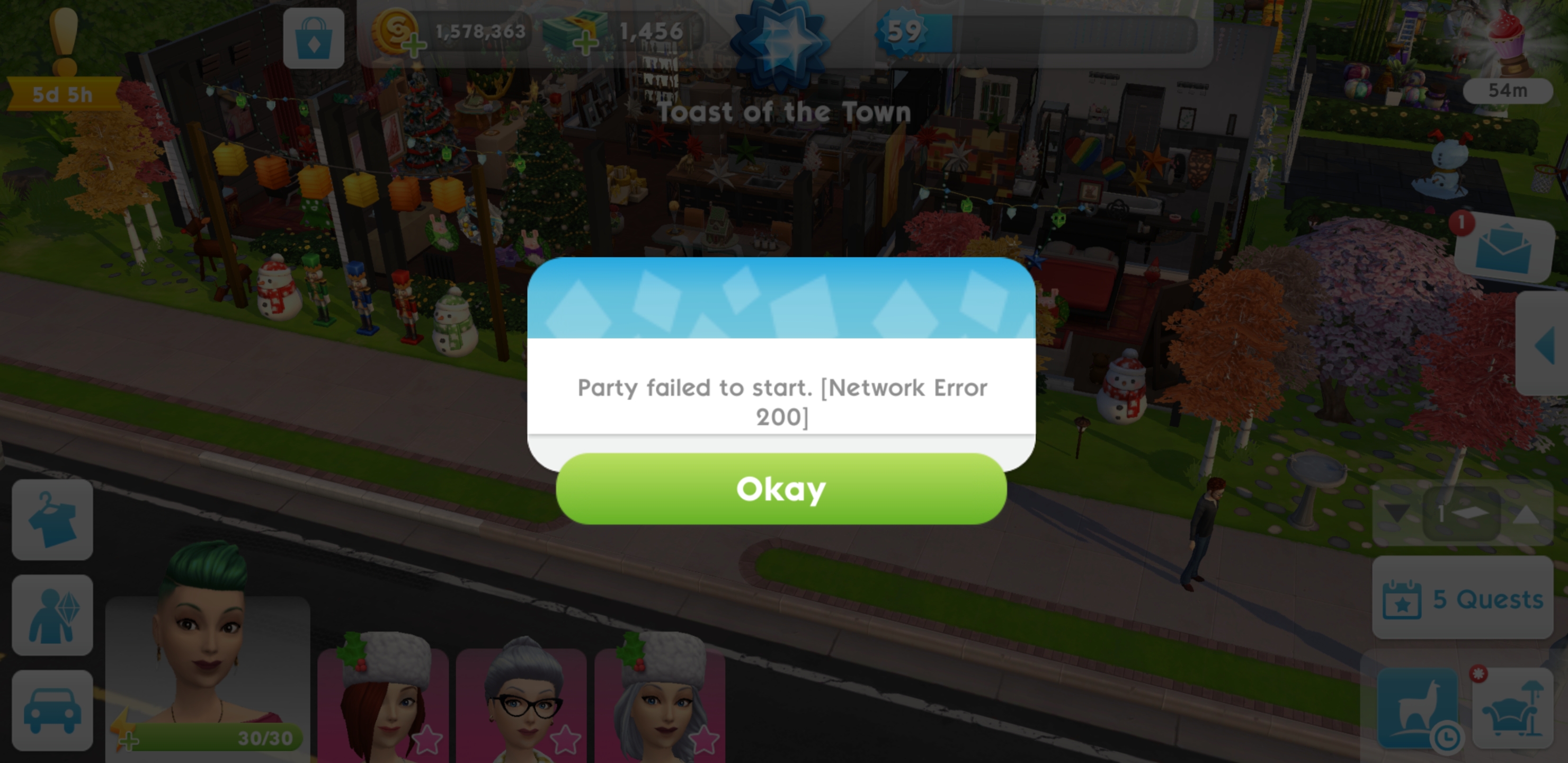
Yesterday (June 22nd 6pm UTC) I was supposed to start a party.
However when I started (Foodie, Friends Only), Party failed to start (Network Error 200) appeared. I tried to start again. The same error. I restarted the game and Party failed to start (Network Error 450) appeared. Then whenever I tried to start 450 network error appeared.
The guests received 2 invitations to my party. During both parties after they brought one sim, they couldn't return.
Today around the same time (June 23rd around 6:30pm UTC) I also tried to start the party. Network error 200 appeared once, Network error 450 appeared afterwards. There was only one invitation on the guests' side of the game. I'm not sure if guests have trouble entering the party.
Edit: I still can attend the parties, I just can't host one.
 6 years ago@yani_tsm Sul Sul, I'm just another user. Just wondering if there's blockade in the network, please try it with VPN active connection?
I don't recommending using vpn, as some don't like the privacy problems, just to try.
Also I'm curious with 200 and 450 code
Thanks for trying.
*Cheers
*Stay Healthy
Lmnmst- 6 years ago
It is my understanding that the VPN just changes IP, but I can host the party on the different account (using a different device) under the same IP.
If it is a device issue, I think I can load my main game on the second device, and see if I can host there.
 SalixCat6 years agoHero+@yani_tsm If there are other players you know or those on your friends list who are experiencing this issue, please ask them to post here screenshots and information that can help the team continue investigating this issue.
It's also for visibility as other players with the same problem can find the report and contribute with information. Spark_Joy_TSM6 years agoNew Rookie
I just has this issue 50 minutes ago.
I had the Network error 200 show up twice when I tried to start my party. Network error 450 showed up the third time I tried to start the party.
- Spark_Joy_TSM6 years agoNew Rookie
I was on wifi at home when the error occurred.
- Spark_Joy_TSM6 years agoNew Rookie
I wanted to add that I don't host parties very often.
I could try again after the cooldown to host another party just to test the network issue by using data instead of wifi.
For about 3 weeks now, I've been having an issue with shifting times for the Party Count reset and Sticker refill reset. Normally the Party Count that tallies how many parties you attend in one day would reset at a specific time consistently. It used to be around 2:30am. Sticker refill would occur around 3:30am Hawaii time (HST). But one night, my party count reset happened at midnight and my stickers didn't refill until 6:30am. After that my reset times have both been shifting unpredictably. It's hard to determine when the reset time would be on any given night. Sometimes it happens together around midnight, other times I would have to wait 3 to 5 hours between the resets. It does reset everyday. That's about the only consistent thing right now. I just don't know when it will be.
- Spark_Joy_TSM6 years agoNew Rookie
I'm using a Samsung Note 9 phone running Android 10 on t-mobile. There was a recent security patch installed a few days ago.
- 6 years ago
@lmnmst Okay, so I tried throwing a party from a different device. No success.
Today I tried starting the party using just the data (without Wi-Fi). The plumbob was spinning for much longer time than usual, but again no success.
I only noticed that Network Error 200 is responsible for the number of duplicate invites. When I used the Data, I got error 200 3 times, and three invites were generated.
- 6 years ago
@yani_tsmHi, hope you still and will always Healthy for going thru the sweats on trying those.
🥺
The results is same in any channel we use.
Is it okay to ask you, are you have modified OS running or any apps that could make system rejecting your connection?
Maybe like Google play Protect turned off?
Or some devs apps in the phone. Some case, system are alerted to user that have some risky apps.
Pardon me if you don't have. It's kinda private.
I'm really sorry to ask but my curiosity bite me.
I have another try if you want to do it, to make sure that system is blocking your phone or the account you have.
We will need fully restarted phone (factory reset), new Google Play Account, and fresh app install.
(So no account to worry ✌️)
Try load the apps and thru the tutorial till party invite.
Is there any network error?
If there, maybe your phone or network things from phone to the server (it don't make sense the game is blocked by provider really. or maybe some server setting that prohibit some ports to work. Could be home router or backbone, usually no filtering to game)
If no error, then you GPA is error on server side.
I haven't try on iOS. But seems slightly differs.
I am really sorry to ask you this and very grateful if you try. Please don't do if you don't wanna try.
*Sorry for long post - 6 years ago
@lmnmst Thank you for taking your time to write the post.
I have an iPhone Xs with iOS 13.5.1. Everything is standard (nothing is modified or hacked) and I have not installed any apps before the parties stopped working for me (but I'm not sure if there were any iOS updates in that timeframe). However during the last 'working' party 2 weeks ago my wifi went down, so I had to switch to data. However the next party (a week ago) I couldn't host.
Just to recap with some details:
- June 15: party hosted at 4:30pm UTC, WiFi went down during the party (maybe 5-10 minutes after the party started). I would say the party was rather slow... I remember putting some party item out of the storage for the friends to use, and it took some time for it to appear at the party for my guests. Usually the next time the guests reenters the party, the party item is updated. My friends in the chat were saying that they had to reenter my party several times, so it took some time for it to be synced. I blamed it on my data connection.
- June 22 6pm UTC: I couldn't host anymore.
I have three devices with three TSM accounts:
- iPhone Xs (with my main account where I can't host now, but I hosted every week for the past two years)
- iPad (with my second account where I can still host, and I used this device to load my main account and I still couldn't host)
- iPod Touch (with my third account, where I can still host).
All three devices are connected to the same WiFi network, so I don't think it is a provider/network/router issue on my end. But just in case I used my data-plan, and I still couldn't host.
Since I used both iPhone Xs and iPad with my main account and both parties were not able to be hosted, I don't think it is a device issue too.
I don't want to factory reset my device just to check if the issue is resolved. I would definitely do that if that was a device issue (but then my main account's parties would work on the iPad, but they didn't).
I believe it is clearly the account issue.
Can it be due to the cloud service I'm connected to?
Currently my game is only connected with GameCenter account . It used to be connected with EA account, but I had some freezings last Fall and it was suggested that I turn it off as one of the debugging steps (see details here - Game Freezing ). I asked EAHelp if I should reconnect EA account after I got my rollback, but they were hesitant about it and I never did. I can probably reconnect it now, but I'm not sure if it helps... I definitely don't want to bring freezings back.
I also used to have a Facebook connection, but I had to close my facebook account late April and therefore I unlinked it too.
- 6 years ago
@yani_tsmThank You too. I'm out of doubts that's device and network thingy.
I'm sorry that my workaround is in Android. In any chance, rather than acc links, what about acc sync.
Are the game account has sync option toggle in the phone setting? How about Game center sync?
Are there any chance the game sent doubled unsynced packages sent that makes that error.
Could you try to turn the sync off then on again and try hosting it.
There's a possible way as someone have the problem with other game.
Please try this with game app closed.
It's just a maybe - 6 years ago
@yani_tsmThanks to trying. Even though I think that might work. I'll go seek another possibility.
What if someone in the friend list are not able to invite that caused the error. But that debug message should be on server side. We shouldn't have that error message.
Chin Up!Edit: I see solved problem, says it needs to retire one sims (This Topic) then problem error 400 before March solved by an update.
I'll go silent as this is no possible workaround from client side. ☹️
Featured Places