Forum Discussion

ppangmee's avatar
6 years ago

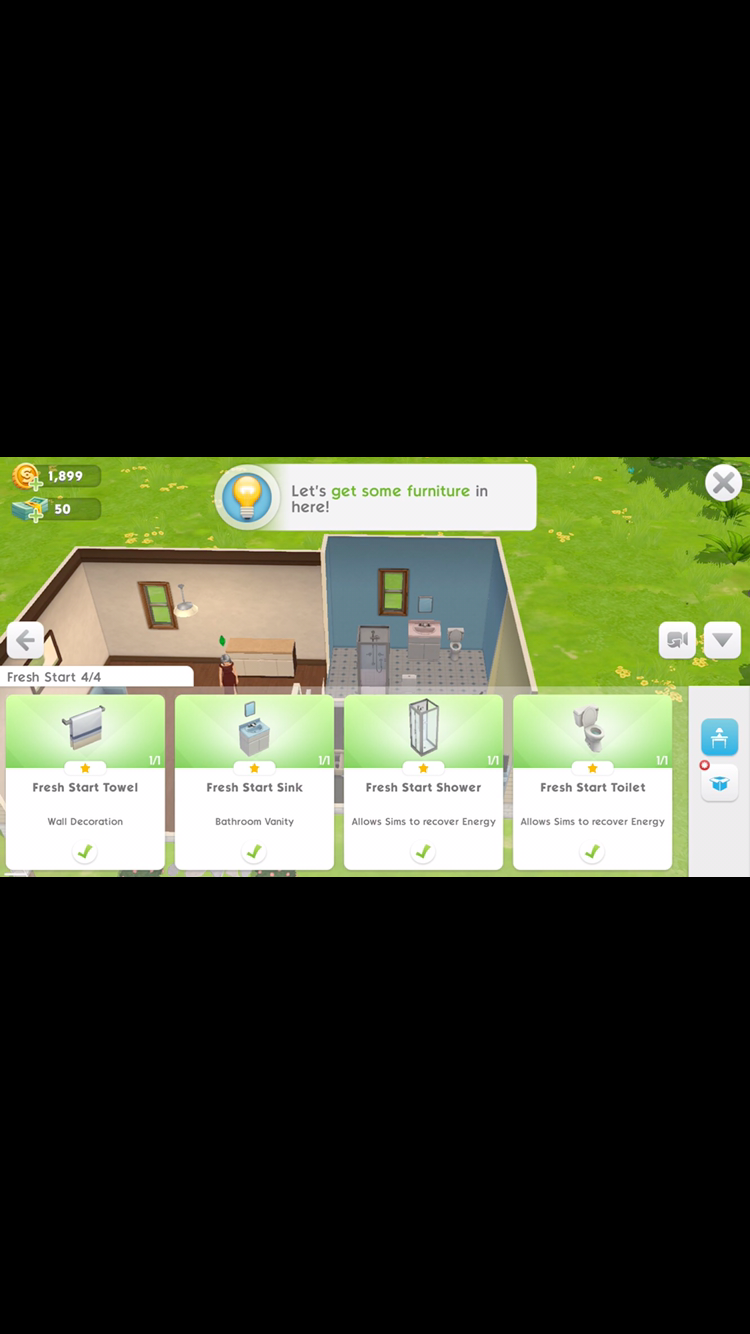
NEED HELP! My sims mobile Lost data on cloud

Product: The Sims Mobile
Platform:Apple iPhone
List the specific devices you play with (e.g. iPhone 6s Plus, Samsung Galaxy S7) Iphone6s
OS Version 13.3.1
Player ID: (Find your Player ID in Sims Mobile: https://help.ea.com/help/the-sims/the-sims-mobile/find-your-player-id-in-the-sims-mobile )
How often does the bug occur? Occasionally (10% - 49%)
Steps: How can we find the bug ourselves? Can not exit the bathroom decoration learning mode
What do you expect to see?
Connection Type Mobile
Please select your region Asia
Country China
Additional feedback

I've played and deleted games When it comes back to load on the cloud, there is still data. I clicked to load the game, but the game still forced to play learning mode. I can't exit the learning mode because of a bug. So I delete the game and reload. But this time in the cloud, I don't have the original data, but it's a bug that I can't play, edit and restore for me

2 Replies

  • @ppangmee  Sorry to hear that's happening in your game. You can ask for help in-game by tapping the arrow at the right side of your screen, tap the little gear button,tap Help & About & tap Help. Fill in all details needed & EA support maybe can help you restore your game. Hope this helps.

  • Phantomlover1717's avatar
    Phantomlover1717
    Legend
    6 years ago

    To add to what @dissenterjasmine wrote:

    You can contact EA through The Sims Mobile app. First things first, write down your Player ID or take a screenshot of it.

    - Open side menu

    - Click the gear icon

    - Click the 'Help & About' tab

    - Click 'Help'

    Your browser opens

    - Scroll down and click on 'Contact Us' 

    Open the spoiler for picture how to get to the 'Contact Us' button:

    Spoiler

    The EA game advisor might ask you to perform a couple of troubleshooting steps you can find over here for Apple or Android. You can try those before contacting them, or while you're waiting on a reply.

    If you're asked to clear data or reinstall the app, make sure your app is being back-upped to the App store or EA account.
    The backup options might have turned off during a previous update. Your app will reset, but after creating a Sim you should get the popup to restore from the cloud. 

    An image in the spoiler on where to find the backup options:

    Spoiler

    If you choose the 'Report Bug' option you might not receive a reply from EA. 

    If you can't access the app for some reason. You can also contact EA outside of it.  

    You can contact EA through this link: https://help.ea.com/en/contact-us/

    If you want to do so in a different language you can choose your country of choice in the upper right-hand corner. 

    You can also contact an EA game advisor through social media:

    - Twitter: https://twitter.com/EAHelp
    - Facebook: https://www.facebook.com/EAHelpHub/

Featured Places

Node avatar for The Sims Mobile

The Sims Mobile

Make a connection with Simmers, share your knowledge, and troubleshoot issues in The Sims Mobile official community.Latest Activity: 2 days ago
6,653 Posts